Website Color Planet : Toolota's Color Hut For Website UI/UX
Table of Contents
What This Tool Does
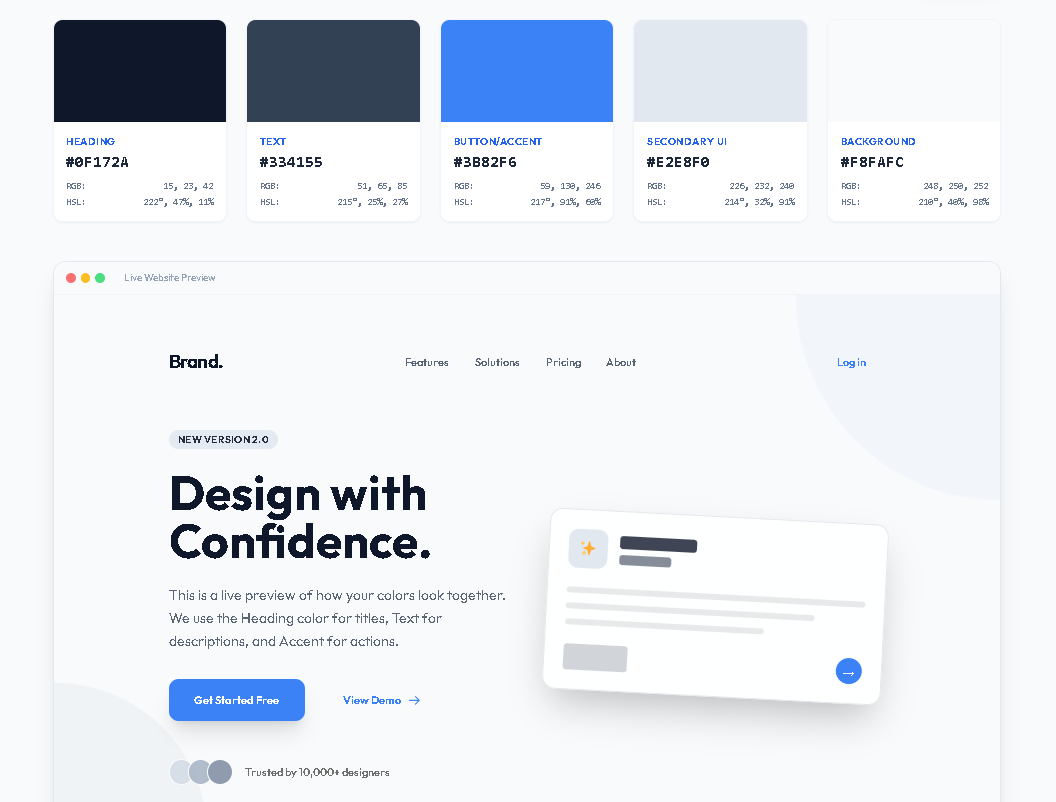
Website Color Planet by Toolota is a cool, web-based tool that helps tackle a big hurdle in web design: picking color combinations that really work together. Think of it as your go-to online workshop for colors. Designers, developers, and marketers can all use it to create, see, and grab professional-looking color schemes for their websites. Instead of spending ages messing around with colors in other software, this tool lets you instantly jump in and start playing around with different looks. You can browse through more than 100 ready-made themes, like “Professional & Corporate” or “Vibrant & Creative,” tweak any color with just a click, and watch how a website preview changes right before your eyes.
Why Choose Toolota
Website Color Planet by Toolota really makes a difference for smooth work. Toolota’s tool really shines because it weaves practical UI/UX ideas right into how it works, which you can see in the HTML analysis. Unlike basic color pickers, this thing is built like a pro design system generator. It’s reliable thanks to its organized data model—the over 100 themes aren’t just thrown together; they’re thoughtfully sorted into logical groups like Professional, Vibrant, Nature, Pastel, and Dark. Each category matches specific brand vibes and industries. This way, you’re not just slapping on colors; you’re applying smart, context-driven design thinking. One standout feature is the “Live Website Preview” panel. It’s not just a static picture; it’s a dynamic HTML/CSS simulation.
How This Tool Works: The Most Detailed Section
Color Planet is a website that uses a clever three-part engine to turn color choices into a live, interactive design adventure. It’s way more than just a color picker—it’s a real-time UI prototyping tool.
Layer 1: The Interactive Palette Engine At the heart of Color Planet is its five-color semantic system: Heading, Text, Button/Accent, Secondary UI, and Background. Each color card is a dynamic component powered by JavaScript functions that instantly calculate and show HEX, RGB, and HSL values. When you click any color in the Color Planet interface, it runs the hexToRgb() and hexToHsl() conversion algorithms, giving both designers and developers professional color data formats. The system keeps a live ‘currentColors’ array that updates all interface elements at once.
Layer 2: The Live Preview Renderer This is where Color Planet really shines. The preview panel is a fully functional HTML mockup that gets dynamic CSS updates. When colors change, the updatePreview() function connects them like this:
Heading colors go to titles and logos
Text colors go to paragraphs and navigation
Accent colors go to buttons, with automatic contrast checks
Secondary colors go to badges and other UI elements
Color Planet is a website that’s packed with smart features, like a function called getContrastColor(). This clever tool makes sure button text is always easy to read by checking how bright the colors are and then automatically switching the text to either black or white. You can also see live previews of interactive hover effects, smooth animations, and stylish glassy looks, so you get a real sense of how your color choices will look in an actual interface.
Layer 3: The Theme Intelligence Database Website Color Planet Maker works because it’s backed by a handpicked database with over 100 professional color palettes, sorted into five categories. Every theme in this collection is built using solid color theory principles and the best practices in UI/UX design. When you pick a theme, the system taps into this database and applies the full five-color palette to both the editor and the live preview at the same time. The “Export CSS” feature then turns your chosen palette into ready-to-use :root CSS variables, making it super easy to move from playing around with colors on Website Color Planet Maker to actually using them in your projects.
This three-layer setup—Palette Engine, Live Renderer, and Theme Database—turns Website Color Planet Maker into a complete toolkit for finding, seeing, and using colors. Every time you interact with the site, you’re using this smooth system: whether you’re looking through professional themes, getting instant visual feedback, or exporting cle
Benefits This Tools
Experience lightning-fast results: transform a blank page into a complete, thought-out, previewed, and exported color scheme in less than a minute.
Achieve design precision and visual harmony: Say goodbye to guesswork. Every pre-made theme within the Website Color Planet adheres to color theory, guaranteeing pleasing combinations with appropriate contrast levels for better accessibility.
Enjoy built-in SEO and UX enhancements: By ensuring accessible contrast (using the getContrastColor() function for buttons), the tool naturally supports a better user experience, which search engines favor. A clearly visible site keeps visitors engaged.
Benefit from developer-friendly exports: A single click generates production-ready CSS, significantly cutting down on handoff time and minimizing errors between design and development phases.
Appreciate a clean, intuitive interface: The tool itself reflects excellent design—responsive, featuring smooth animations, a clear visual layout, and instant feedback, making the creative journey more enjoyable.
Benefit from convenient copy & download options: Quickly copy HEX codes and CSS variables, seamlessly fitting into any workflow, whether you’re using Figma, VS Code, or a content management system.
Important Conditions & Guidelines for Use
How Your Output Connects to Your Input: Even though the themes are carefully put together, how well a color palette works for you really depends on your unique brand, the industry you’re in, and who you’re trying to reach. Think of the preview as a helpful guide.
Give It a Manual Check: Always test out the color palettes you create, especially to make sure they meet accessibility standards (like WCAG) on the actual parts of your website. Check how they look under different lighting and on various devices too.
Meant for Genuine Design: This Website Color Planet is meant for coming up with original website designs. Please don’t use it to copy someone else’s brand in a way that could be misleading or harmful.
Basic Things to Know: This tool works right in your web browser; just make sure JavaScript is turned on for everything to work properly. Also, know that no user data or palettes you create are saved on any servers – everything happens right on your computer during your browsing session.
Frequently Asked Questions (FAQ)