Calculate monthly loan instalments. View principal vs interest breakdown with amortization schedule.
| Month | EMI (₹) | Principal (₹) | Interest (₹) | Balance (₹) |
|---|---|---|---|---|
| Enter loan details and click Calculate | ||||
Looking for the Best EMI Calculator Online Free to plan your loan repayments? This tool helps you calculate monthly instalments instantly by entering your loan amount, interest rate, and tenure. Simply adjust the sliders or input fields, and the EMI, total payment, and total interest are displayed immediately — making it a reliable loan EMI calculator for home loans, car loans, or personal loans.
✔ Loan Amount Slider & Input — Set from ₹0 to ₹1Cr with real-time value display
✔ Annual Interest Rate Control — Adjust from 0% to 30% using slider or number field
✔ Loan Tenure in Years — Choose between 0 to 30 years with instant updates
✔ Monthly EMI Display — Shows your exact monthly payment in Indian Rupees
✔ Total Payment & Total Interest — See the complete financial picture at a glance
✔ Principal vs Interest Donut Chart — Visual percentage breakdown of what you pay
✔ Amortization Schedule Table — Month-by-month breakdown of EMI, principal, interest, and remaining balance
✔ Calculate & Reset Buttons — One-click calculation refresh or reset all fields to zero
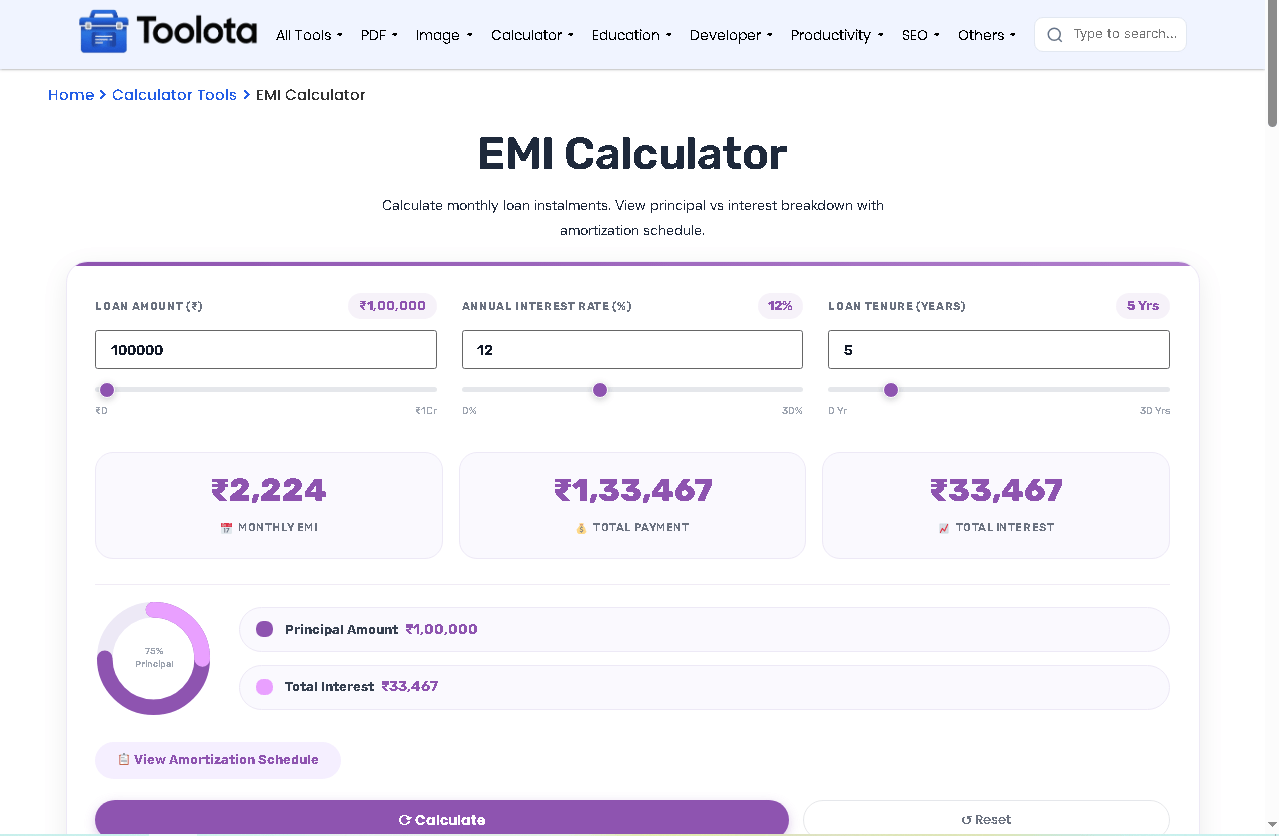

Use the LOAN AMOUNT (₹) input field or drag the slider from ₹0 to ₹1Cr. The label updates automatically to show your entered amount.

Adjust the ANNUAL INTEREST RATE (%) using the number box or slider (0% to 30%). The rate label displays your current selection.

Select LOAN TENURE (YEARS) between 0 and 30 years using the input or slider control.

Press the ⟳ Calculate button to view your monthly EMI, total payment, and total interest instantly.

Check the three result cards for Monthly EMI, Total Payment, and Total Interest — all formatted in ₹ INR.
Tip 1: Use the sliders first to get a rough estimate, then fine-tune with the number fields for precise loan planning.
Tip 2: If monthly rate is zero (0% interest), the calculator uses simple division — EMI = principal ÷ total months.
Tip 3: The amortization schedule automatically stops when the remaining balance reaches zero, avoiding unnecessary rows.
Tip 4: Click “View Amortization Schedule” to see exactly when your interest payment drops below your principal payment each month.
Tip 5: For home loan planning, try different tenure combinations — longer tenure means lower EMI but higher total interest.
Unlike basic calculators, this loan EMI calculator updates labels and sliders simultaneously, so you never lose track of your inputs.
Expand the schedule to view every month's EMI, principal portion, interest portion, and remaining balance until the loan is fully paid.
The reset button instantly zeros out all three fields, making it easy to start over without manual deletion.
See exactly what percentage of your total payment goes toward the principal amount versus interest — a feature most EMI tools lack.
All amounts are displayed in ₹ with proper Indian numbering system (lakhs/crores formatting) for easy understanding.
Most EMI calculators just show numbers. This Best EMI Calculator Online Free shows you a live donut chart that changes the moment you move any slider. Immediately increase or decrease the purple principal arc by dragging the loan amount. The light purple interest arc will react right away if the interest rate is changed. The doughnut center will automatically provide you with the exact main proportion. Below the donut, the principal and interest’s real ₹ amounts are displayed on two legend cards. Observe how the payment changes each month by clicking View Amortization Schedule: more interest is paid in the early months, and more principle is paid in the later months. Loan planning becomes visual rather than merely arithmetic because to the real-time link between the monthly breakdown table and the donut.
The Best EMI Calculator Online Free is a tool that calculates monthly loan instalments using principal, interest rate, and tenure — then shows principal vs interest breakdown with a full amortization schedule.
Enter your home loan amount in ₹, set the annual interest rate (%), and choose the tenure in years — the tool instantly shows monthly EMI, total payment, and total interest.
Yes, click “View Amortization Schedule” to see a complete table showing EMI, principal paid, interest paid, and remaining balance for every month.
The donut chart shows what percentage of your total payment goes toward the principal amount versus total interest — helping you understand loan cost visually.
Yes, this is completely free — no signup, no hidden charges, and works instantly in your browser.
The schedule calculates each month using the standard EMI formula: interest payment = balance × monthly rate, then principal payment = EMI − interest.
Yes, click the red “Reset” button to set loan amount, interest rate, and tenure all back to zero instantly.
Use this as a home loan EMI calculator, car loan EMI calculator, personal loan EMI calculator, or any fixed-rate loan with monthly repayments.
Toolota is your all-in-one online tools platform. Fast, simple, and free utilities designed to make everyday digital tasks easier and smarter.
