
Recent Tools
No tools found matching your search.
↑↓ Navigate
←→ Category
↵ Select
esc Close
Edit, sort keys, re-indent and refine your JSON with live preview.
JSON Editor Online lets you edit, sort, and validate JSON files in a clean workspace that shows your data the way it’s meant to be read. If you’ve ever wrestled with a messy API response or a config file that’s impossible to scan, this tool gives you a tree view, syntax validation, and one-click formatting. Paste raw data, use the Beautify button to tidy it up, and toggle key sorting or string escaping to fit your needs. Whether you’re a developer debugging an endpoint or an analyst checking a data structure, you get a live preview that reflects your changes.
Upload a .json file directly from your computer
Fetch JSON from a public URL with one click
Load a ready-made sample dataset to test the interface
Paste JSON from your clipboard without touching the file system
Clear the editor instantly with a single button
Choose your preferred indent size: 2 spaces, 4 spaces, or a tab character
Beautify raw JSON to make it readable and structured
Minify compressed JSON for lightweight storage or transmission
Validate syntax and catch errors before you use the data elsewhere
Sort all object keys alphabetically (A→Z) for consistent ordering
Escape special characters inside strings to avoid parsing issues
Download the final JSON as a .json file
Adjust the editor font size for better readability
Toggle word wrap so long lines don’t scroll off-screen
View line numbers and track your cursor position (Ln, Col)
See the file size update in real time as you edit
Switch between an interactive tree editor and a plain code view
Copy the formatted output to your clipboard with one click
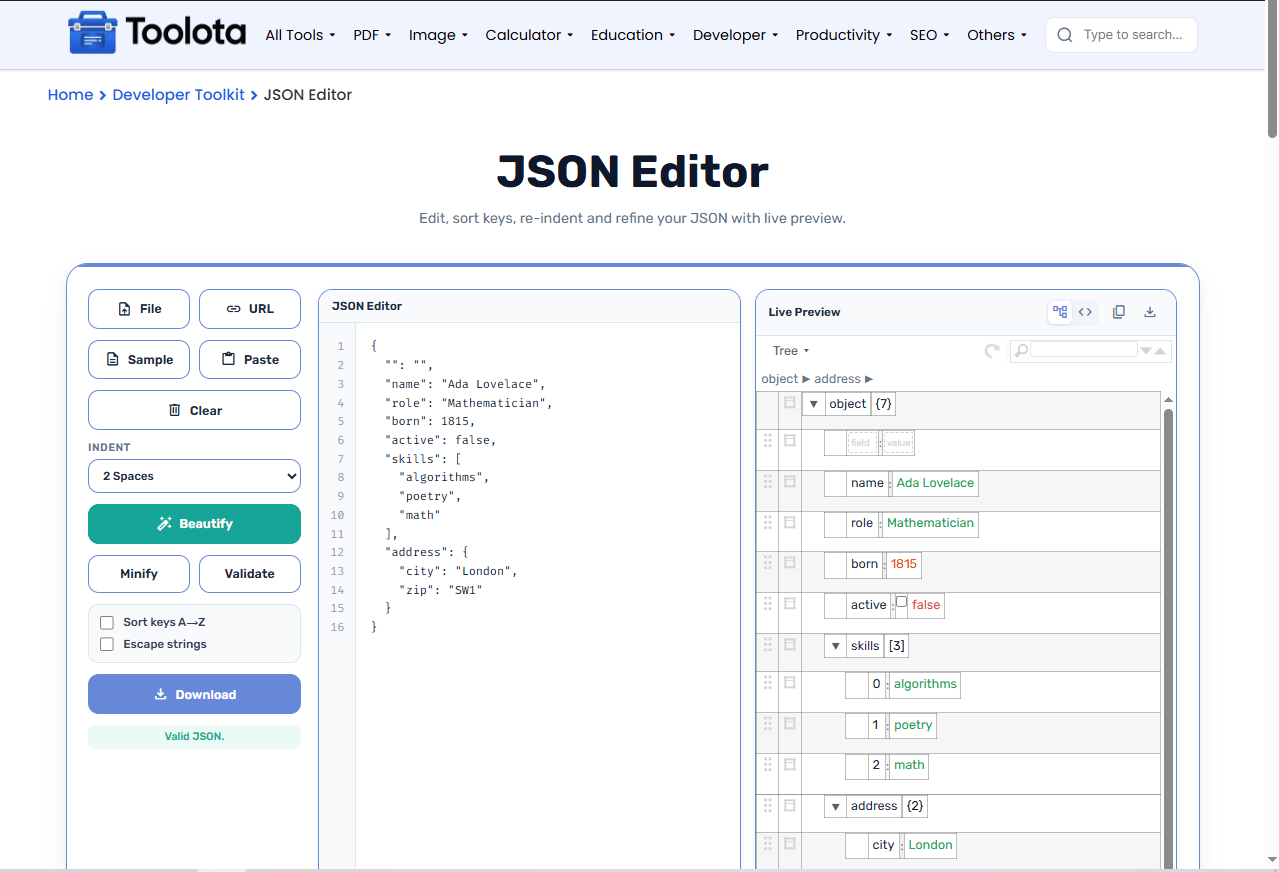

Click File, paste from clipboard, fetch a URL, or drag a .json file onto the editor area.

Pick an indent option (2 spaces, 4 spaces, or tab) and decide whether to sort keys alphabetically.

Press the Beautify button to reformat your JSON with clean indentation and proper structure.

After you edit, the live preview refreshes. Click Validate at any time to check your syntax; if something is wrong, an error message points to the problem.

Hit Download to get a .json file, or use the Copy button to grab the formatted output for pasting elsewhere.
How do I know if my JSON is valid before I save it?” – Click Validate. If your JSON is valid, you can copy or download it with confidence; if not, the error message tells you what to fix.
Browse nested objects and arrays visually—expand, collapse, and edit nodes directly without touching raw text.
Sort every object key alphabetically with one checkbox so fields always appear in a consistent order.
Export your polished JSON as a file or copy it straight to your clipboard without extra steps.
Get real-time feedback on syntax errors and see beautifully indented JSON the moment you hit Beautify.
Upload, paste, fetch from a URL, or load a sample—whatever works fastest for your workflow.
The responsive layout adapts to your screen, so you can edit JSON on your laptop, tablet, or phone.
Validate structural integrity and catch syntax errors in modified code using the JSON Validator.
Clean up messy indentations and standardize layout hierarchy with the JSON Formatter.
Safely encode output strings before transmitting them over network calls using the URL Encoder.
Structured state editing simplifies managing dynamic data configurations defined under the JSON data-interchange standard.
The tree view shows parent-child relationships at a glance, so you can spot unexpected arrays or misplaced nesting quickly. The Validate button catches syntax problems such as missing commas or unclosed braces before they break your application. Sorting keys alphabetically also makes it much easier to compare two versions of the same dataset, because fields always appear in the same order.
Yes. The live preview lets you change values, rename keys, add or remove nodes, and the editor syncs back to the text area automatically.
Check the “Sort keys A→Z” box, then click Beautify. All object keys will be reordered alphabetically in the output.
Yes. Click Validate to check your JSON. If anything is malformed, such as a missing comma or an unclosed brace, the tool shows an error message so you can fix it.
Absolutely. Click the File button or drag a .json file into the editor area to load it instantly.
Beautify adds indentation and line breaks for readability. Minify removes all extra whitespace to shrink file size.
No. Everything runs locally in your browser. Your JSON never leaves your device, so it stays private and secure.
Toolota is your all-in-one online tools platform. Fast, simple, and free utilities designed to make everyday digital tasks easier and smarter.
