
Recent Tools
No tools found matching your search.
↑↓ Navigate
←→ Category
↵ Select
esc Close
Set a default crawl rule, fine-tune it per search engine, block AI crawlers, add restricted directories and a sitemap — then generate a ready-to-upload robots.txt file.
Robots.txt generator lets you tell search engine bots and AI crawlers which paths to crawl or skip Set a global default rule, then fine-tune permissions for specific engines like Googlebot or Baidu. You can also block AI crawlers such as GPTBot and ClaudeBot, add custom restricted directories, and include your sitemap URL. The tool combines everything into a clean robots.txt file you can copy, download, or test in Google Search Console. Whether you are starting from scratch or rebuilding your rules, the tool handles the syntax for you.
Set a default allow or disallow rule for all robots
Choose a global crawl-delay value from 1 to 120 seconds
Add your sitemap URL directly into the final file
Override default rules for 15 specific search engine agents
Block 8 major AI crawlers with a single checkbox each
Add custom restricted directories like /private/ or /admin/
Remove any directory from the restriction list with one click
Generate the full robots.txt file instantly from your settings
Copy the generated code to your clipboard with one button
Export the final file as a plain .txt download
Reset and start a new configuration at any time
Built-in warning box explains robots.txt limitations versus indexing
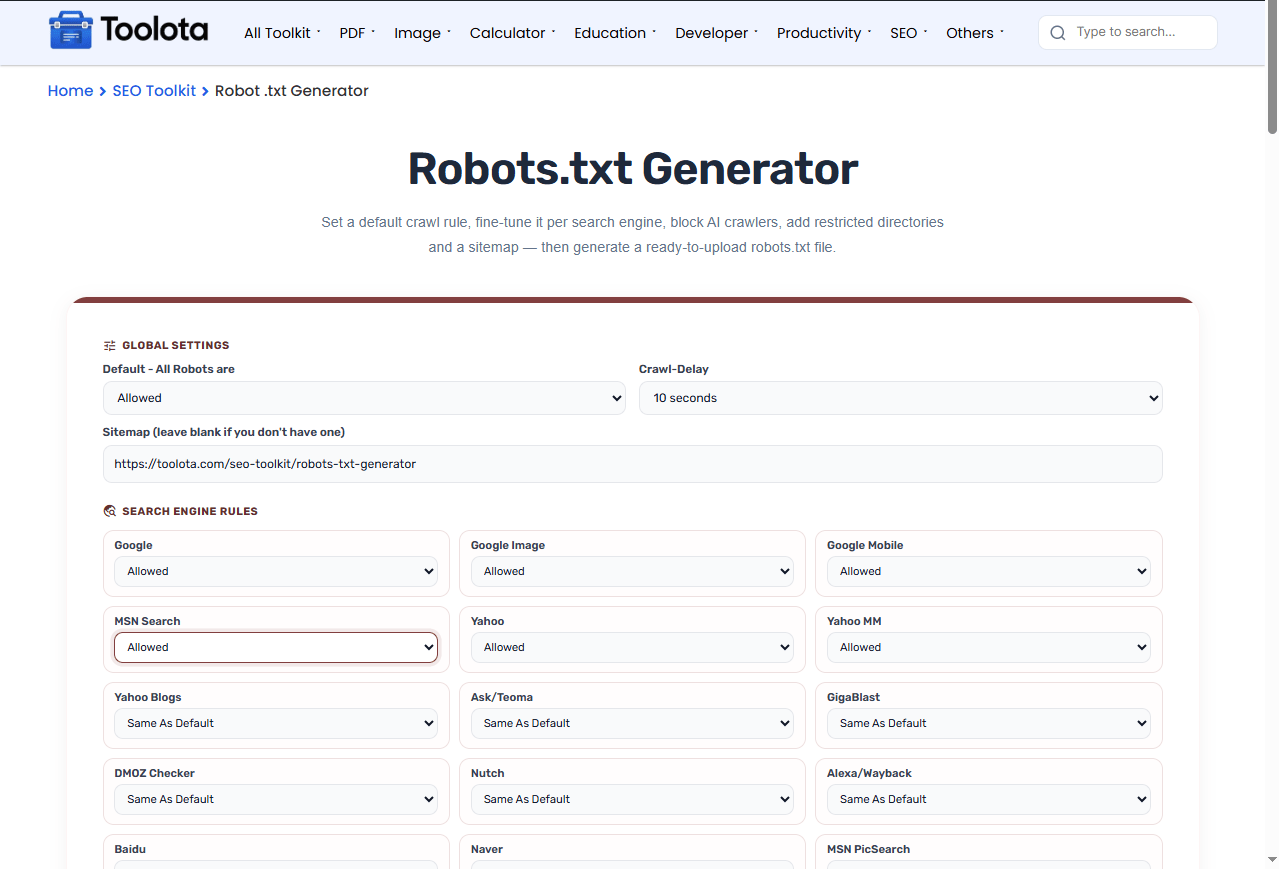

choose Allow or Disallow for all robots under "Global Settings".

pick specific behaviors for Googlebot, Yahoo, Baidu, and others in the search engine grid.

check the boxes for any AI bots you want to keep out of your site.

Add restricted directories –/private/ and click Add to include it in the disallow list.

hit the Create Robots.txt button, then copy the code or download it as a file.
To ask AI bots such as GPTBot or ClaudeBot to stay away, check their boxes and generate your file. Well-behaved crawlers follow robots.txt, but it cannot force a bot to comply.
Set global defaults, override for specific bots, and block AI crawlers individually without touching code.
Ask OpenAI, Anthropic, Common Crawl, and other AI crawlers not to crawl your site with simple checkboxes.
Copy the generated code to your clipboard or download it as a plain text file for immediate server upload.
Fine-tune permissions for 15 different search engines, from Google to Naver, all in one place.
Add any custom path you want to hide from crawlers, like /private/ or /backup/, and remove them just as easily.
The warning box tells you exactly what robots.txt can and cannot do, so you stay informed and avoid common mistakes.
Once your crawl rules are set, submit your site structure with the XML Sitemap Generator so search engines know exactly what to crawl.
If you’re blocking specific paths, double-check them against your Sitemap Validator results to avoid accidentally excluding pages you want indexed.
Pair your robots rules with a proper Canonical Tag Generator setup so crawling and indexing signals stay consistent.
Remember that robots.txt only controls crawling, not indexing — a disallowed page can still appear in results if other sites link to it.
When you hit Create, the tool builds the file in a specific layered order. It starts with the global User-agent: * rule and your default allow or disallow, followed by any crawl-delay you set and all restricted directories you added. Next, it appends specific rules for each search engine you customized, then adds individual AI bot blocks. Finally, it includes your sitemap URL at the bottom.Search engines pick the group that matches their name most specifically, so rules for a named bot take priority over the * group, whatever the order.
It’s a text file that tells search engine crawlers which parts of your site they can or cannot access.
Simply check the box next to that AI bot’s name in the AI Crawlers section before generating. Compliance is voluntary, so well-behaved crawlers follow it, but a bot can still ignore it.
Yes, it applies to all robots unless you add a more specific rule for a particular agent.
No, it only prevents crawling – a blocked page can still be indexed if linked from other websites.
Crawl-delay tells bots to wait a certain number of seconds between requests, useful for managing server load.
Paste your sitemap URL into the Sitemap input field before generating – it gets added to the bottom automatically.
Toolota is your all-in-one online tools platform. Fast, simple, and free utilities designed to make everyday digital tasks easier and smarter.
