
Recent Tools
No tools found matching your search.
↑↓ Navigate
←→ Category
↵ Select
esc Close
Enter your numbers below to calculate the average, sum, and more — results update in real time.
Need to calculate average quickly? This average calculator online lets you type numbers and see the mean instantly – no button clicking required. The average of a set of numbers is found by adding all the values together and dividing by how many there are. As you type, this tool updates the result automatically, whether you are averaging test scores, expenses, or any other data set.

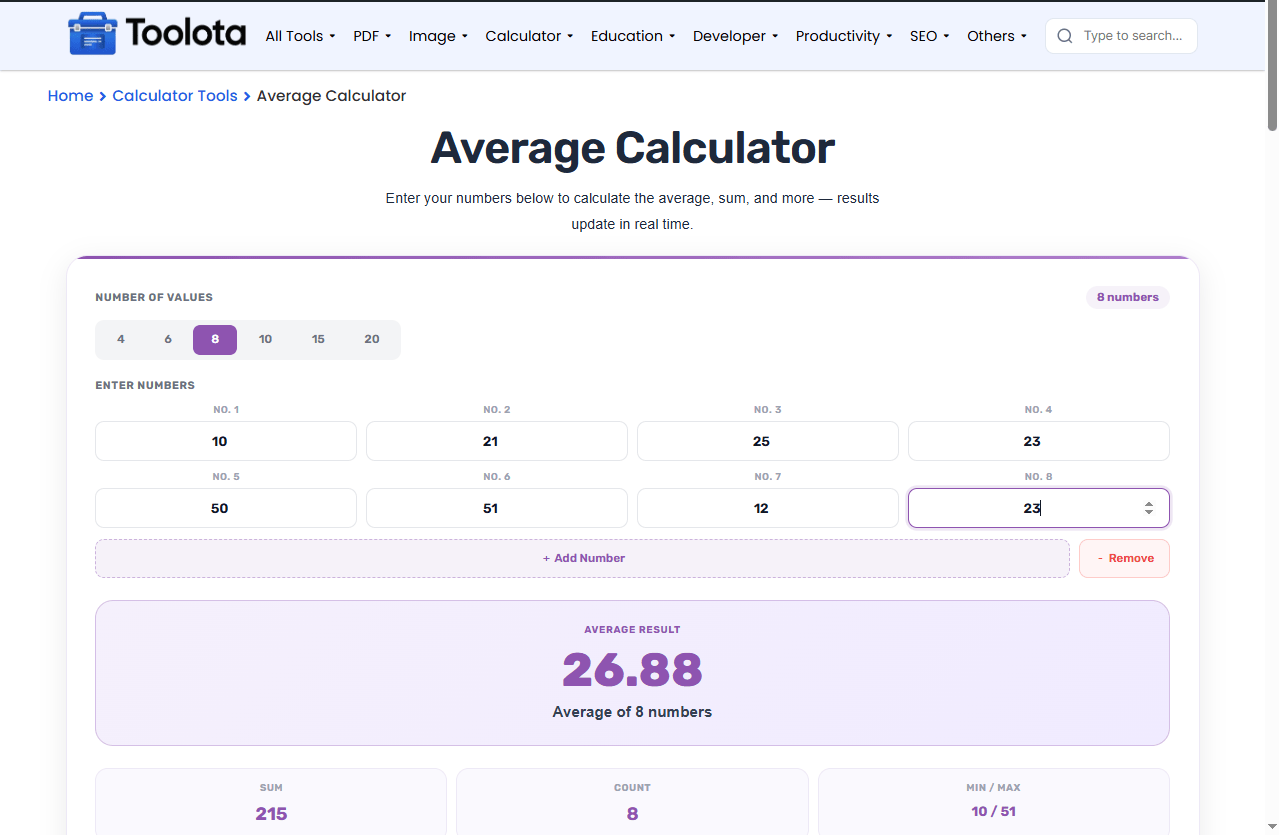
Click the toggle buttons (4, 6, 8, 10, 15, or 20) at the top. The label updates to show "X numbers."

Type each number into the labeled input boxes (No. 1, No. 2, etc.). The tool starts calculating the average as soon as you fill in a field

Use the green "Add Number" button to insert more fields or the red "Remove" button to delete the last one.

The purple box shows the average (mean) of your numbers.Below it, the stats grid reveals the total sum, how many valid numbers you entered, and the smallest/largest values.

Click the "Reset" button to clear every input and begin a fresh calculation.
| Feature | What It Does |
|---|---|
| Dynamic Number Grid | Shows input fields for 4 to 20 numbers |
| Count Preset Toggle | Switch between 4, 6, 8, 10, 15, or 20 values instantly |
| Add / Remove Buttons | Insert or delete number fields one by one |
| Real-Time Calculation | Updates average, sum, count, and min/max as you type |
| Purple Result Card | Displays the average of numbers prominently |
| Statistics Grid | Shows sum, total count, and min/max side by side |
| Calculate Button | Forces a manual refresh (though auto-update is already active) |
| Reset Button | Clears all fields instantly |
Need a weighted version instead of a simple mean? The Grade Calculator lets you assign different weights to each value.
Curious how spread out your numbers are around the average? The Standard Deviation Calculator measures exactly that.
Averaging GPA-style course grades instead of plain numbers? Use the GPA Calculator for credit-weighted results.
This tool computes the arithmetic mean — the sum of your values divided by how many there are — which is the simplest and most common type of average.
No waiting. No "Submit. As soon as you type a number, the result refreshes automatically.
Use the preset count buttons or the add/remove buttons. The tool adapts to your exact data set size, from a small set of numbers up to 20 values.
Made a mistake? The reset button clears everything instantly so you can find the mean of a completely new set without refreshing the page.
You get more than just the average.. You also see the sum, count, minimum, and maximum – everything you need in one glance.
The calculator lives inside a unique wrapper (.gtool-average), meaning it won't break or inherit strange styles from your website or Elementor page.
This average calculator online does more than just show a final number. Watch the purple result card change with every keystroke. The sum recalculates. The min and max adjust. The count label filters out empty fields automatically. If you switch between 4 and 20 numbers, the fields expand or shrink without erasing the values you have already entered. You can leave some fields empty; the tool simply averages the values you actually enter.
Add all your numbers together, then divide by how many numbers you entered. This tool does it instantly.
Yes – click the “20” toggle button or keep pressing “Add Number” until you have 20 fields.
The average calculator online ignores empty fields and only averages the numbers you actually typed.
Yes – completely free. No signup, no hidden fees, and you can use it as often as you like.
Yes – the stats grid displays sum, total valid count, and the minimum and maximum values.
All number fields clear instantly, and the result boxes show dashes until you enter new values.
Yes – the layout adjusts for tablets and mobile screens using built-in responsive CSS.
Toolota is your all-in-one online tools platform. Fast, simple, and free utilities designed to make everyday digital tasks easier and smarter.
