Beautify and indent SQL statements, plus a heuristic validator for unbalanced brackets/quotes, missing WHERE clauses and dialect quirks — not a full SQL parser.
Sql Formatter Online gives you a clean way to turn messy, unreadable query strings into neatly indented, well‑structured blocks. Whether you are debugging a complex join or preparing a script for review, this tool handles the heavy lifting. It works as a SQL beautifier for quick cleanups, but also includes a validation layer that checks for unbalanced parentheses, mismatched quotes, and dialect‑specific traps across MySQL, PostgreSQL, SQLite, and SQL Server. Just paste your code, choose your dialect, and in a matter of seconds, you’ll have a correctly formatted SQL query without having to manually space anything.
Upload SQL files directly from your device using the File button
Fetch remote scripts via URL without leaving the page
Load a ready‑made Sample query to see the formatter in action
Paste SQL from your clipboard with one click
Clear the editor instantly to start fresh
Choose from five Dialect options: Generic SQL, MySQL, PostgreSQL, SQLite, or SQL Server
Run Format to beautify the entire script with consistent indentation
Click Validate to detect unbalanced brackets, missing WHERE clauses, and dialect warnings
Use Apply to Editor to move the formatted output back into the input area
Download Output as a .sql file for offline use
View line numbers that adapt to word‑wrapped lines
Toggle Word Wrap on and off for long queries
Adjust font size with dedicated increase/decrease buttons
See real‑time line and column position as you type
Monitor file size in the footer as your query grows
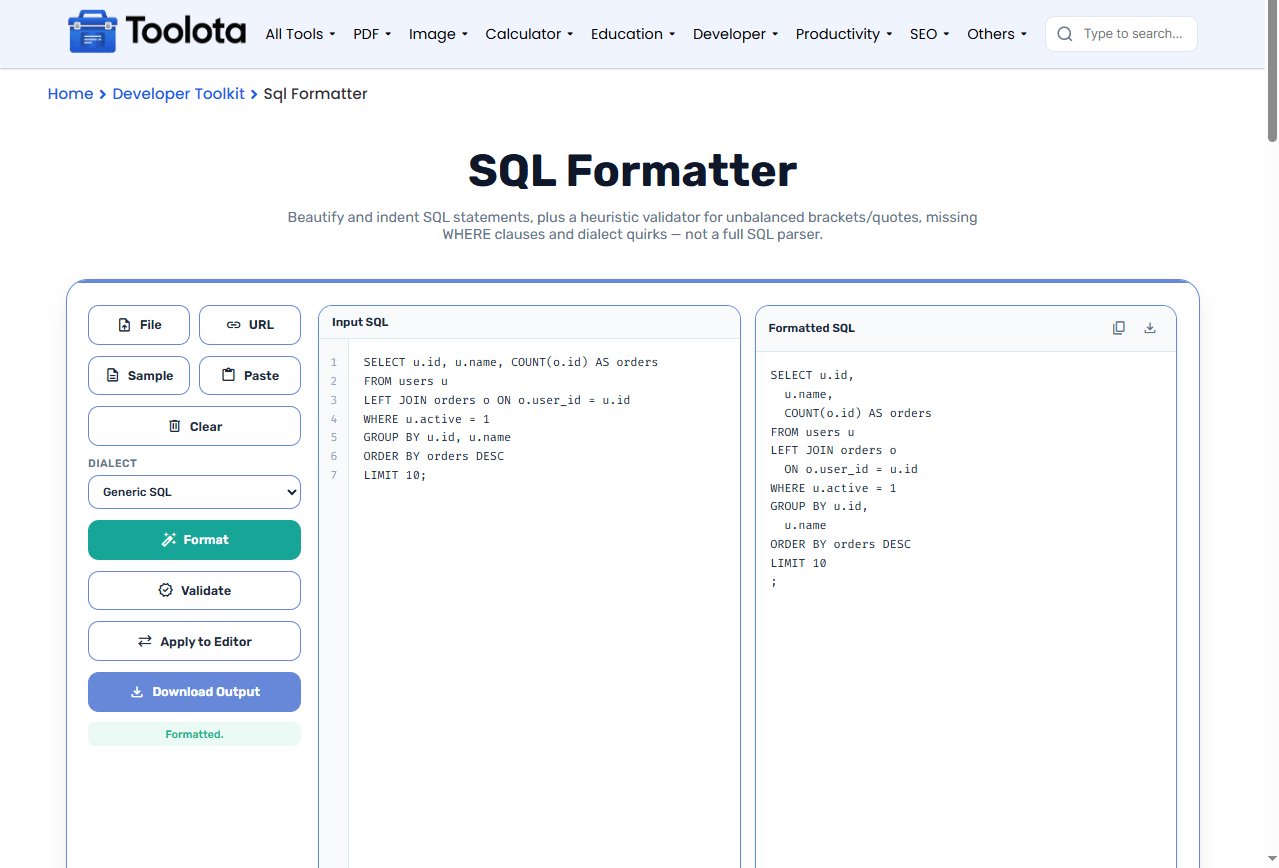

paste it directly, upload a .sql file, fetch from a URL, or load the sample query.

from the dropdown so the validator understands your syntax rules.

to beautify the code, or click Validate to run a structural health check.

in the right panel, then copy it, apply it back to the editor, or download it as a file.
“So I just paste my query, hit Format, and it cleans everything up automatically?” — Yes. The indentation and line breaks are applied instantly, and you can toggle word wrap if the lines get too long.
Catches unbalanced parentheses, mismatched quotes, and dialect‑specific issues (like ILIKE in MySQL or RIGHT JOIN in SQLite) before you run the query.
Load SQL from your local drive, a remote URL, or your clipboard. You are not locked into typing everything manually.
After formatting, the “Apply to Editor” button pushes the beautified output back into the input area, letting you refine it further or re‑validate.
Switch between Generic SQL, MySQL, PostgreSQL, SQLite, and SQL Server — the validator adjusts its warnings based on your selection.
The gutter accurately counts wrapped lines when word wrap is on, so you always know exactly which line you are editing.
Run Validate first before formatting — it will highlight structural problems that formatting alone cannot fix.
Use the dialect selector even when formatting (not just validating) because some keywords are treated differently across databases.
If you are dealing with very long SELECT lists, turn on Word Wrap so you can read every column without horizontal scrolling.
When you run the formatter, the output is more than just pretty spaces. The tool re‑indents each clause — SELECT, FROM, WHERE, GROUP BY, and joins — to visually separate logical blocks. This structure makes it much easier to spot missing conditions, misplaced operators, or nested subqueries that are hard to read in a raw string. You gain a complete grasp of your statement’s logical flow and syntactic integrity when you combine it with the validation report.
It takes raw SQL text and re‑indents it with consistent spacing and line breaks, making the query easier to read and debug.
No — formatting only adjusts whitespace and indentation; it never alters keywords, table names, or values.
Validation catches missing WHERE clauses in updates and deletes, unbalanced parentheses, and dialect‑specific syntax mistakes that could cause errors.
You can paste any query, but you should select the correct dialect so the validator gives accurate warnings for that specific database.
You can upload .sql or plain text files, and download the formatted result as a .sql file.
No — the tool uses a heuristic validator that checks brackets, quotes, and keyword patterns. It catches common mistakes but is not a full parser.
Toolota is your all-in-one online tools platform. Fast, simple, and free utilities designed to make everyday digital tasks easier and smarter.
