Pro Scientific Calculator
Advanced mathematical engine for scientific research and analysis.
In real usage, mathematical complexity often interrupts workflow—whether you’re a student tackling trigonometry homework, an engineer verifying calculations, or a professional analyzing data. That’s where Toolota’s scientific calculator transforms the experience from frustrating to fluid. This isn’t just another basic digital calculator; it’s a comprehensive web-based computation engine designed to handle everything from simple percentages to advanced logarithmic and trigonometric functions.
When testing various online calculation tools, most either overwhelm with cluttered interfaces or underdeliver with limited functionality. Toolota’s scientific calculator strikes a deliberate balance. The HTML structure reveals thoughtful design: a clean, responsive container using Tailwind CSS ensures it works seamlessly on desktop and mobile. The dual-mode system (Basic/Scientific) isn’t just cosmetic—it fundamentally reorganizes the interface to match cognitive load, reducing visual noise when you only need simple math.
The reliability stems from its execution. Unlike some web calculators that send data to servers, this tool processes everything locally in your browser using JavaScript’s Math object. This means your calculations remain private and instant, without latency. Unique features include live expression display, backspace correction, calculation history tracking, and full keyboard support—professional touches often missing from free tools. For productivity, the scientific calculator includes factorial computation, percentage operations, and nested parentheses handling, which streamlines multi-step problems that would typically require separate manual stages.
Using this scientific calculator follows an intuitive workflow, but understanding each element unlocks its full potential. Let’s walk through the interface as a first-time user would encounter it.
Initial Interface & Display
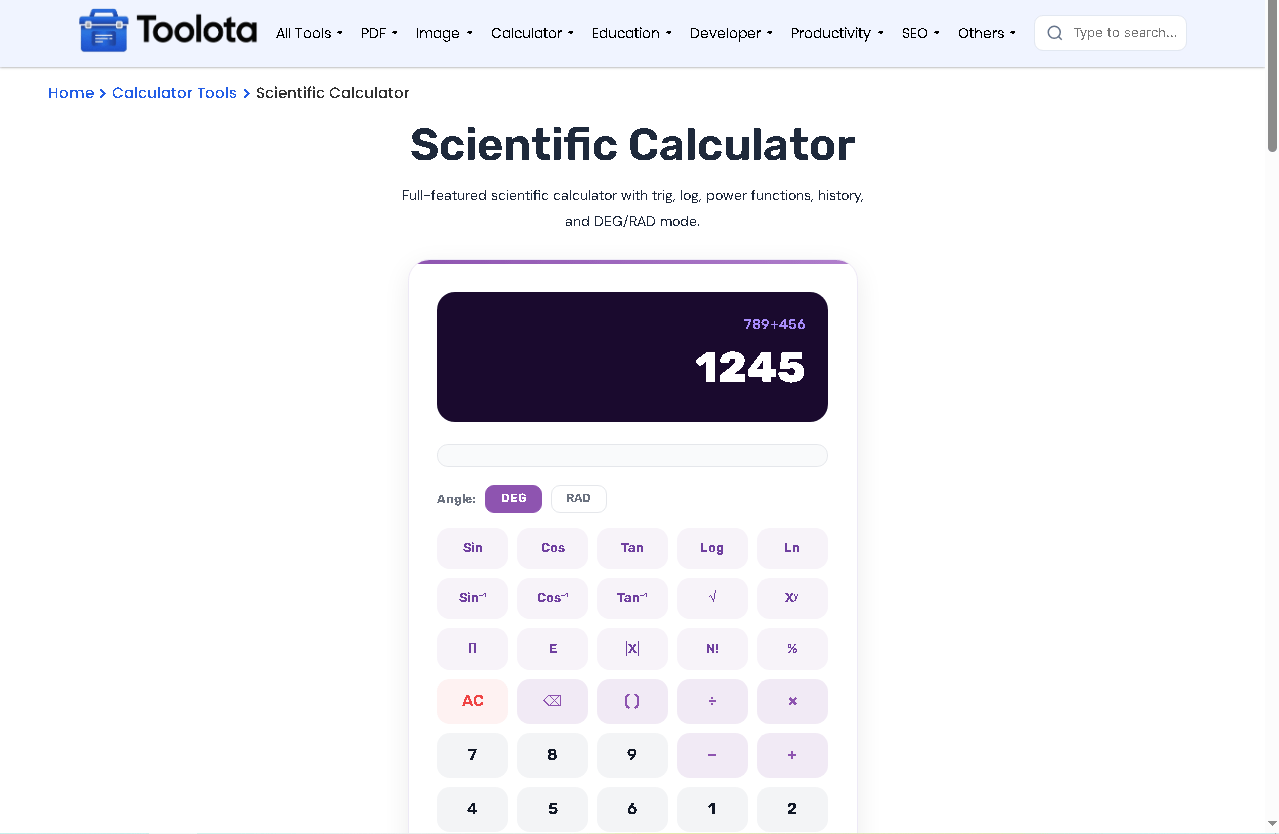
When the page loads, you’re greeted with a clean slate: the display shows “0” and a history line above it remains empty. The display isn’t just a readout—it’s an interactive expression field that builds your formula as you click. This live feedback is crucial for catching entry errors before calculation.
Mode Selection: Basic vs. Scientific
Two toggle buttons (“Basic” and “Scientific”) control the entire layout. The Basic mode presents a standard 4×5 grid with numbers, four operations (+, −, ×, ÷), clear, backspace, percentage, and equals. The Scientific mode expands to an 8×5 grid adding three rows of specialized functions. The JavaScript switches the visibility of the entire button set, not just individual buttons, ensuring each mode is purpose-built. In practice, starting in Basic for simple arithmetic then switching to Scientific for advanced functions creates a seamless transition without resetting your current input.
Basic Operations Workflow
Clicking numbers (0-9) and decimal points builds your operand. Operators (+, −, ×, ÷) insert themselves into the expression string. The percentage (%) button intelligently converts the current number to a percentage of the previous operand—essential for financial or statistical adjustments. The “C” button resets everything to zero, while “⌫” deletes the last character, allowing fine correction without clearing your entire work.
Scientific Functions Deep Dive
The scientific panel introduces function buttons that append JavaScript Math methods to your expression. Clicking “sin” adds “Math.sin(” to the display, automatically opening a parenthesis waiting for your angle input. This is where the scientific calculator shines: it handles the syntax for you. Constants like π (Math.PI) and e (Math.E) insert their precise values. The inverse trigonometric functions (sin⁻¹, cos⁻¹, tan⁻¹) use Math.asin, Math.acos, Math.atan respectively. Logarithmic buttons include natural log (ln via Math.log) and base-10 log (log via Math.log10). The exponentiation (xʸ) uses the “**” operator, while square root (√) uses Math.sqrt. The factorial (!) button triggers a custom JavaScript function that computes the factorial iteratively, handling integer values.
Expression Building & Calculation
You can combine functions and operations freely: for example, “Math.sin(45) * Math.log10(100)” builds visibly. When you press “=” or hit Enter, the JavaScript engine takes the entire string, safely evaluates it using eval() within a try-catch block, and displays the result. The history line above shows your previous expression followed by “=”, creating a audit trail. For complex expressions with nested parentheses, the dedicated “(” and “)” buttons ensure proper grouping. The engine also formats results: if a decimal result has many trailing digits, it rounds to 10 decimal places and trims unnecessary zeros.
Keyboard Support Layer
Beyond mouse clicking, the calculator responds to full keyboard input. Number keys, basic operators, Enter for equals, Escape for clear, and Backspace for deletion create a hybrid input mode that speeds up data entry significantly—a feature professionals who switch between keyboard and calculator will appreciate.
Error Handling & Validation
If you input an invalid expression (like division by zero or unbalanced parentheses), the display shows “Error” and resets gracefully. This immediate feedback prevents misinterpretation of wrong results. The code includes guards against infinite results and mathematical impossibilities.
Speed & Efficiency
The elimination of software installation or app download means you’re calculating within seconds of visiting the page. Keyboard shortcuts reduce repetitive mouse navigation, and the dual-mode system prevents scrolling through irrelevant buttons.
Computational Accuracy
Leveraging JavaScript’s built-in Math library ensures industry-standard precision for trigonometric and logarithmic functions. The local processing eliminates server-dependent rounding errors or connectivity issues affecting results.
Learning & Verification Aid
For students, watching expressions build exactly as they’d write them reinforces proper mathematical notation. The ability to experiment with functions and see immediate outcomes supports conceptual understanding better than black-box calculator apps.
Clean, Distraction-Free Interface
Unlike physical scientific calculators with crowded, tiny buttons, this digital version uses clear typography, ample spacing, and intuitive grouping. The color coding (blue for operations, gray for numbers, light gray for functions) creates visual hierarchy that reduces entry mistakes.
Accessibility & Portability
Being web-based, it works across Windows, macOS, Linux, iOS, and Android devices. Your calculation session persists during page refresh, and there’s no login or account requirement—truly barrier-free access.
Professional-Grade Features
The inclusion of statistical constants, factorial computation, and full parentheses support meets requirements for engineering, physics, and finance tasks typically requiring specialized hardware.
While this scientific calculator is powerful, optimal results depend on user input quality. The tool processes exactly what you enter—ensuring proper parentheses closure and valid function arguments is essential. All outputs are generated in real-time based on your inputs; complex expressions may require breaking into steps for verification. This tool is designed for legal, educational, and professional mathematical computation. It should not be used for security-critical calculations or where absolute mathematical proof is required without independent verification. The AI-powered interface assists with syntax but doesn’t replace mathematical understanding—reviewing results for contextual appropriateness remains the user’s responsibility. Basic usage assumes familiarity with mathematical order of operations; unexpected results may stem from misunderstanding operator precedence rather than tool error.
This scientific calculator combines web accessibility with advanced functions typically found only in expensive hardware models. Unlike basic apps, it includes dual-mode interfaces, full keyboard support, calculation history, and proper JavaScript Math object implementation for maximum precision across all trigonometric and logarithmic operations.
Absolutely. The tool includes all functions required for calculus, statistics, physics, and engineering coursework: trigonometric functions (sin, cos, tan) and their inverses, natural and base-10 logarithms, exponentiation, roots, π and e constants, factorial computation, and parentheses for complex expression grouping. It’s suitable for everything from algebra to differential equations when used appropriately.
Yes, completely free. There are no usage caps, subscription requirements, or premium features locked behind paywalls. The entire functionality—basic and scientific modes, all functions, keyboard support, and history tracking—is available immediately without registration. Toolota maintains this as a free educational and professional resource.
The calculations leverage JavaScript’s Math library, which implements IEEE 754 floating-point standards—the same computational foundation used in most professional software. Precision extends to approximately 15-16 significant digits, with trigonometric functions using radian measures internally for maximum accuracy. For typical academic and professional applications, this exceeds required precision thresholds.
Toolota – 350+ Free Online Tools for PDF, AI, Design & More. Use any place, any time with out paying and signup needed.