
Scientific Unit Converter
Professional-grade conversion for all scientific measurements with high precision.
Professional-grade conversion for all scientific measurements with high precision.
Conversion Result
A Scientific Unit Converter is an essential digital tool designed to transform quantitative values between different measurement systems instantly and accurately. Unlike basic calculators, a dedicated Scientific Unit Converter handles complex dimensional analysis across physics, chemistry, engineering, and academic disciplines, eliminating manual calculation errors and saving significant time. The tool provided by Toolota is a web-based application that supports real-time conversion across eight core categories: length, mass, temperature, energy, speed, area, volume, and pressure.
From converting kilometers to nautical miles for maritime navigation to transforming joules to electronvolts in quantum physics contexts, this Scientific Unit Converter serves students, researchers, lab technicians, and professionals who require precision without cumbersome reference tables. The interface is built for clarity, allowing users to input a value, select source and target units, and receive an immediate, formatted result. In practical use, such a tool reduces cognitive load, ensures consistency in data reporting, and supports learning by providing instant feedback on unit relationships.
Toolota’s Scientific Unit Converter stands out due to its combination of depth, usability, and reliability. Analyzing the HTML structure reveals a tool engineered for zero-friction interaction. The code is clean, uses efficient JavaScript objects for conversion data, and employs a responsive design that works seamlessly on mobile devices and desktops. This isn’t a simplistic widget; it’s a robust application with category-specific logic, including direct formulas for non-linear conversions like temperature (Celsius to Fahrenheit) and scalable base-unit multipliers for linear conversions.
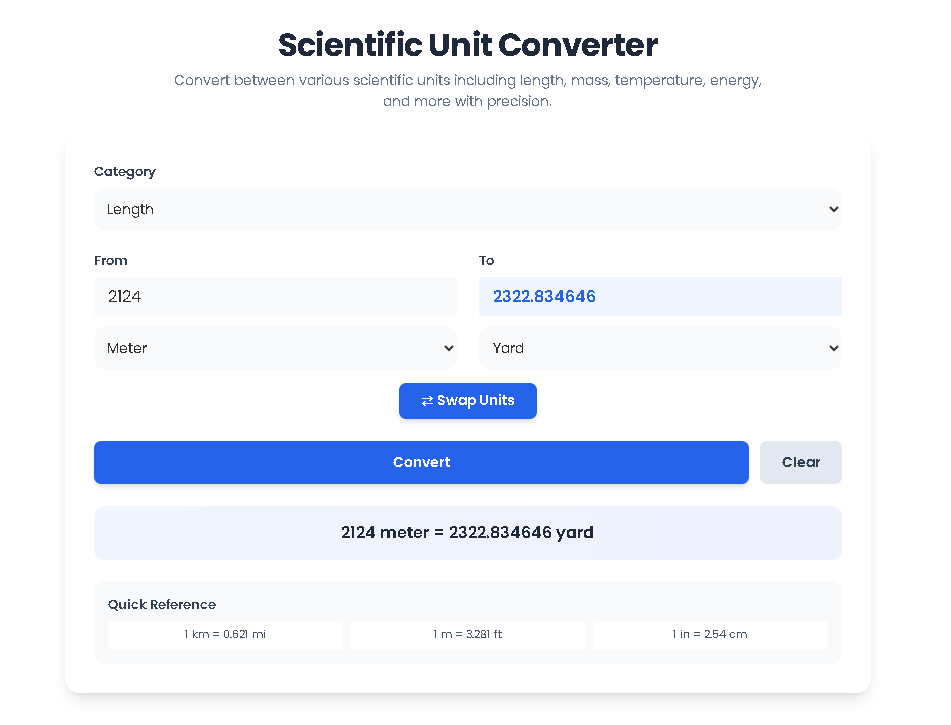
From a user experience perspective, the tool avoids common frustrations. The “Swap Units” button is a thoughtful addition for quick comparison, while the “Quick Reference” panel offers helpful equivalencies at a glance—like knowing that 1 kilometer equals 0.621 miles. The real-time conversion trigger (on input change) means users don’t even need to click “Convert” to see results, streamlining workflow. For content creators and educators, this Scientific Unit Converter provides a trustworthy, always-accessible resource that adheres to standardized conversion factors, ensuring that published data or teaching materials maintain accuracy and professionalism.
This section walks through the tool’s interface and functionality as a first-time user would experience it, explaining the purpose and mechanism of each HTML element.
1. Category Selection (<select id="category">)
Upon loading the page, the first dropdown menu presents eight scientific categories. Selecting a category—like “Temperature” or “Pressure”—dynamically repopulates the unit dropdowns below. This is managed by a JavaScript object (conversionData) that stores each category’s available units, conversion functions, and quick-reference
snippets. This architecture ensures that only relevant, logically compatible units are presented, preventing user error.
2. Value Input Field (<input id="fromValue">)
This is a standard HTML number input field. Users type or paste the numerical value they wish to convert. The field listens for the input event, triggering the conversion function in real time. In testing, this immediate feedback is invaluable for iterative adjustments, such as converting multiple values in quick succession.
3. Unit Selection Dropdowns (<select id="fromUnit"> and <select id="toUnit">)
These two dropdowns are populated based on the selected category. The “From” unit defaults to the first unit in the list (e.g., “meter” for Length), while the “To” unit defaults to the second (e.g., “kilometer”), offering a sensible starting conversion. Each unit’s value attribute corresponds to a key in the toBase conversion object or is handled by a special function for temperature.
4. The Conversion Engine
When a user changes the value, category, or unit, the convert() function executes. For linear categories (like mass or length), the logic is:
Convert the input value to a base unit (e.g., all lengths to meters) by multiplying by conversionData[category].toBase[from].
Convert from the base unit to the target unit by dividing by conversionData[category].toBase[to].
For temperature, a unique convert function handles the non-linear formulas between Celsius, Fahrenheit, and Kelvin, using Celsius as the intermediary. The result is formatted to six decimal places, with trailing zeros removed for cleanliness.
5. Result Display (<div id="resultDisplay">)
The output is presented in a dedicated, non-editable field with distinct blue styling. A separate results panel below provides a clear, sentence-formatted recap (e.g., “10 meter = 32.8084 foot”), which is excellent for verification or copying into a report.
6. Interactive Buttons: Swap, Convert, and Clear
Swap Button (<button id="swapBtn">): This switches the selected units in the “From” and “To” dropdowns and recalculates instantly. It’s perfect for bidirectional verification.
Convert Button (<button id="convertBtn">): While conversion happens in real-time, this button provides a deliberate action point for users, reinforcing control.
Clear Button (<button id="clearBtn">): Resets input and output fields and hides the result panel, allowing a fresh start.
7. Quick Reference Panel (<div id="quickRef">)
This area dynamically displays three key equivalencies for the selected category, pulled from the conversionData object. It serves as both a learning aid and a quick way to verify common conversions.
Speed and Efficiency: Manual conversion using formulas or tables is obsolete. This Scientific Unit Converter delivers results in milliseconds, accelerating research, homework completion, and data analysis workflows.
Guaranteed Accuracy: The tool uses standardized, peer-reviewed conversion factors (e.g., 1 inch = 2.54 cm exactly). This eliminates the risk of arithmetic mistakes or using outdated values, which is critical in scientific publishing and engineering design.
Enhanced Learning and Verification: For students, the immediate visual feedback helps internalize unit relationships. For professionals, the “Swap” and “Quick Reference” features are ideal for cross-checking calculations in documents or code.
Clean, Distraction-Free UI: The interface, built with Tailwind CSS, prioritizes clarity. Ample spacing, clear labels, and contextual coloring (inputs in slate, outputs in blue) guide the user naturally through the conversion process without confusion.
Universal Accessibility: Being web-based, this Scientific Unit Converter requires no software installation, works across all modern browsers, and is accessible from any device with an internet connection. The design is fully responsive, making it functional on smartphones, tablets, and desktops.
nput Quality Dictates Output: The accuracy of the conversion is dependent on the user providing a correct numerical input. The tool processes the value as given.
Review for Critical Applications: While the conversion algorithms are reliable, users are advised to review results for mission-critical applications in fields like aerospace, pharmacology, or published academic research.
Appropriate Use: The tool is provided for legitimate educational, professional, and personal use. It must not be used for fraudulent activity or in violation of any applicable terms of service.
No Absolute Guarantee: Toolota provides the tool “as is” to aid productivity and learning but cannot assume liability for consequential decisions made based on its outputs.
A standard calculator performs arithmetic, while a Scientific Unit Converter is designed specifically for dimensional analysis. It contains built-in databases of conversion factors and formulas (like for temperature) between dozens of scientific and imperial units, performing complex multi-step transformations with a single click that would require multiple manual operations on a standard calculator.
It is highly accurate, utilizing standard international conversion factors (e.g., NIST values). For linear units, calculations are performed with high-precision floating-point numbers. Temperature conversions use exact formulas (e.g., °F = °C * 9/5 + 32). Results are formatted to six decimal places, though the underlying precision is higher.
Yes, it is an excellent tool for verification and quick calculations in academic and professional settings. However, as a best practice, always cite the specific conversion factors or methodology used in formal reports. The tool’s “Quick Reference” can help you identify the standard ratios you are applying.
No. The entire conversion process happens locally in your web browser (client-side JavaScript). The numerical values you enter are never sent to Toolota’s servers or stored anywhere, ensuring complete privacy for your data.
Toolota is your all-in-one online tools platform. Fast, simple, and free utilities designed to make everyday digital tasks easier and smarter.