
Recent Tools
No tools found matching your search.
↑↓ Navigate
←→ Category
↵ Select
esc Close
Five powerful percentage tools in one — find percentages, percentage change, what percent, and more.
Need a percentage calculator online that actually does it all? This tool handles four common percent scenarios in one clean interface — from calculating tips to finding percent change between two numbers. Select a tab, enter your numbers, and click Calculate to get your result instantly. Whether you’re figuring out a discount at a store or comparing sales growth, this free utility provides precise answers without requiring any mathematical effort.
| Feature | What It Does |
|---|---|
| X% of Y Tab | Enter any percentage and a number — get the exact value |
| % Change Tab | Compare original vs new value to see increase or decrease |
| X is what % of Y Tab | Find what percentage one number represents of another |
| % more/less Tab | Calculate both increased and decreased results from a base |
| Color-Coded Results | Purple for increase, red for decrease — easy to read |
| Responsive Card Design | Works perfectly on mobile, tablet, and desktop |
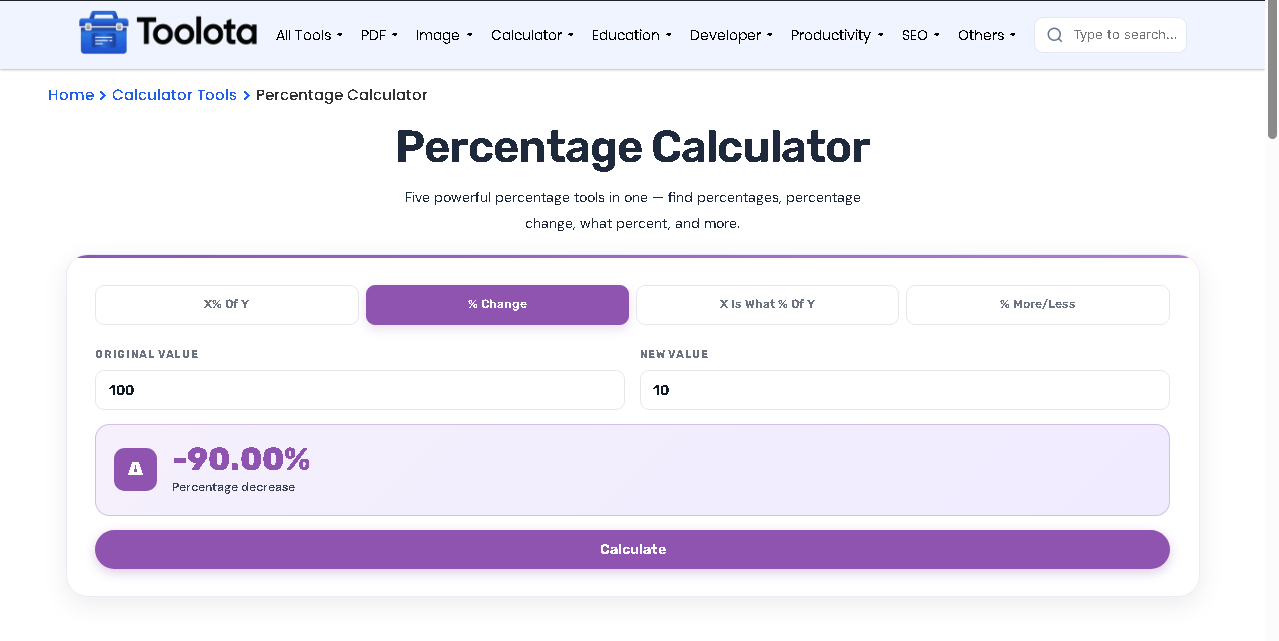

Look at the four tabs at the top — tap the one that matches what you need. Need 15% of $200? That's tab 1. Comparing prices from last year? Tab 2.

Each tab has two input fields with clear labels. Type your numbers into the white boxes — the placeholders show you examples like "e.g., 20" or "e.g., 500".

Click the purple button that says "Calculate". Your result appears instantly inside the colored result box. For the % more/less tab, you get both answers at once — the increased amount and the decreased amount.
Once you’ve found your percentage, run the numbers through the Discount Calculator to see the final sale price instantly.
Splitting a bill or eating out? The Tip Calculator uses the same percent-of-a-number logic to work out gratuity.
For tax-inclusive pricing, pair this tool with the VAT Calculator to add or remove tax percentages.
The standard percent change formula — dividing the difference by the original value and multiplying by 100 — is the same method government statisticians use to track price changes.
No need to search for separate tools. This single tool handles everything from tip amounts to discount scenarios.
The layout adapts to phones, tablets and desktops, with tighter spacing and smaller text on narrow screens so every field stays easy to tap.
A clean card layout with clear labels and readable fonts keeps the calculator easy on the eyes.
The result boxes use color-coded icons (%, Δ, ?, +, -) and gradient backgrounds so you immediately see your answer without scanning cluttered pages.
Open the page and start calculating; there is nothing to install and no account to create.
Most basic calculators only give you one answer. But the percent change calculator logic here is different. Look at the fourth tab labeled “% more/less”. When you enter a base value like $1,000 and a percentage like 15%, this tool instantly shows you BOTH results side by side:
Purple result box (+ icon) → Value after a 15% increase ($1,150)
Red result box (- icon) → Value after a 15% decrease ($850)
This is perfect for business owners comparing markup vs markdown, or shoppers wondering “what would this cost after a discount versus after tax?” Two answers. One click. Zero extra work.
It solves everyday percent problems like discounts, tips, tax amounts, grade scores, and growth rates in seconds.
Use Tab 2 labeled “% Change”. Enter original value, then new value, then click Calculate — you’ll see +X% for increase or -X% for decrease.
Yes. Tab 3 labeled “X is what % of Y” does exactly that — enter your part and your whole, get the percentage instantly.
Yes, completely free. No signup, no hidden fees, no credit card required.
Absolutely. The HTML includes responsive CSS that adjusts layouts, font sizes, and spacing for screens under 720px and 480px.
Tab 1 finds a specific percentage OF a number (like 20% of $50 = $10). Tab 4 adds or subtracts that percentage FROM the number (like $50 + 20% = $60).
Toolota is your all-in-one online tools platform. Fast, simple, and free utilities designed to make everyday digital tasks easier and smarter.
