
Recent Tools
No tools found matching your search.
↑↓ Navigate
←→ Category
↵ Select
esc Close
Calculate your daily calorie needs using the Mifflin-St Jeor equation. Get personalized goals for weight loss, maintenance & gain.
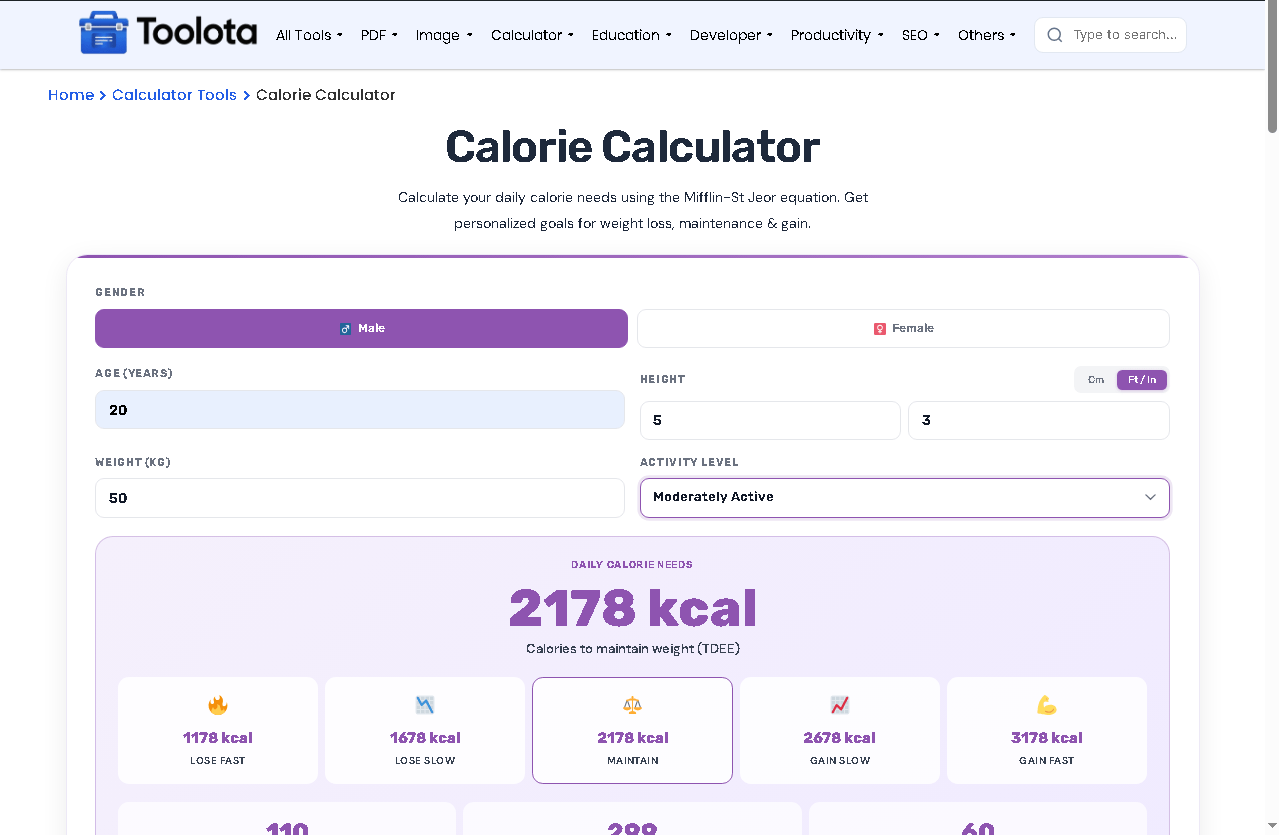
Need a Calorie Calculator Online to figure out how many calories you actually burn each day? This tool uses the Mifflin-St Jeor equation to give you a precise TDEE (total daily energy expenditure) based on your gender, age, height, weight, and activity level. One clear answer: enter your details once, and you’ll instantly see your daily calorie needs for weight maintenance, plus customized targets for losing or gaining weight.

Tap ♂ Male or ♀ Female at the top. This changes the base BMR formula.

Type your age (years), height (cm or ft/in), and weight (kg). The height toggle lets you switch units without converting manually.

Open the dropdown and select how active you are daily, from Sedentary to Extra Active.

Press the purple "Calculate" button. Tool instantly shows TDEE in large text

Hit "↺ Reset" to clear everything and start over.
| Feature | What It Does |
|---|---|
| Gender Toggle | Switch between male / female – BMR formula adjusts automatically |
| Age Input | Enter years (1–120) for metabolic baseline |
| Height Unit Toggle | Use cm OR feet/inches – converts on the fly |
| Weight Input | Enter kg (supports decimals) |
| Activity Dropdown | 5 levels from Sedentary (1.2) to Extra Active (1.9) |
| 5 Goal Cards | Lose Fast (-1000), Lose Slow (-500), Maintain, Gain Slow (+500), Gain Fast (+1000) |
| Macro Display | Protein (g), Carbs (g), Fat (g) calculated from TDEE |
| Calculate Button | Recalculates all values instantly |
| Reset Button | Clears all fields with one click |
Before setting a calorie target, check your BMI Calculator result to see where your current weight sits.
For a resting-only baseline separate from activity level, the BMR Calculator breaks down calories burned at complete rest.
If you’re cutting calories for weight loss, the Water Intake Calculator helps you keep hydration in check during the process.
This tool’s Mifflin-St Jeor formula is one of several ways to estimate basal metabolic rate, which forms the foundation of any calorie target.
Mifflin-St Jeor equation, clinically used for BMR and TDEE.
No second tool needed. Get protein, carbs, and fat grams automatically calculated from your TDEE.
Works on mobile, tablet, and desktop with stacked layouts under 720px.
Five color-coded goal cards show fast/slow loss, maintenance, and fast/slow gain.
Switch between cm and feet/inches without leaving the calculator.
This tool does more than show one number. It gives you a complete calorie roadmap. After you hit calculate, five goal cards appear side by side: Lose Fast (cut 1000 kcal), Lose Slow (cut 500 kcal), Maintain (your exact TDEE), Gain Slow (+500 kcal), and Gain Fast (+1000 kcal). Below that, three macro boxes show exactly how many grams of protein, carbs, and fat to eat daily. hat means you don’t need separate calculators for macro tracking, muscle gain, or weight loss; everything is in one place.
It estimates how many calories your body burns daily based on age, gender, height, weight, and activity level.
Yes. This tool uses the Mifflin-St Jeor equation
Look at the “Lose Slow” or “Lose Fast” goal cards after calculating. Those numbers are your daily calorie targets for weight loss.
Yes. It shows protein, carbs, and fat grams automatically below the goal cards, based on your TDEE.
Calorie estimates are based on your details and activity level, so actual needs may vary from person to person.
Toolota is your all-in-one online tools platform. Fast, simple, and free utilities designed to make everyday digital tasks easier and smarter.
