No tools found matching your search.

Invoice Generator

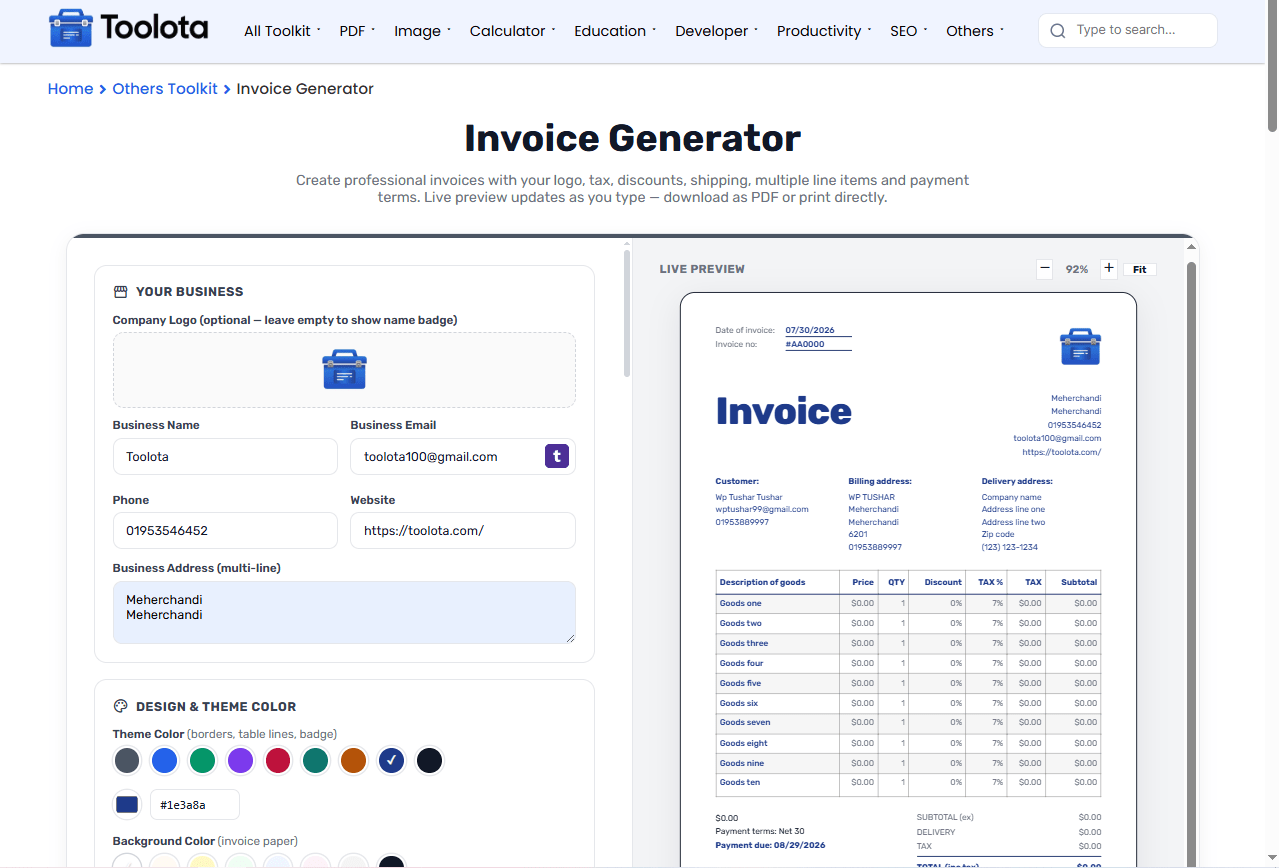
Create professional invoices with your logo, tax, discounts, shipping, multiple line items and payment terms. Live preview updates as you type — download as PDF or print directly.

storefront Your Business

Company Logo (optional — leave empty to show name badge)
Business Name
Business Email
Phone
Website
Business Address (multi-line)

palette Design & Theme Color

Theme Color (borders, table lines, badge)
Background Color (invoice paper)
Text Color (headings & body text)

receipt_long Invoice Details

Invoice #
Invoice Date
Currency
Payment Terms
Payment Due
Status

person Customer

Contact Name
Email
Phone Number
Customer PO #
Delivery Date
 

home Billing Address

Company Name
Address Line 1
Address Line 2
Zip Code
Phone

local_shipping Delivery Address

Company Name
Address Line 1
Address Line 2
Zip Code
Phone

list_alt Description of Goods

Description Price Qty Disc % Tax % Subtotal
Swipe left/right to see all columns →

calculate Adjustments

Delivery Charge
Extra Discount
Amount Paid

account_balance Payment Details

Bank Name
Routing Number
Account Number
SWIFT / IBAN
Make Checks Payable To
Additional Notes / Comments
Footer Message

format_size Section Text Size

Header (title, invoice #, business info)
100%
Customer & Address (bill to, ship to)
100%
Items Table
100%
Totals & Summary
100%
Notes, Payment & Signature
100%

qr_code_2 Payment QR Code

QR Content (bKash/Nagad number, payment link, or any text)

draw Digital Signature

Draw your signature above with mouse or finger
check_circle Saved

Live preview

85%
Date of invoice: 01/01/2024
Invoice no: #AA0000
Goods LLC
Invoice
Your company Your address Your address Your address Your phone Your email
Customer:

Contact name Email here Phone number here Customer PO no: 0123456 Delivery date here

Billing address:

Company name Address line one Address line two Zip code (123) 123-1234

Delivery address:

Company name Address line one Address line two Zip code (123) 123-1234

Description of goods Price QTY Discount TAX % TAX Subtotal
$0.00
Payment terms: Net 30
Payment due: 01/01/2024
SUBTOTAL (ex)$0.00
DELIVERY$0.00
TAX$0.00
TOTAL (inc tax)$0.00
Additional notes or comments
Thank you for your business
Our payment details:
Name of your bank here
Routing number: 121010155
Account number: 00123456789
SWIFT: AAAUS12345
Make checks payable to: Your company name here

Other Tools

Invoice Generator | Create Professional Invoice Instantly

Invoice Generator lets you create professional, fully customized invoices in minutes without any design or accounting skills. This free online tool handles everything from your company logo and customer details to line items, taxes, discounts, and payment terms — all with a live preview that updates as you type. You can even adjust the text size of different sections independently, add a digital signature or QR code, and download the final document as PDF or JPG. Whether you’re a freelancer sending your first bill or a small business owner managing multiple clients, this free invoice maker helps you create polished, print-ready invoices with accurate calculations, customizable styling, and a live preview.

Features Of This Invoice Generator

  • Upload your company logo or use the text-based business name badge

  • Add business name, email, phone, website, and multi-line business address

  • Set invoice number, date, currency (10 currencies supported), payment terms, and due date

  • Track invoice status: Draft, Unpaid, Partial, Paid, or Overdue

  • Enter customer contact info, PO number, and delivery date

  • Separate billing and delivery address fields with phone numbers

  • Add multiple line items with description, price, quantity, discount %, and tax %.

  • Auto-calculated subtotals and tax amounts for each line item

  • Apply delivery charges and extra discounts to the whole invoice

  • Record amount paid and see remaining balance due automatically

  • Full color customization: accent color, background color, and text color with presets + hex picker

  • Independent text size control for five sections: Header, Customer/Address, Items Table, Totals, and Footer

  • Zoom in/out with a live preview and Fit-to-panel option

  • Include bank details: bank name, routing number, account number, SWIFT/IBAN

  • Add checks payable to field for traditional payments

  • Optional QR code with custom content (payment links, bKash/Nagad numbers, etc.)

  • Draw or upload a digital signature with clear/remove options

  • Live preview updates in real-time as you fill out fields

  • Download as PDF, download as JPG, or print directly from your browser

  • Save draft to resume later from your browser’s local storage

  • “PAID” stamp overlay when invoice status is set to Paid

  • Reset colors, text sizes, or the entire invoice with one click

Invoice Generator Toolota

How To Create An Invoice With This Invoice Generator

1 2

Fill in your business and customer details —

Add your company name, logo, contact info, and address. Enter the client's name, email, phone, PO number, and delivery date.

2 1

Set invoice meta and addresses —

Choose the invoice number, date, currency, and payment terms. Fill in the billing and delivery addresses separately.

3 1

Add your line items —

Describe each product or service, set the price and quantity, then apply discount and tax rates per item. Click "Add another item" for more rows.

4 1

Adjust extras and text sizes —

Add delivery charges or extra discounts, record any amount already paid, and use the Section Text Size controls to make specific parts larger or smaller.

5 1

Preview, customize, and download —

Watch the live preview update automatically. Use zoom controls to see details clearly, then download as PDF, JPG, or hit Print.

Why Choose This Invoice Generator

🔄 Real-Time Preview

See a live preview of your invoice as you fill in each field, so you can review the layout and details before exporting or printing.

🎨 Full Color & Font Size Customization

Change accent, background, and text colors to match your brand. Adjust text sizes independently for five different sections — header, addresses, table, totals, and footer.

💾 Auto-Save Draft

Your work saves automatically to your browser's storage.Your draft is saved in your browser's local storage, allowing you to close the tab and continue later on the same browser and device.

📊 Smart Tax & Discount Calculations

Each line item calculates its own subtotal with tax and discount applied. The grand total updates automatically with delivery charges and extra discounts included.

📱 Works Anywhere

Use it from your laptop, tablet, or phone. The layout adapts to any screen size, and the touch-friendly signature pad works with your finger or stylus.

🖨️ Multiple Export Options

Download as PDF for professional sharing, save as JPG for quick previews, or print a physical copy directly from your browser.

Pro Tips

Once you generate your billing details, you can seamlessly convert your client documentation using our PDF Converter Free to keep all records standardized.

Need to organize multiple billing statements before emailing your client? You can easily merge PDF online into a single cohesive document.

Calculate total client charges, tax breakdowns, and discounts accurately beforehand using the discount calculator online to avoid billing discrepancies.

Maintaining clear and accurate invoice layout specifications ensures faster payment processing and compliant tax reporting for freelancers and businesses alike.


Understanding Your Invoice Layout And Text Sizing

The invoice is divided into five distinct sections, each with its own font size control. The Header includes the invoice title, number, date, and your company badge or logo. The Customer & Address section shows who you’re billing and where to ship. The Items Table lists your goods or services with prices, quantities, discounts, and taxes. The Totals & Summary area displays subtotals, delivery charges, tax totals, and the final balance. Finally, the Footer holds notes, payment details, and the signature block. By adjusting the size of each section independently, you can make the most important information stand out — for example, enlarging the totals for emphasis or shrinking the address block to save space. You may fine-tune the document until it seems flawless to your client because the preview updates instantly.

Frequently Asked Questions

Can I add my company logo to the invoice?

Yes — upload a PNG or JPG image using the logo drop zone, and it appears in the top-right corner of the preview.

Each line item can have its own tax percentage, and the tool automatically calculates the applicable tax and updates the invoice totals.

Yes — the Section Text Size controls let you increase or decrease font size for the header, customer addresses, items table, totals, and footer independently.

The tool saves a draft automatically to your browser’s local storage. Your work stays even if you close the tab.

Yes — you can select payment terms like Net 30 and set a due date that appears on the invoice.

Yes — the layout adapts to any screen size, and the signature pad works with touch input.