
Recent Tools
No tools found matching your search.
↑↓ Navigate
←→ Category
↵ Select
esc Close
Convert each PDF page into a PowerPoint slide. Works fully in your browser.
Drop your PDF here
or click anywhere in this box to select
Generating slides...
Please wait
This tool turns every page of a PDF into a PowerPoint slide, right in your browser. It’s useful when you need a quick slide version of a report, contract, or handout to present or share — without re-typing anything. Drop in a PDF, flip through the page thumbnails, pick Standard or High quality, then convert. Each slide is an image of the original page, so layout and formatting stay exactly as they were in the PDF. Nothing is uploaded to a server, and the finished .pptx file downloads straight to your device.
Standard is faster. High gives sharper slides.
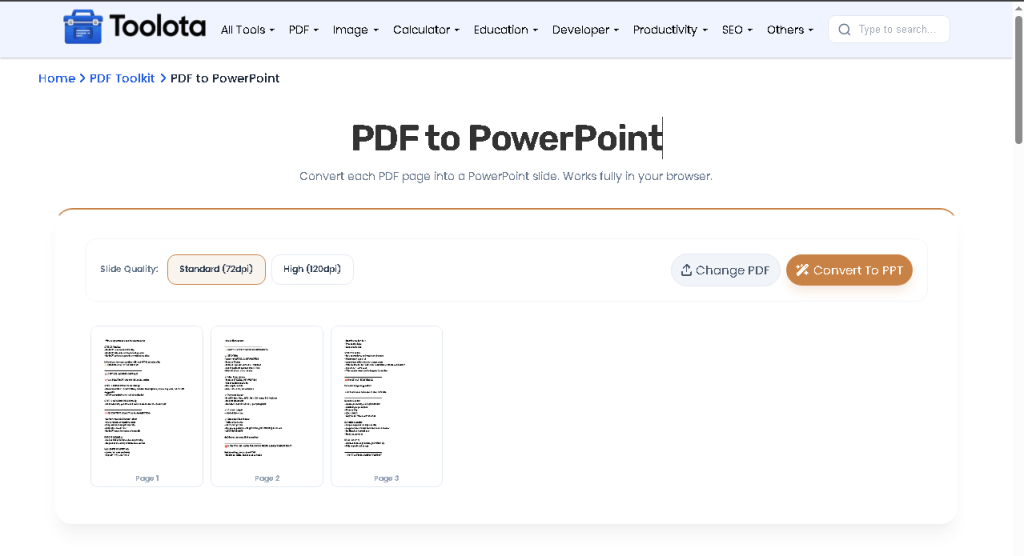
Follow these steps to Convert PDF to PPT in seconds:

Drag a file into the drop zone or click it to browse, as shown by “Drop your PDF here.”

Thumbnails appear for every page; click the eye icon on any thumbnail to zoom in and confirm it’s the right file.

Select Standard (72dpi) for speed or High (120dpi) for sharper slides.

Click the Convert to PPT button and watch the “Converting... X / Y” progress as slides are generated.

Your .pptx downloads automatically, named after the original PDF.
Your PDF is converted inside your browser using PDF.js and PptxGenJS, so the file itself is never uploaded anywhere.
Pick Standard (72dpi) for a quick, lighter file or High (120dpi) when you need sharper slides.
The finished .pptx is saved automatically, named after your original PDF file.
Every page appears as a thumbnail before you convert, and the eye icon zooms in so you can check it first.
Every page in the PDF becomes its own slide automatically, so multi-page files convert together.
The Change PDF button resets the tool instantly so you can convert another file without reloading the page.
.pptx file is created and downloaded – all without any external API or cloud processing.No. Conversion happens entirely inside your browser using local JavaScript libraries, so your file is never transmitted anywhere.
Yes. Every page in the PDF becomes its own slide in the output file, so a 20-page PDF produces a 20-slide presentation automatically.
Standard renders pages at about 72dpi for a smaller, faster file. High renders at about 120dpi, giving sharper slide images at a larger file size.
Not directly. Each slide is an image of the original page, so text isn’t editable in PowerPoint. Use PDF to Word first if you need editable text.
No. The output is a standard .pptx file that also opens in Google Slides, LibreOffice Impress, and other presentation software.
Only to load the page the first time. Once it’s loaded, the actual PDF-to-slide conversion runs locally without sending data anywhere.
Yes. Thumbnails appear for every page as soon as you upload the PDF, and clicking the eye icon zooms into any page for a closer look.
Toolota is your all-in-one online tools platform. Fast, simple, and free utilities designed to make everyday digital tasks easier and smarter.
