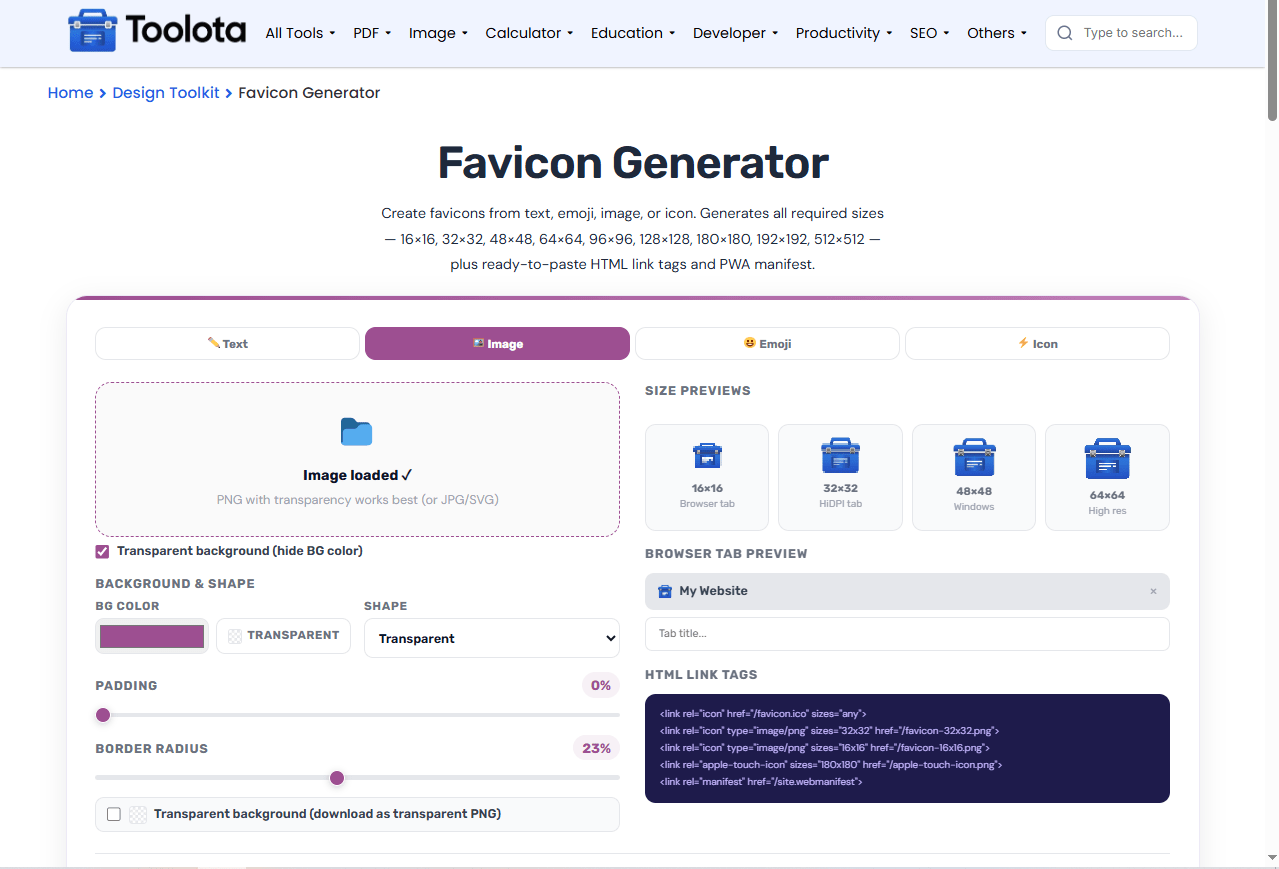
Create favicons from text, emoji, image, or icon. Generates all required sizes — 16×16, 32×32, 48×48, 64×64, 96×96, 128×128, 180×180, 192×192, 512×512 — plus ready-to-paste HTML link tags and PWA manifest.
A favicon generator helps you create custom icons for your website without any design experience. This free tool lets you build favicons from text, emojis, images, or icons in seconds. Just select your content, customize colors and shapes, and save the files that are ready for use. You can create various dimensions automatically and also receive HTML code for your site. Require a quick favicon? Simply enter a letter, select a typeface, and save your symbol.
This favicon creator includes everything you need to design website icons:
Text Mode — Type 1–3 characters and apply from 50+ fonts
Emoji Library — Pick from 10 categories including smileys, animals, food, and flags
Icon Collection — Choose from 150+ SVG icons grouped by category
Image Upload — Upload PNG, JPG, or SVG files to convert to favicon
Color Picker — Set custom text and background colors
Shape Options — Choose rounded, square, circle, or transparent background
Padding Control — Adjust the space between content and edge with a slider
Border Radius — Fine-tune how rounded your icon corners appear
Size Previews — See your design at 16×16, 32×32, 48×48, and 64×64
Browser Tab Preview — Visualize how your favicon looks in a browser tab
HTML Code Generation — Copy ready-to-use link tags for your website
Multiple Formats — Download as PNG, JPG, or ICO format
PWA Support — Generate manifest.json with 192×192 and 512×512 icons
9 Sizes Available — Export from 16×16 up to 512×512 pixels
Bulk Download — Save all selected sizes in a single ZIP file

Choose Text, Image, Emoji, or Icon mode from the tabs at the top. Text mode works best for simple letters, while emoji and icon modes offer ready-made graphics.

Adjust the background color, shape, padding, and border radius sliders. For text mode, pick a font and text color. For images, upload your file and toggle transparency as needed.

Check the size preview section to see how your icon looks at different resolutions. The browser tab preview shows exactly how it appears in a live website.

Select the sizes you need, choose PNG, JPG, or ICO format, and click download. The tool bundles everything into a ZIP file with HTML tags ready to paste.
Have a website ready but no icon? This website icon generator does all the heavy lifting in minutes.
One tool handles text, emoji, icons, and image uploads. No need to switch between different apps to create your favicon.
See your design at multiple sizes before downloading. The live preview shows 16×16, 32×32, 48×48, and 64×64 versions side by side.
Download PNG, JPG, and ICO formats with HTML tags and PWA manifest support. Everything you need for modern web development.
Copy HTML link tags directly from the tool. Includes favicon.ico, PNG sizes, Apple touch icon, and webmanifest support.
Your favicon appears in browser tabs, bookmarks, and search results — making it one of the most visible parts of your brand. The 16×16 pixel version is what most users see daily, so bold shapes and simple designs work best. The custom favicon you create here scales automatically across all sizes, but the smaller versions deserve special attention. Test your design at 16×16 and 32×32 to ensure readability. The shape and padding settings have a direct impact on the icon’s performance when it is small. Decreasing the padding will result in more content being visible, but if the padding is reduced too much, the icon may feel overcrowded.
1. Keep text short
Use 1–2 characters maximum for text mode. Three characters become too small at 16×16.
2. Test at small sizes
Always check the 16×16 preview. If your design looks blurry or unreadable there, simplify it.
3. Use the transparent background option
For PNG downloads, enable transparent background to make your favicon work on any website theme.
Use this free favicon generator — pick text, emoji, or an icon, customize the design, and download your icon in PNG, JPG, or ICO format.
It generates 16×16, 32×32, 48×48, 64×64, 96×96, 128×128, 180×180, 192×192, and 512×512 pixels.
Yes — the image mode lets you upload PNG, JPG, or SVG files. PNG with transparency works best.
Choose from PNG (best quality with transparency), JPG (smaller file size), or ICO (classic favicon format with multi-layer support).
Yes — the tool generates HTML link tags for all sizes, including favicon.ico, PNG icons, and Apple touch icon.
Toolota is your all-in-one online tools platform. Fast, simple, and free utilities designed to make everyday digital tasks easier and smarter.