Instantly preview and apply professional color palettes to a realistic website layout. Use the keyboard shortcuts or navigation to explore hundreds of themes.
Click any planet to apply instantly. Click colors to copy.
Click a planet to apply • Click colors to copy
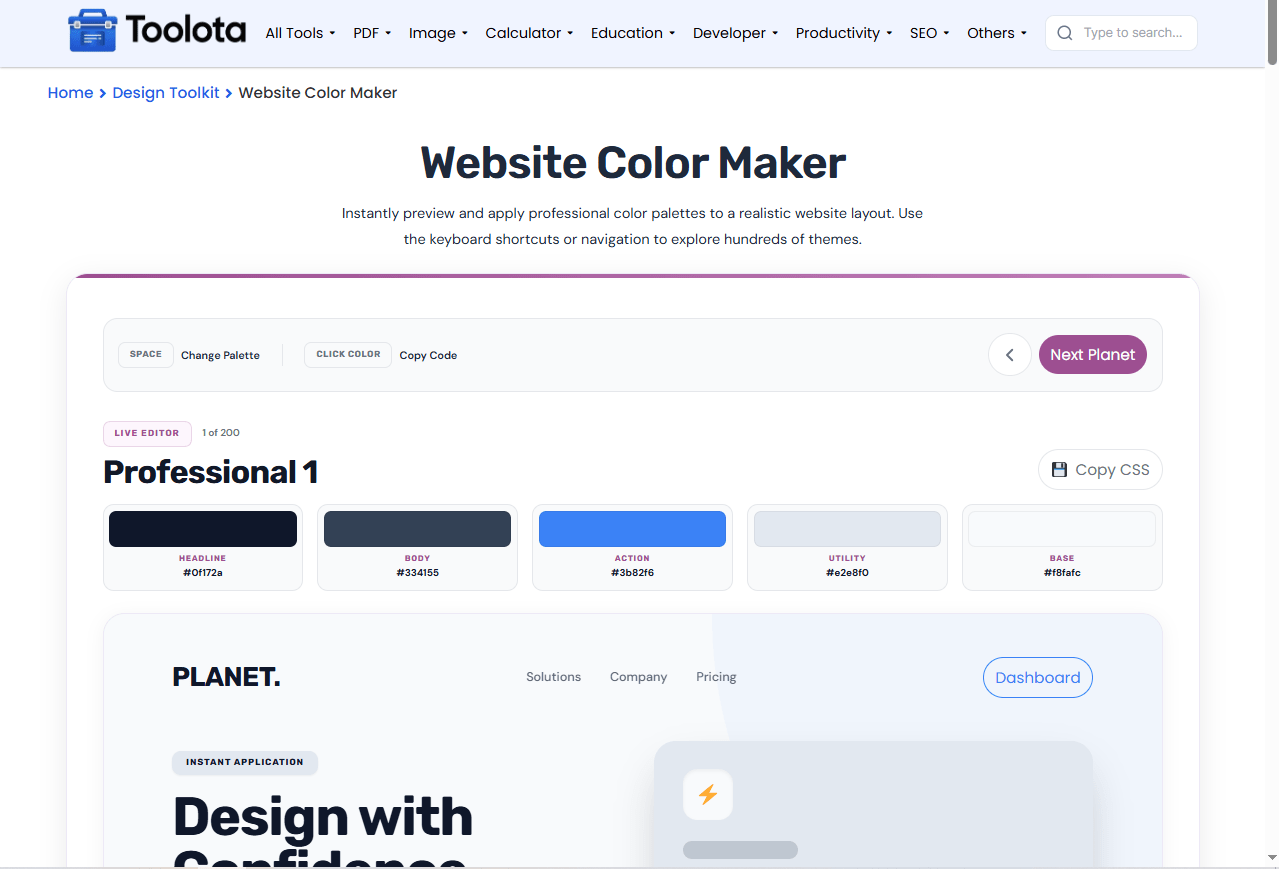
A website color palette sets the mood, guides the eye, and makes your design feel complete. ColorPlanet gives you 200 premade palettes organized into five categories — Professional, Creative, Nature, Pastel, and Dark Mode. Click any palette and watch a live website preview update instantly with those colors applied to headings, buttons, cards, and backgrounds. Every palette includes five shades named Headline, Body, Action, Utility, and Base. This color scheme creator functions directly in your browser without needing any downloads, registrations, or waiting time. Want to change hex to CSS variables or quickly check color pairings? This tool manages both tasks in a tidy interface.
200 premade palettes — five categories with 40 palettes each: Professional, Creative, Nature, Pastel, and Dark Mode
Live website preview — see your selected palette applied to a real page layout instantly
Five-color system — each palette includes Headline, Body, Action, Utility, and Base colors
One-click color copy — click any color swatch to copy its hex code to your clipboard
Keyboard shortcuts — press Space, Arrow Right, or Arrow Left to cycle through palettes
CSS export — copy all five colors as CSS custom properties with one button
Interactive Planet Library — browse all 200 palettes in a visual grid below the preview
Active selection indicator — a checkmark appears on your currently selected palette
Responsive preview frame — adapts to different screen sizes automatically
Color contrast helper — action buttons automatically use white or dark text based on contrast

scroll down to see all 200 palettes organized by category.

the live preview updates instantly with those five colors applied.

see headings, buttons, cards, and backgrounds shift to your selected palette.

click any swatch in the palette grid to copy its hex code.

hit the "Copy CSS" button to grab the full palette as CSS variables.
How do you test a website color palette quickly? Just click through the options and watch the preview change in real time — no uploads, no waiting, no hassle.
Five curated categories give you professional, creative, nature, pastel, and dark mode options — enough variety for any project.
Cycle through palettes with Space, Arrow Right, or Arrow Left — faster than clicking through a dropdown.
See exactly how your website color palette looks on a real page layout before you commit to using it.
Copy hex codes individually or grab the entire palette as CSS custom properties with one click.
The preview panel gives you a practical look at how your website color palette behaves across different UI elements. You can observe the main heading hue, the text color of the body, the background of the action button, the background of the utility badge, and the overall page background simultaneously. The action button automatically changes its text color to ensure it is easy to read — it appears white on darker backgrounds and dark on lighter ones. The preview also features a decorative card with its own background and an arrow button that responds to your action color. This indicates that you are not merely viewing five color samples — you are examining how those colors interact in a realistic website format. The UI color tool handles all the complicated tasks, allowing you to concentrate on what appears appealing.
Use Dark Mode palettes to test how your design looks on dark backgrounds before building a full dark theme.
Click the color swatches directly in the palette grid to copy hex codes — faster than selecting and copying text.
Press the Space key to quickly cycle through palettes while keeping your hands on the keyboard.
A website color palette is a set of colors used consistently across a website’s design. It typically includes primary, secondary, accent, and neutral colors.
ColorPlanet includes 200 palettes total, divided into five categories with 40 palettes each.
Yes. Click any color swatch in the palette grid and the hex code copies to your clipboard automatically.
You can copy hex codes individually or export all five colors as CSS custom properties using the Copy CSS button.
Yes. The interface adapts to any screen size, and the preview frame resizes automatically for mobile viewing.
Toolota is your all-in-one online tools platform. Fast, simple, and free utilities designed to make everyday digital tasks easier and smarter.
