
Recent Tools
No tools found matching your search.
↑↓ Navigate
←→ Category
↵ Select
esc Close
Add GST to get the final price, or remove GST from an inclusive amount. Supports all Indian GST slabs.
Need a GST Calculator Online that actually works? This tool lets you add GST to an exclusive price or remove GST from an inclusive amount in one click. Simply enter your amount, select a GST rate (0%, 5%, 18%, or 40%), and see the base value, tax amount, and total straight away. Whether you’re a business owner billing customers or a shopper checking tax inclusion, this calculator handles both scenarios without confusion.

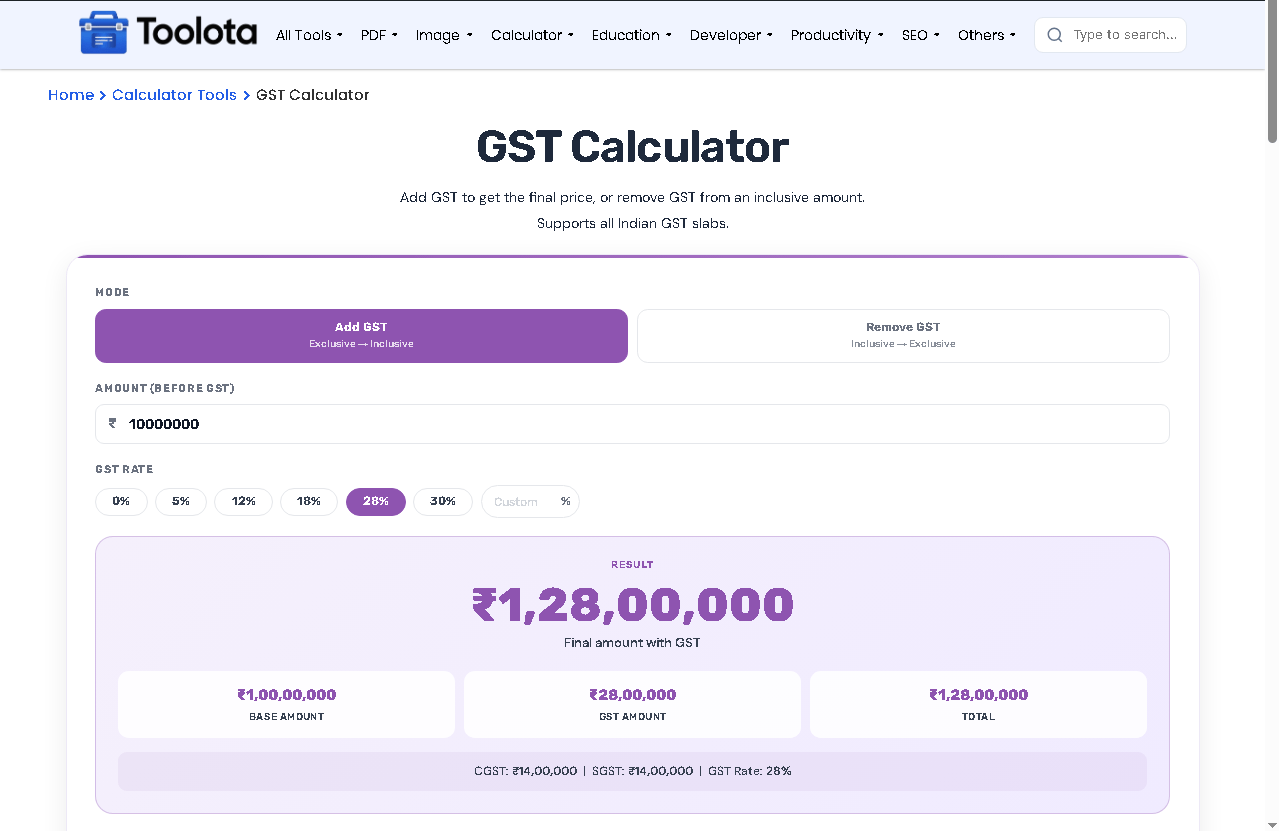
Click "Add GST" if your amount excludes tax. Click "Remove GST" if your amount already includes tax.

Type the value in the ₹ input box. For Add mode, this is your pre-GST price. For Remove mode, this is the GST-inclusive total.

Tap any rate button – 0%, 5%, 18%, or 40%, or type a custom rate. The active button turns purple.

The large purple number shows your final amount. Below it, three boxes display base amount, GST amount, and total. The note also splits tax into CGST and SGST.

Change any field and results update automatically. Or hit Reset to start over.
Add GST Mode – Convert exclusive price → inclusive final price
Remove GST Mode – Back-calculate base amount from inclusive total
5 GST Slabs – 0%, 5%, 12%, 18%, 28% (click any chip)
CGST + SGST Split – Automatically divides tax into two equal halves
Three-Way Breakdown – Base amount, GST amount, and total in one view
₹ Prefix Input – Clean Indian rupee formatting
Reset Button – Clear all fields with one click
If your business also deals in loans or EMIs, the EMI Calculator helps you plan repayments alongside your GST-inclusive pricing.
Before applying GST to a discounted item, run it through the Discount Calculator first to get the correct base price.
For freelancers and small businesses tracking overall margins, the Profit / Loss Calculator shows how tax and pricing decisions affect your bottom line.
India’s dual GST structure, where a transaction is split into Central GST and State GST, is why this tool always divides the tax amount into two equal halves.
One tool works for both "How to add GST" and "How to remove GST from a bill"
See exactly how much tax you're paying on every transaction
Buttons and inputs resize cleanly on any device
Results update as you type or change the rate
Perfect for invoice verification, pricing, and tax reconciliation
Here’s what makes this GST Calculator Online different: when you calculate, the tool doesn’t just show a single tax number. It automatically splits the total GST into CGST (Central GST) and SGST (State GST) – each displayed right below the breakdown. For instance, if your GST is ₹360, you’ll see CGST: ₹180 and SGST: ₹180. This is how intra-state invoices show GST. For inter-state sales, the same total is charged as IGST instead. No need for manual partitioning.
Switch to “Remove GST” mode, enter the inclusive total, select the GST rate, and the tool shows your base amount before tax.
Yes. It includes the current 0%, 5%, 18%, and 40% rates, and you can type any other rate, such as an older 12% or 28% on past invoices.
Add GST calculates final price from base amount. Remove GST calculates base amount from final price.
Yes. Every calculation shows CGST and SGST as equal halves of the total GST amount, which is how intra-state sales are billed. For inter-state sales, the same total applies as a single IGST charge.
Yes. No signup, no payment – just enter numbers and get results instantly.
Toolota is your all-in-one online tools platform. Fast, simple, and free utilities designed to make everyday digital tasks easier and smarter.
