Find the exact difference between two dates in years, months, weeks, days, hours & minutes. With quick presets.
A date difference calculator helps you measure exactly how much time separates two moments. Whether you need to know the days between dates for a project deadline or count months until an event, this tool delivers instant answers. In just one location, the calculator presents the complete breakdown in years, months, weeks, days, hours, minutes, and seconds. Simply select your start and end dates.

Click the Start Date and End Date input fields to choose your from and to dates.

Tap any preset button below the labels, such as "Today ↔ New Year" or *"Today ↔ +1 Year"*, to auto-fill both dates instantly.

Click the purple ⇄ button between the date fields to exchange start and end dates.

Press the Calculate button (purple, labeled "Calculate") to see the full difference.

The big display shows years, months, and days. Below, the unit grid breaks down the same duration into total months, weeks, days, hours, minutes, and seconds. The timeline shows how much of that period has already passed from the start date to today.

Click the Reset button (white, labeled "↺ Reset") to clear all results and return to default dates.
| Feature | What It Does |
|---|---|
| Quick Presets | One-click options like “Today ↔ New Year” or “+100 Days” |
| Swap Dates Button | Instantly reverse start and end dates with ⇄ |
| Date Pickers | Clean input fields for selecting any start or end date |
| Hero Difference Display | Shows “Xy Xm Xd” in large, bold text |
| Unit Grid | Displays total months, weeks, days, hours, minutes, seconds |
| Visual Timeline | Shows percentage of time elapsed between dates with fill bar |
| Calculate Button | Triggers the full difference calculation |
| Reset Button | Clears results and restores default dates |
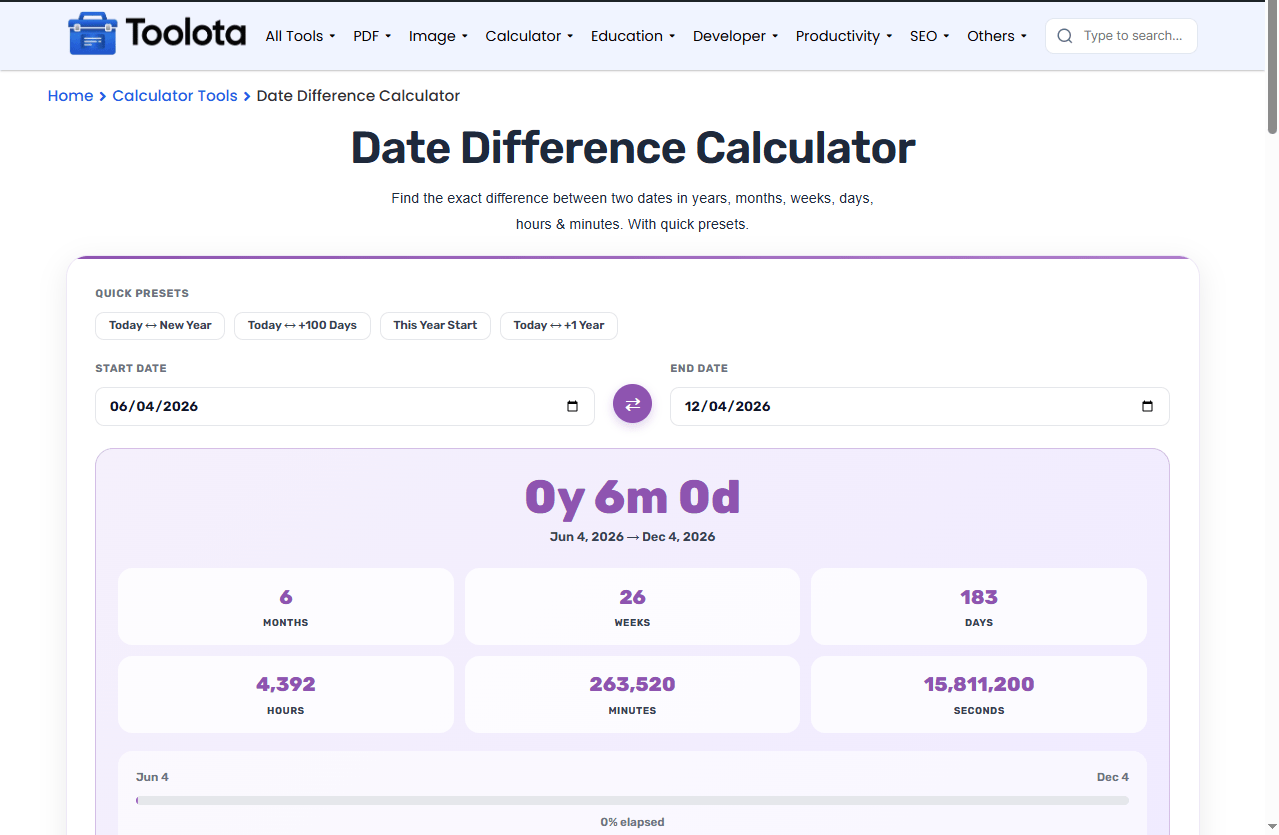
Want to plan 100 days from now? Click the *“Today ↔ +100 Days”* preset — it auto-sets start as today and end as 100 days later.
Counting down to next year? Use “Today ↔ New Year” to see exactly how many days remain until January 1.
Double-check your order – If the result shows negative or swapped values, click the ⇄ swap button instead of re-typing dates.
How much is left is answered by the timeline. Observe the fill percentage. The time has only just begun at 0%. It is finished at 100%.
Everything happens on one screen — pick dates, click calculate, see results immediately
Made a mistake? Swap start and end with one click instead of re-entering
Works perfectly on mobile — grid shifts to 2 columns on smaller screens
Unlike basic calculators, this shows what percentage of the period has already passed
Skip manual typing with presets for New Year, +100 days, +1 year, and year start
The calculator won't break or look wrong inside any webpage or Elementor builder
The timeline bar at the bottom of the result panel does something unique. It compares your selected date range to today’s date. If today falls between your start and end dates, the bar fills to show exactly what percentage of the period has already elapsed. If the period hasn’t started yet, it says “Starts in future.” It says Period ended if it’s over. This provides you with immediate context, including the raw difference and your current position within that time frame.
Select a start date and an end date using the date pickers, then click the purple Calculate button.
Yes, click the circular ⇄ button between the two date fields to instantly swap start and end dates.
They automatically fill both dates with common ranges like today to New Year’s Day or today to 100 days later.
Yes, the unit grid displays total hours, minutes, and seconds between your two selected dates.
It shows what percentage of your date range has already passed based on today’s date.
Toolota is your all-in-one online tools platform. Fast, simple, and free utilities designed to make everyday digital tasks easier and smarter.
