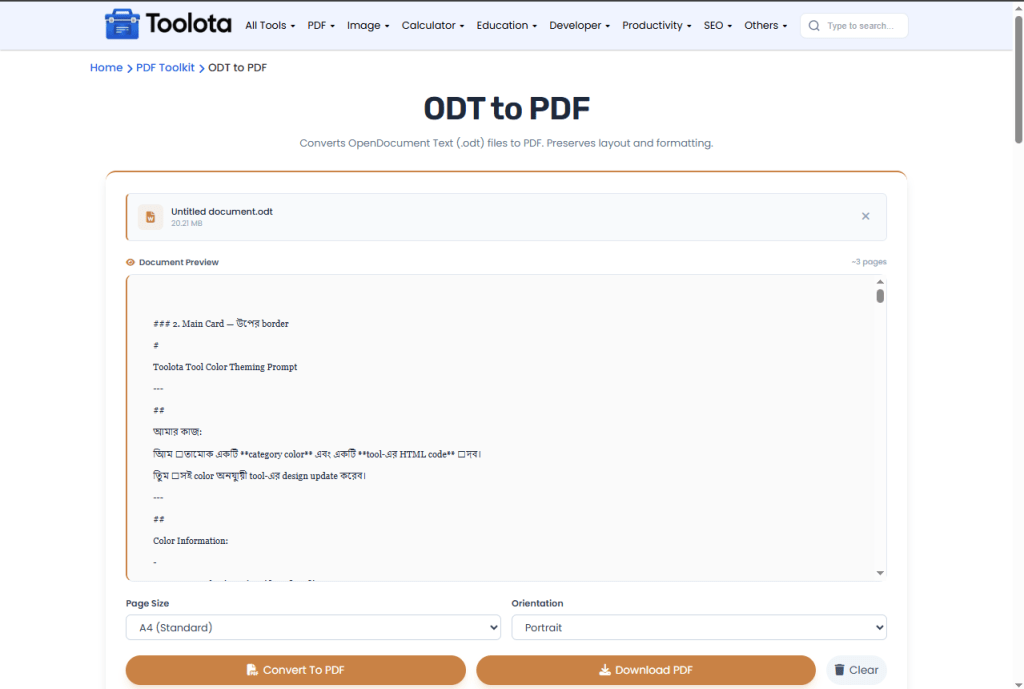
ODT to PDF
Converts OpenDocument Text (.odt) files to PDF. Preserves layout and formatting.
Click to upload or drag and drop
OpenDocument Text files (.odt) only — Max 50MB
filename.odt
—
Converting...
Converts OpenDocument Text (.odt) files to PDF. Preserves layout and formatting.
Click to upload or drag and drop
OpenDocument Text files (.odt) only — Max 50MB
filename.odt
—
Converting...
Need to convert ODT to PDF quickly? This tool lets you upload OpenDocument Text files, adjust page size (A4, Letter, Legal) and orientation (Portrait, Landscape), then convert with one click. You can change ODT to PDF while watching the real-time progress bar. This ODT to PDF converter handles everything, whether you need to convert one document or several files simultaneously, and bundles several PDFs into a ZIP for simple download without the need for additional software.
| Feature | Description |
|---|---|
| 📁 Drag & Drop Upload | Click or drag ODT files directly into the drop zone |
| 📄 Multiple File Support | Upload several ODT files at once for batch conversion |
| 🎨 Page Size Options | Choose A4, Letter, or Legal page format |
| 🔄 Orientation Control | Switch between Portrait and Landscape layout |
| 📊 Progress Tracking | Watch the conversion bar move from 0% to 100% |
| 🗑️ Remove Individual Files | Delete specific files from the list before converting |
| 💾 ZIP Bundle Download | Get all converted PDFs in one compressed file |
| 🔒 50MB File Limit | Each ODT file can be up to 50 megabytes |

Click the drop zone or drag your OpenDocument files directly into the converter area. The tool accepts .odt files only, up to 50MB each.

Use the Page Size dropdown to pick A4, Letter, or Legal. Then select Portrait or Landscape orientation from the second menu.

Click the "Convert to PDF" button. The progress bar shows each file being processed, and the status text tells you exactly which file is converting.

When conversion completes, the Download button appears. Click it — single file downloads as PDF, multiple files download as a ZIP archive named "converted_documents.zip".
✅ Batch processing tip — Upload up to 10 ODT files at once and let the tool convert them sequentially. The progress bar shows real-time status for each file.
✅ File removal before conversion — Review the file list before clicking Convert. Each file shows its name and size — use the X button to remove any unwanted files instantly.
✅ ZIP download for multiple files — When converting 2+ files, the tool automatically bundles all PDFs into a ZIP. For single files, you get the PDF directly.
✅ Settings apply to all files — Your selected page size and orientation apply to every PDF in that conversion session. No need to set preferences per file.
Works entirely in your browser using JavaScript. No desktop software required.
The purple progress bar and live status text tell you exactly when each file finishes converting.
The Clear All button empties your file list instantly, letting you start a new batch conversion.
Upload multiple ODT files and change ODT to PDF for all of them in one session, then download everything together.
Each uploaded file shows its name and size. Click the X button on any file to remove it before conversion.
Yes, the tool extracts content from content.xml inside your ODT file and preserves headings, paragraphs, lists, tables, and links in the final PDF.
Each ODT file can be up to 50MB. Larger files will show an error message and won’t be added to the list.
Select multiple files when uploading, or drag several files into the drop zone. All files appear in the list, and one click converts everything.
The tool offers A4 (standard international), Letter (US/Canada), and Legal (longer documents) page sizes.
Yes, each file in the list has a circular X button. Click it to remove that specific file before conversion.
No, all conversion happens locally in your browser using JavaScript and html2pdf libraries — your files never upload to any server.
To your browser’s default download folder, automatically named after your original PDF with a .txt extension.
No. One file per session. Use the remove button to clear and upload a new file.
Toolota is your all-in-one online tools platform. Fast, simple, and free utilities designed to make everyday digital tasks easier and smarter.