XML Sitemap Generator – Easy Sitemap Maker | Toolota
Table of Contents
What This Tool Does
An XML sitemap generator is a specialized tool that creates a structured, machine-readable file containing all important URLs from your website. This file, typically named sitemap.xml, acts as a roadmap for search engines like Google, Bing, and Yahoo, helping them discover and index your content more efficiently.
The XML sitemap generator tool you’re looking at right now takes a completely different approach from traditional crawler-based generators. Instead of crawling your entire website (which can take hours or even days), it lets you manually input your most important URLs and instantly generates a perfectly formatted XML file. This is particularly useful when you:
Have a new website with minimal pages
Want to prioritize specific content for indexing
Need to update your sitemap quickly after adding new pages
Prefer having full control over which URLs get included
The beauty of this approach lies in its simplicity and precision. You decide exactly which pages matter most, and the XML sitemap generator handles all the complex formatting requirements that search engines demand.
Why Choose Toolota
Search engines are remarkably good at finding content on their own, but they’re not perfect. Here’s why relying solely on organic discovery can hurt your website’s performance:
Discovery Gaps
Even the most sophisticated search engine crawlers can miss pages, especially if:
Your internal linking structure is weak
Pages are buried deep within your site architecture
New content hasn’t been linked from existing pages
Your site has dynamic content that’s hard to navigate
Indexing Prioritization
Not all pages on your website are equally important. Your privacy policy probably doesn’t need to be indexed as urgently as your latest blog post or product page. An XML sitemap generator lets you signal to search engines which URLs matter most.
Fresh Content Alerts
When you publish new content, waiting for search engines to discover it naturally can take days or weeks. Submitting an updated sitemap through Google Search Console tells crawlers: “Hey, there’s new stuff here – come get it!”
Structured Data Context
Your sitemap can include additional metadata like:
When each page was last modified (lastmod)
How often content typically changes (changefreq)
The relative importance of pages (priority)
The XML sitemap generator we’re discussing handles the lastmod field automatically when you check the “Include last modified date” option, using today’s date – perfect for fresh content.
How This Tool Works: The Most Detailed Section
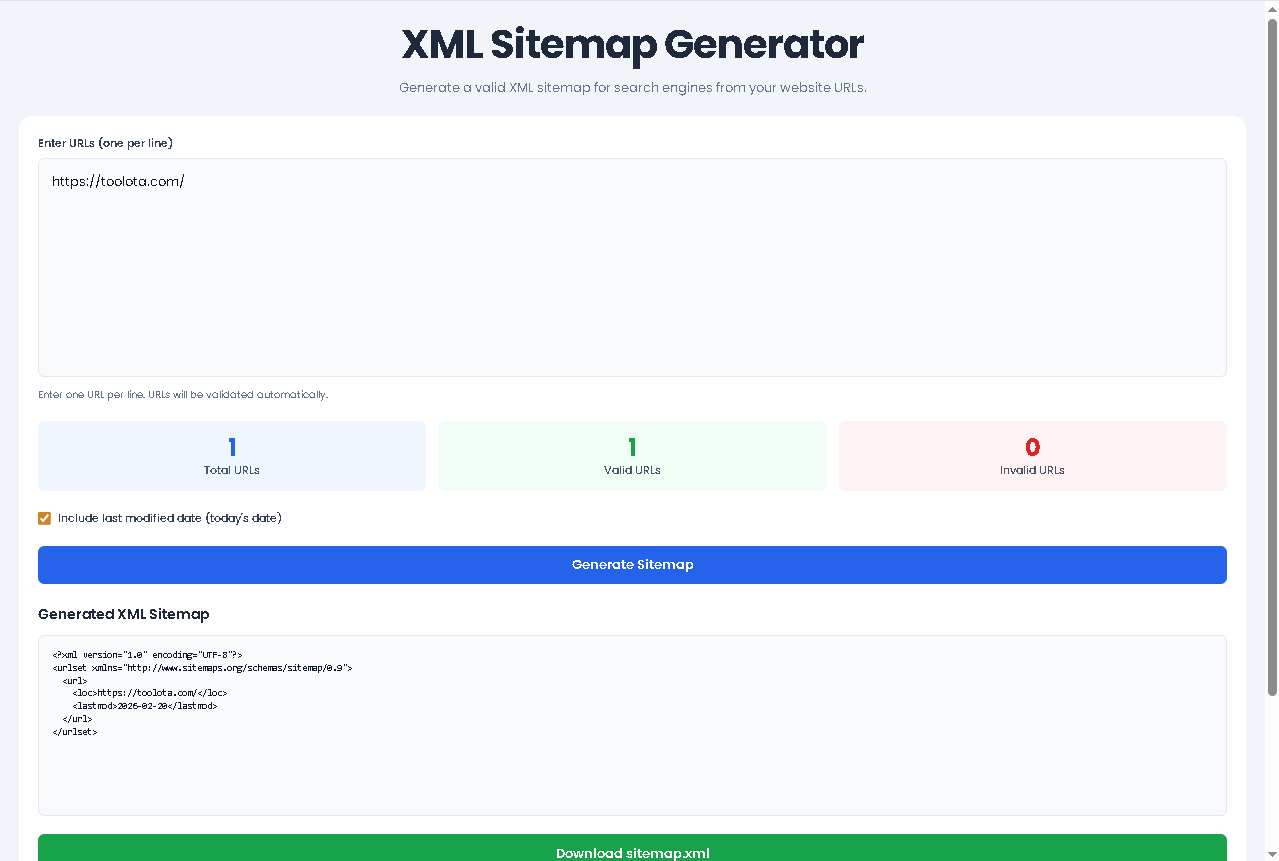
Let me walk you through exactly how to use this XML sitemap generator, following the actual interface and functionality built into the HTML:
Step 1: Prepare Your URLs
Before touching the tool, gather all the URLs you want to include. These should be:
Complete, absolute URLs (starting with https:// or http://)
From your own website (pointing to other domains in your sitemap is generally not recommended)
Free of tracking parameters unless absolutely necessary
Step 2: Paste Your URLs
Look for the large textarea labeled “Enter URLs (one per line).” This is where the magic begins. You can:
Each URL must be on its own line. The XML sitemap generator accepts any number of URLs, though keep in mind that search engines typically recommend splitting sitemaps after 50,000 URLs.
Step 3: Watch Real-Time Validation
Here’s where this tool really shines. As soon as you paste or type URLs, three counters update automatically:
Total URLs: Counts every line that contains text
Valid URLs: Numbers that successfully parse as proper web addresses
Invalid URLs: Lines that don’t meet URL formatting requirements
This instant feedback is invaluable. If you accidentally paste a line with “www.example.com” instead of “https://www.example.com,” the XML sitemap generator immediately flags it so you can fix the issue before generating your final file.
Step 4: Choose Your Options
Below the URL input area, you’ll find a clean checkbox labeled “Include last modified date (today’s date).” When checked, every URL in your sitemap will include:
<lastmod>2026-02-20</lastmod>
This tells search engines exactly when each page was last updated. Since the tool uses today’s date, it’s perfect for brand-new content or when you’ve just refreshed existing pages.
Click the prominent blue “Generate Sitemap” button. The XML sitemap generator immediately:
Filters out any invalid URLs automatically
Creates properly formatted XML with the correct namespace declaration
Wraps each URL in proper <url> and <loc> tags
Adds <lastmod> tags only if you selected that option
Step 6: Review and Download
The generated XML appears in a read-only textarea, letting you:
Visually inspect the code (though it’s always valid)
Copy it manually if needed
Click “Download sitemap.xml” to save the file directly to your computer
The download button creates a proper XML file with the correct MIME type, ready for upload to your website’s root directory or submission to search engine tools.
Benefits This Tools
Speed and Efficiency
Traditional sitemap creation methods require either:
Running complex crawling software
Writing XML manually (tedious and error-prone)
Using plugins that might not give you full control
This XML sitemap generator produces results in milliseconds. Type or paste, click generate, download – total time under 30 seconds even for hundreds of URLs.
Built-In Validation Engine
The validation happens as you type, not after you click generate. This proactive approach means:
You catch formatting errors immediately
No surprises when generating the final XML
Clear visual feedback through the color-coded counters
Clean, Professional Output
The generated XML follows the official sitemap protocol maintained by sitemaps.org. Every file includes:
Zero Learning Curve
You don’t need to understand XML syntax, know what a namespace is, or worry about proper encoding. The XML sitemap generator handles all technical requirements behind the scenes.
Download Convenience
Unlike tools that only let you copy text, this generator provides a proper file download with:
Correct .xml file extension
Proper MIME type for browser recognition
Clean filename ready for immediate use
Visual Statistics Dashboard
The three counter boxes aren’t just decorative – they provide actionable insights:
Blue counter: Total volume of URLs you’re working with
Green counter: Confidently know which URLs will make it into your final sitemap
Red counter: Immediately identify problematic entries that need attention
Understanding Your Text Similarity Analyzer Results
The validation logic in this XML sitemap generator follows the same standards browsers use when parsing web addresses. Here’s what makes a URL valid according to the tool:
Protocol Requirement
Every URL must start with either:
This is non-negotiable. URLs without protocols (like example.com/page) will be flagged as invalid because search engines need to know whether to access the page via secure or standard HTTP.
Proper Domain Structure
The domain portion must follow standard naming conventions:
No spaces
Valid characters only (letters, numbers, hyphens, dots)
Proper top-level domain (like .com, .org, .country codes)
Path Formatting
After the domain, the path can include:
Forward slashes for directories
File names with extensions
Query parameters (though it’s best to minimize these in sitemaps)
What Gets Flagged as Invalid
The XML sitemap generator will mark URLs as invalid if they contain:
Spaces anywhere in the address
Missing protocol (http:// or https://)
Invalid characters like brackets or carets
Multiple consecutive dots
IP addresses instead of domain names (generally not recommended for sitemaps anyway)
Ideal Uses and Applications
New Website Launch
When launching a fresh website, you have complete control over which URLs exist. The XML sitemap generator helps you create your first sitemap in minutes, ready for submission to Google Search Console before your site even fully launches.
Content Refresh Campaigns
After updating multiple pages with fresh information, use this tool to create a sitemap containing only the updated URLs. Submit it separately to encourage search engines to recrawl your refreshed content quickly.
SEO Audits and Cleanup
During technical SEO audits, you’ll often identify pages that should or shouldn’t be indexed. The XML sitemap generator lets you quickly create test sitemaps with different URL combinations to see how search engines respond.
Client Deliverables
SEO agencies and consultants can use this tool to:
Provide clean sitemap files to clients
Demonstrate which pages are being optimized
Create documentation of site structure
Frequently Asked Questions (FAQ)