No tools found matching your search.
PDF Converter - All in One PDF Tools

PDF Converter

Convert PDF to Word, Excel, PowerPoint, Images, Text, HTML and more — free & instant.

Drag & Drop PDF here

or click anywhere in this box to browse

PDF to Text – Extract Text from Any PDF Instantly

Looking for a PDF converter free tool that handles everything in one place? This all-in-one solution lets you convert PDF to Word, Excel, PowerPoint, images, text, HTML, and structured data formats like CSV and JSON — all without installing software. Simply drag your PDF into the upload box, select your output format from the list, and click convert to get your file in seconds. Whether you need a PDF to image converter for JPG or PNG, a way to convert PDF to Word for editing, or a free PDF to Excel tool for data extraction, this single tool covers every need.

What This PDF to Text Extractor Puts at Your Fingertips

FeatureWhat It Does
Drag & Drop ZoneClick anywhere or drag PDF files directly into the upload area
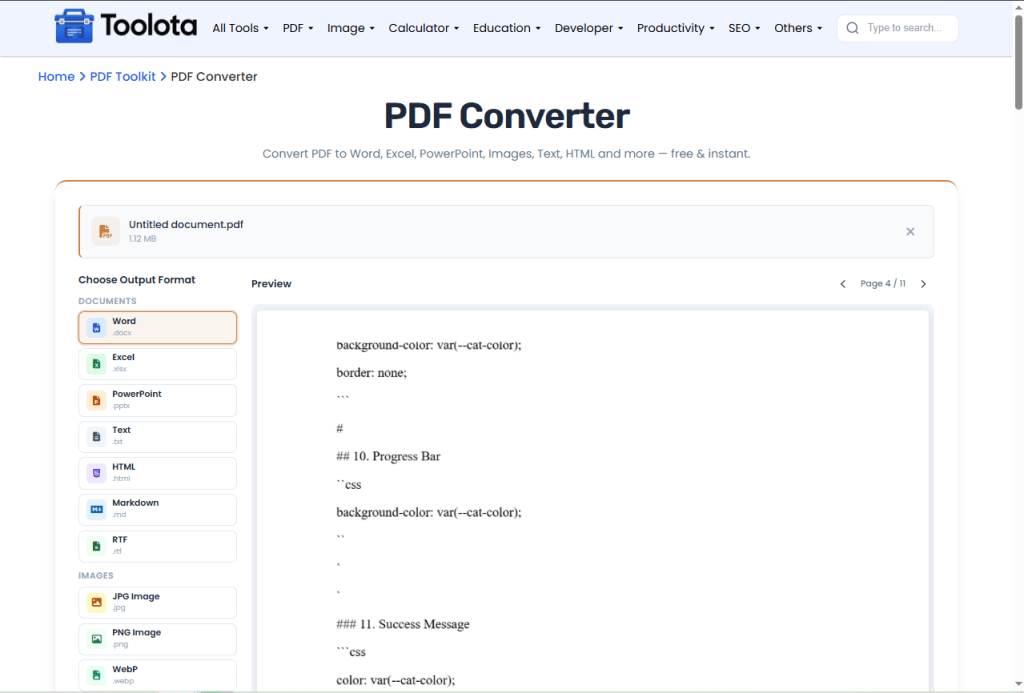
PDF Preview CanvasSee actual PDF pages before converting with page navigation buttons
20+ Output FormatsWord, Excel, PowerPoint, JPG, PNG, WebP, BMP, TIFF, TXT, HTML, Markdown, RTF, CSV, JSON, XML, EPUB, PDF/A
Page NavigationPrevious/next buttons to browse multi-page PDFs before conversion
File Info DisplayShows file name and size after upload with remove option
Progress BarReal-time conversion progress with percentage indicator
Image Grid OutputFor image formats, displays all converted pages as thumbnails
Text Output AreaFor text-based formats, shows content with copy button
One-Click DownloadDirect file download with proper extension and naming
PDF Converter Free

How to Use This PDF to Text Tool in Three Steps

1

Upload Your PDF

Click anywhere in the drag-and-drop box or browse from your device. The tool accepts only PDF files and instantly shows file name and size.

2

Preview Your Document

Once uploaded, the PDF preview loads automatically. Use the Previous and Next page buttons to navigate through multi-page documents before converting.

3

Choose Output Format

Scroll through format categories: Documents (Word, Excel, PowerPoint, Text, HTML, Markdown, RTF), Images (JPG, PNG, WebP, BMP, TIFF), Structured Data (CSV, JSON, XML), or Other (EPUB, PDF/A). Click any format card — it highlights orange when selected.

5

All-in-One Dashboard

No switching between tools. Convert PDF to Word, Excel, images, or data formats from a single interface — saves time and bookmark clutter.

5

Download or Copy Result

For text formats, copy output directly. For images, download individual pages or the complete set. Click Download File or Convert Another to start over.

PRO TIPS

TipWhy It Helps
Use high-quality source PDFsText extraction accuracy depends on original PDF text layer
For images, preview firstCheck page orientation and quality before converting
CSV output works best with tablesPDFs with structured columns extract cleaner data rows
Markdown conversion preserves headingsPage breaks become ## Page X headers for easy navigation
PDF/A output simulates archiving formatUse for long-term document storage compatibility
Copy button works for text formatsOne-click copy entire extracted content to clipboard

Why This PDF to Text Tool Stands Above the Rest

🔒 Processes Entirely in Your Browser

No file is sent to any server — your document stays completely private.

📦 No Installation Required

Runs entirely in your browser using PDF.js. No software download, no registration, no hidden fees — truly a PDF converter free experience.

📊 Structured Data Extraction

Need tables from PDF? Convert directly to CSV for spreadsheets, JSON for APIs, or XML for data exchange — unique features not found in basic converters.

👁️ Live PDF Preview

Unlike most free converters, this tool shows actual PDF pages with page navigation. You see exactly what you're converting before processing.

🖼️ Image Format Variety

Convert PDF to JPG, PNG, WebP, BMP, or TIFF with adjustable quality. Perfect for extracting slides, receipts, or scanned pages as separate images.

🔁 Batch-Ready Flow

The "Convert Another" button lets you process multiple files sequentially without page refresh.

PDF to Image Converter Built Into the Same Tool

Many tools separate document conversion from image conversion, but this PDF converter free combines both. When you select JPG, PNG, WebP, BMP, or TIFF as your output, the tool renders each PDF page as a high-quality image using canvas rendering at 2.0 scale. The image output grid displays every converted page as a thumbnail, and clicking download saves all pages individually with automatic naming (filename_page1.jpg). This means you don’t need a separate PDF to image converter — it’s already inside. This one workflow manages everything from document to visual format without additional actions for programmers who need to convert PDF to picture for web assets or for anybody who wants to save PDF as image for social media.

Frequently Asked Questions

Is this PDF converter free really free?

Yes, completely free. No credit card, no signup, no hidden payments.

The tool renders at 2.0 scale, preserving sharpness for most documents.

Select Excel format from Documents section, then download as .xlsx file.

Choose JPG or PNG format. The tool converts every page and lets you download all images individually.

Yes, the responsive design works on phones, tablets, and desktops with touch support.

Yes, the PDF preview canvas shows the first page with navigation buttons for multi-page documents.

All conversion happens in your browser. Files are not uploaded to any server.

Browser memory is the only limit. Most standard PDFs under 50MB work smoothly.