
Recent Tools
No tools found matching your search.
↑↓ Navigate
←→ Category
↵ Select
esc Close
Estimate how many pages your writing will take based on word count, font size, and spacing.
*Based on standard A4 page margins
Need to convert a word count to pages for an essay, assignment, or manuscript? Paste your text or enter your word count, choose a font, font size, and line spacing, and the tool estimates the page count. A live counter shows your exact word and character count as you type, and results are based on standard A4 page margins.
Paste Your Text — Directly paste any text into the tool for automatic word counting and page estimation.
Live Word & Character Count — See your word and character count update in real-time as you type or paste.
Auto-Fill Word Count — The tool automatically fills the word count field when you paste text — no manual entry needed.
Clear Button — Clear all pasted text and reset the word count with one click.
Manual Word Count Input — Enter your word count manually if you already know the number.
Font Family Selector — Choose from Arial, Times New Roman, Verdana, or Courier New.
Font Size Options — Pick from 10px, 12px, 14px, or 16px for accurate page estimation.
Line Spacing Control — Select single, 1.5, or double spacing to match your document.
Real-Time Page Count — See your estimated total pages update instantly.
Words Per Page Display — View the calculated number of words that fit on each page.
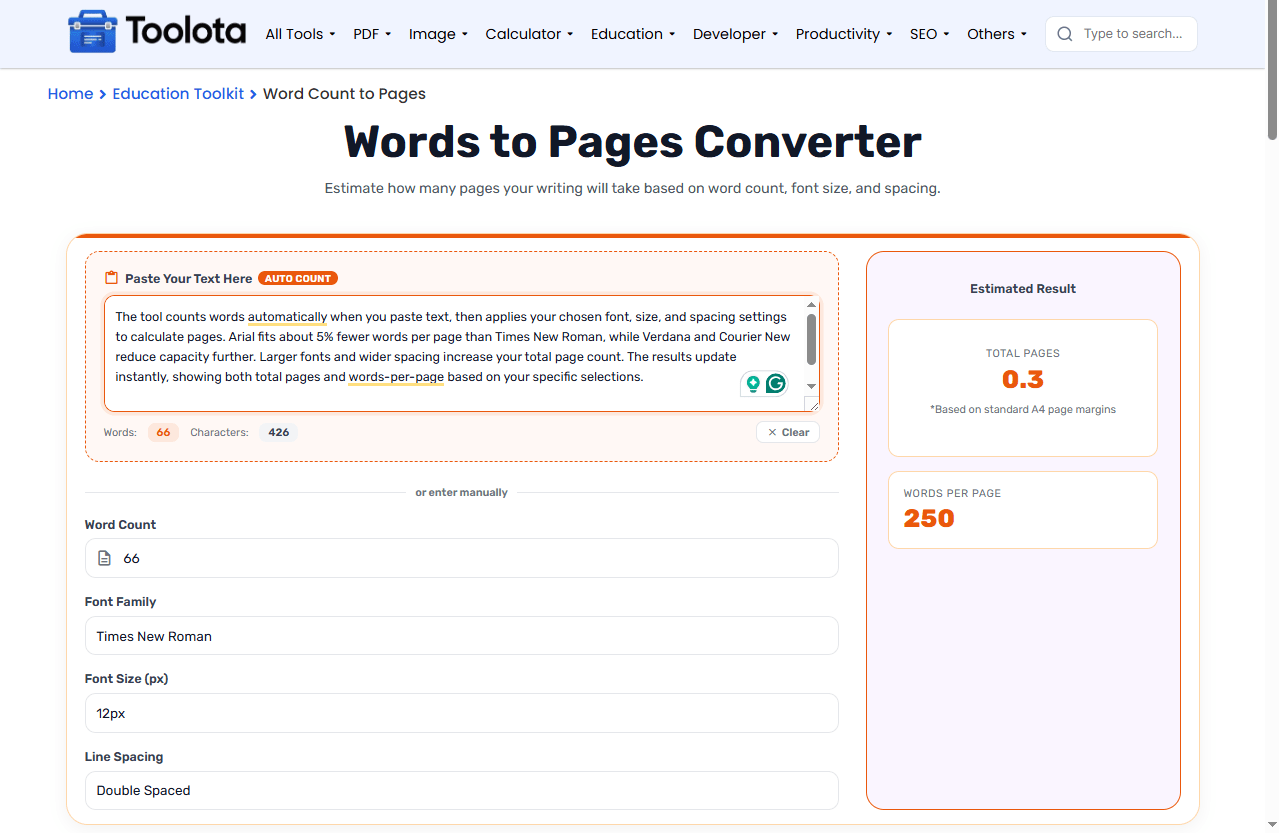

Paste your text directly into the text area — the tool automatically counts your words and characters.
Or manually enter your word count in the "Word Count" field if you already know it.
Select the font family used in your document from the dropdown menu.
Choose your font size and line spacing preferences.
Read your estimated total pages and words-per-page instantly.
The tool updates automatically, so you don’t need to click any button. Just paste, select, and see your page count. Want to start fresh? Hit the “Clear” button to remove all text and reset everything.
The tool counts words automatically when you paste text, then applies your chosen font, size, and spacing settings to calculate pages.Wider fonts such as Arial, Verdana, and Courier New fit fewer words on a page than Times New Roman, so the same word count takes more pages.Larger fonts and wider spacing increase your total page count. The results update instantly, showing both total pages and words-per-page based on your specific selections.
Have a document but not its word count? Paste it into the Word Counter for an exact number, or paste it straight into this tool’s text box.
Once you know your page count, check whether the writing itself is at the right level with the Readability Score Checker.
Academic formatting standards like MLA and APA specify exact margins and spacing that affect actual page count more than word count alone.
Adjust font, size, and spacing to match your exact document setup — the tool adapts to your choices, not the other way around.
Clean, straightforward interface that works for essays, research papers, and academic assignments.
No waiting, no clicking "calculate" — every change you make updates the results immediately.
Get both total pages and words-per-page figures to help you plan your writing more effectively.
At 12 pt Times New Roman with single spacing, 1,000 words is about 2 pages. With double spacing, it is about 4 pages.
Yes, as an estimate. Most manuscript submission guidelines ask for double spacing, so select Double Spaced along with the font your publisher requests. Check the publisher’s guidelines, because page size and margins may differ from the A4 layout used here.
Most academic essays require double spacing. This tool helps you see exactly how many pages your essay will be with that requirement.
It provides estimates based on standard formatting assumptions.
Yes. The tool works well for manuscript page estimation. Choose your font and size, and select single spacing for most manuscript submissions.
Toolota is your all-in-one online tools platform. Fast, simple, and free utilities designed to make everyday digital tasks easier and smarter.
