
CSS Gradient Generator
Design stunning multi-color gradients. Visual editor for linear and radial backgrounds with instant CSS output.
Live Preview
CSS3
Design stunning multi-color gradients. Visual editor for linear and radial backgrounds with instant CSS output.
Toolota‘s CSS Gradient Generator is a handy, free online tool that makes designing color gradients much easier for web developers and designers. It takes the hassle out of writing complex CSS code for linear, radial, and conic gradients by letting you create them visually. Instead of wrestling with your code editor, you can simply design your gradient, watch it in a live preview, and grab the clean CSS code in an instant. Whether you’re crafting a striking hero section, experimenting with button styles for a UI design, or giving your blog’s background a personal touch, this tool helps simplify the whole process, from the initial idea to the final look.
Picking the right online tool can really make a difference in how efficient you are and the quality of what you produce. Here’s what makes our CSS Gradient Generator special:
Precision & Reliability: It’s built with a clean, accurate code engine. This means Toolota’s generator creates CSS that follows the standards and works the same way in all modern browsers. You’ll always get reliable code.
Intuitive, Clutter-Free UI: We looked at tons of web tools to make sure ours is smooth to use. Our interface is designed with a clear purpose—no annoying ads, extra steps, or confusing tech talk. You get the controls you need right where you need them, plus a big, clear preview.
Unique Productivity Features: Our CSS Gradient Generator goes beyond just basic color stops. It includes advanced controls for angles (in degrees), color stop positioning (in percentage or pixels), and opacity (RGBA/HSLA). Plus, the one-click copy and download functions fit right into your workflow.
Commitment to Quality: Toolota is all about creating strong, single-purpose tools that do one thing really well. This focus means the
CSS Gradient Generator is constantly getting better based on what users say and updates to web standards.
This part really dives into the specifics, explaining every HTML element and how each function works in our CSS Gradient Generator.
Left Panel – Where You Design: Input & Controls This is your main workspace for creating the gradient. Everything is neatly organized into logical sections:
Gradient Type Selector: Decide whether you want a Linear, Radial, or Conic gradient. You can pick using radio buttons or a dropdown menu. Your choice changes the underlying CSS function and brings up the relevant controls you’ll need (like the angle for linear gradients or the shape for radial ones).
Color Stops Management: This is the heart of the tool! You’ll see a visual gradient bar, and underneath it, little circles represent the color stops.
Adding/Removing Stops: Want to add a new color? Just click the “+” button. To remove a stop you don’t want, click the “x” that appears on that stop.
Adjusting the Color: Click on any stop to open a color picker. You can choose your color using the wheel, sliders (RGB or HSL), or by typing in a hex code.
Adjusting the Position: You can drag a stop left or right along the gradient bar to change where it appears. Alternatively, click on a stop and type in a precise percentage (like 25%) to set its exact location.
Advanced Controls (Context-Specific): These controls appear based on the gradient type you’ve chosen:
For Linear Gradients: You’ll see an Angle input, which includes both a slider and a number field. Use this to set the direction of your CSS Gradient Generator anywhere from 0 to 360 degrees.
For Radial Gradients: Options for the Shape (circle or ellipse) and Size (like closest-side, farthest-corner, etc.) will show up here.
Global Opacity: There’s a slider that lets you adjust the overall transparency of the entire gradient layer in Toolota.
Live Preview Panel (Center): Right in the middle, you’ll see a big area that updates instantly as you tweak the controls. It shows exactly how your gradient will look on a plain background, giving you a clear picture of the final result. This real-time feedback is super helpful for playing around with different ideas in Toolota.
Output & Actions Panel (Right): This side panel is where you get the final product using our CSS Gradient Generator.
CSS Code Output Box: Here, you’ll find a read-only code box that neatly displays the CSS code for your gradient. It’s usually well-formatted and might include comments to make it easier to understand (like /* Standard syntax */).
Action Buttons:
Copy Code: Just click this button to instantly copy all the CSS code to your clipboard. You’ll get a little confirmation message to let you know it worked.
Download as CSS File: This option lets you save the CSS code as a file (like gradient.css), which is great for keeping your project files organized.
Editor Toolbar (Inline): Some more advanced versions of the CSS Gradient Generator include a small toolbar right above the preview area for quick adjustments:
Preset Selector: A dropdown menu with popular gradient styles (like Sunset, Ocean, Mint, etc.) that you can use as a starting point.
Swap Colors: A button that flips the order of your colors in the gradient.
Randomize: This generates a random gradient that often looks really nice, giving you some inspiration.
When you tweak a color or angle, a JavaScript function like updateGradient() springs into action. It checks all the current control settings, builds the right CSS gradient string (for example: background: linear-gradient(45deg, #ff0000 0%, #0000ff 100%);), adds it to the live preview panel’s style, and fills the code output box. This all happens in just milliseconds, giving you a smooth journey from design to code using Toolota‘s CSS Gradient Generator.
Speed: You can take an idea and turn it into ready-to-use CSS in less than a minute using the CSS Gradient Generator.
Accuracy: Say goodbye to syntax errors, misplaced commas, or color format issues in your style sheets with Toolota.
SEO & Performance: The tool gives you clean, minimal code. Cleaner CSS means faster page loading times, which is great for your SEO ranking.
Learning Tool: Being able to visually tweak parameters and watch the code change in real-time is a fantastic way to really get CSS Gradient Generator syntax.
Copy & Download Convenience: You can easily add the output straight into your project with just one click on Toolota, making your development process smoother.
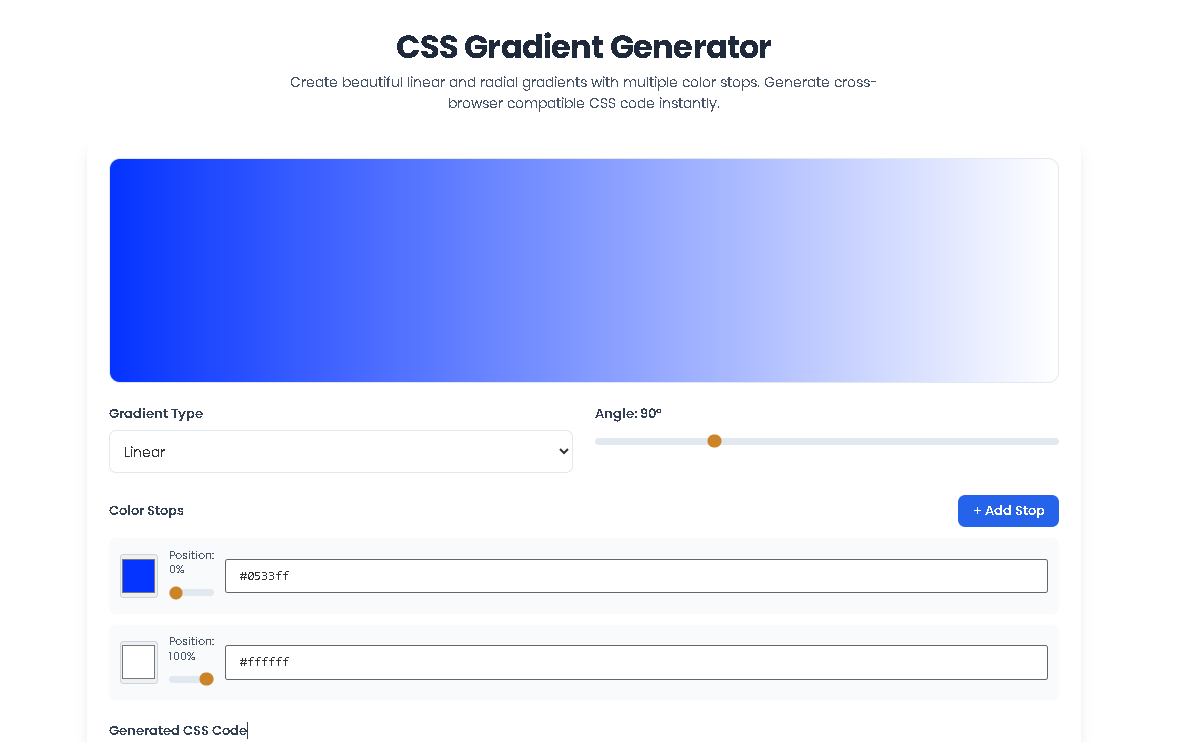
The final look: The final look of your design will be shaped by the choices you make. Trying out different colors and gradient stops can really make it pop and give you the best outcome using our CSS Gradient Generator.
Browser Compatibility: Even though the code follows standard guidelines, it’s always smart to check how the final gradient looks in the browsers or environments where your site will actually be used.
Responsible Usage: This CSS Gradient Generator is meant to be used responsibly for good web design and development. Think of it as a helpful tool for creating cool gradients in a fair and ethical way on Toolota.
Final Verification: The tool is free and provided just as it is. For projects that really matter and can’t afford any mistakes, it’s a good idea to have a person double-check the code.
Our CSS Gradient Generator prioritizes a clean, ad-free user experience with professional-grade controls. It offers a precise live preview, advanced angle/position inputs, and exports clean, commented code that’s ready for production, setting it apart from basic color blenders.
Absolutely. A core feature of this CSS Gradient Generator is the ability to add unlimited color stops. You can create complex, multi-color gradients (like rainbows or duotones) by simply clicking the “Add Color Stop” button and adjusting each color and its position along the gradient bar.
Yes, it fully supports transparency. When you select a color using the color picker, you can adjust the alpha channel (opacity) slider. The tool will generate code using rgba() or hsla() color functions, allowing you to create beautiful fading and overlay effects.
The generator produces standard CSS gradient syntax recognized by all modern browsers. For maximum compatibility, it often provides a fallback solid color and the vendor-prefixed -webkit- version for older WebKit browsers. The gradients themselves are inherently responsive, scaling with their container element.
Toolota is your all-in-one online tools platform. Fast, simple, and free utilities designed to make everyday digital tasks easier and smarter.