Pick a base color, choose a harmony type, and generate beautiful color palettes instantly. Copy HEX, RGB, or export as CSS variables.
A color palette generator helps you build professional color combinations in seconds. Choose any base color using the sliders, color wheel, or hex input. Then, to immediately create five complementary colors, pick a harmony type such as complementary, analogous, or triadic. One click can copy the HEX and RGB numbers from every swatch. Shades and tints from 50 to 800 may also be generated from your palette or exported as CSS variables. Whether you are a web designer or brand strategist, this color harmony tool gives you everything you need to create cohesive color schemes without any design experience. It answers a simple question: how do I generate a color palette fast?
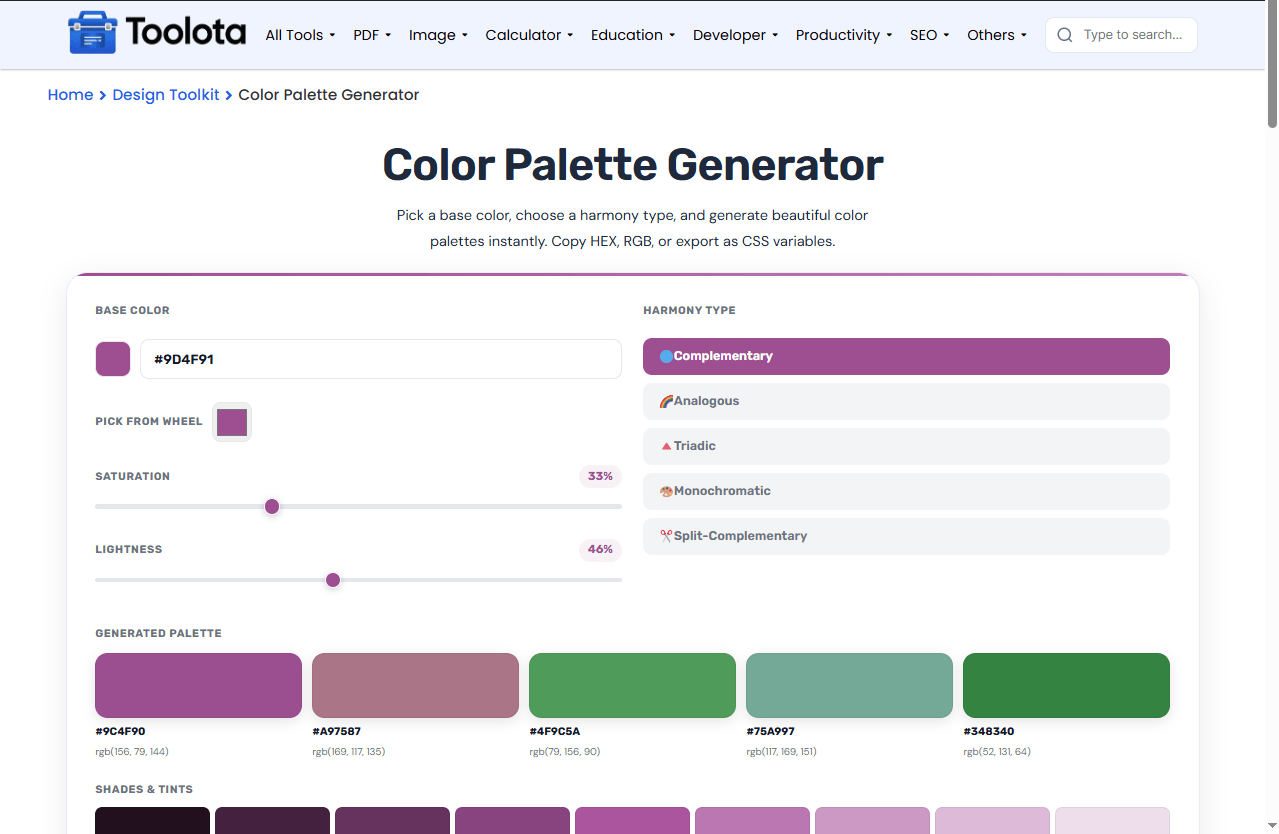
Base Color Selection — Enter a HEX code or use the native color picker to choose your starting color.
Interactive Color Wheel — Click anywhere on the wheel to pick colors visually with a draggable dot.
Saturation Slider — Adjust color intensity from 0% to 100% with a simple range slider.
Lightness Slider — Fine-tune brightness from 10% to 90% for better control.
5 Harmony Types — Choose from complementary, analogous, triadic, monochromatic, or split-complementary.
Palette Swatches — View 5 generated colors with HEX codes and RGB values displayed below each swatch.
Shades & Tints Row — Instantly see 9 variations from lightest (50) to darkest (800).
CSS Variables Export — Copy your entire palette as CSS custom properties for web development.
Copy to Clipboard — Click any swatch or shade box to copy its HEX code.
Randomize Button — Generate unexpected palettes with one click for inspiration.
Reset Option — Return to the default purple base color instantly.
Toast Notifications — Get visual confirmation when you copy any color code.
Follow these simple steps to calculate your student loan calculator results:

Enter a HEX code or use the color wheel and picker.

Use the sliders to fine-tune your base color.

Click one of the five harmony buttons to generate matching colors.

Click a swatch or shade box to copy its HEX value to your clipboard.

Click the CSS Variables button to copy your palette as code.
How do you build a color palette from nothing? The tool automatically generates five harmonious hues based on the harmony type you choose; simply choose a beginning color and use the sliders to get the exact shade you desire.
Mathematical color theory is used by the generator to produce harmonic color schemes based on your base color. Every type of harmony has a particular rule that it adheres to: complementary uses colors opposite on the wheel, analogous uses adjacent colors, triadic uses three evenly spaced colors, monochromatic uses variations of the same hue, and split-complementary uses the base plus two adjacent to its complement. The saturation and lightness sliders modify your base color in real time, and all five generated colors update instantly. By varying lightness in 10% steps from 10% to 90%, shades are produced while maintaining the same hue and saturation. This provides you with a full range of dark to light for any color you select.
Start with a brand color — Enter your existing brand HEX code and use complementary or analogous harmonies to build a complete brand palette.
Use split-complementary for balance — This harmony creates contrast without being too harsh, making it great for UI design.
Check shade contrast — Use the shades row to find a dark and light version of your base color for text and backgrounds.
Choose from five proven color harmonies — complementary, analogous, triadic, monochromatic, and split-complementary — so you always get balanced results.
Export your entire palette as CSS variables. Paste the code directly into your stylesheet for consistent theming.
Every swatch, shade, and HEX value is clickable. Copy any color instantly without selecting text or using keyboard shortcuts.
Fine-tune saturation and lightness independently while keeping your hue locked. This gives you precise control over every color in your palette.
Click anywhere on the circular color wheel. A draggable dot appears, and your base color updates instantly to the selected hue.
Complementary, analogous, triadic, monochromatic, and split-complementary. Each produces a different style of color combination.
Yes. Click any swatch box or shade box, and the HEX code copies to your clipboard with a toast notification.
Click the “Copy CSS Variables” button. The code appears in a box and copies automatically to your clipboard.
It shows 9 variations of your base color from light (50) to dark (800), keeping the same hue and saturation.
Toolota is your all-in-one online tools platform. Fast, simple, and free utilities designed to make everyday digital tasks easier and smarter.
