
Box Shadow Generator
Create beautiful CSS box shadows with an interactive visual editor. Adjust all parameters and get the CSS code instantly.
Create beautiful CSS box shadows with an interactive visual editor. Adjust all parameters and get the CSS code instantly.
The Box Shadow Generator from Toolota is a handy, free online tool that makes creating CSS shadows a breeze. It’s designed to take the guesswork out of styling, offering a visual and user-friendly interface where you can tweak every part of a CSS box-shadow property. You get to see the changes happen right before your eyes in real-time. Whether you’re an experienced developer aiming to streamline your work or someone new to CSS feeling a bit overwhelmed by the code, this tool acts as a bridge between how things look and the code that makes them happen. It tackles the hassle of fine-tuning CSS manually by giving you instant visual results.
Selecting the right tool can really make a difference when it comes to efficiency and quality. Toolota‘s Box Shadow Generator really shines because it’s crafted with a solid grasp of both design principles and what developers actually need, which you can see right in its clean HTML structure. Not only does the tool look great, but it’s also incredibly easy and effective to use.
Precision & Reliability: It’s built with a clean, accurate code engine. This means Toolota’s generator creates CSS that follows the standards and works the same way in all modern browsers. You’ll always get reliable code.
Intuitive, Clutter-Free UI: We looked at tons of web tools to make sure ours is smooth to use. Our interface is designed with a clear purpose—no annoying ads, extra steps, or confusing tech talk. You get the controls you need right where you need them, plus a big, clear preview.
Unique Productivity Features: Our CSS Gradient Generator goes beyond just basic color stops. It includes advanced controls for angles (in degrees), color stop positioning (in percentage or pixels), and opacity (RGBA/HSLA). Plus, the one-click copy and download functions fit right into your workflow.
Commitment to Quality: Toolota is all about creating strong, single-purpose tools that do one thing really well. This focus means the
CSS Gradient Generator is constantly getting better based on what users say and updates to web standards.
This part takes a closer look at every HTML element and how they all work together to build a smooth experience for users.
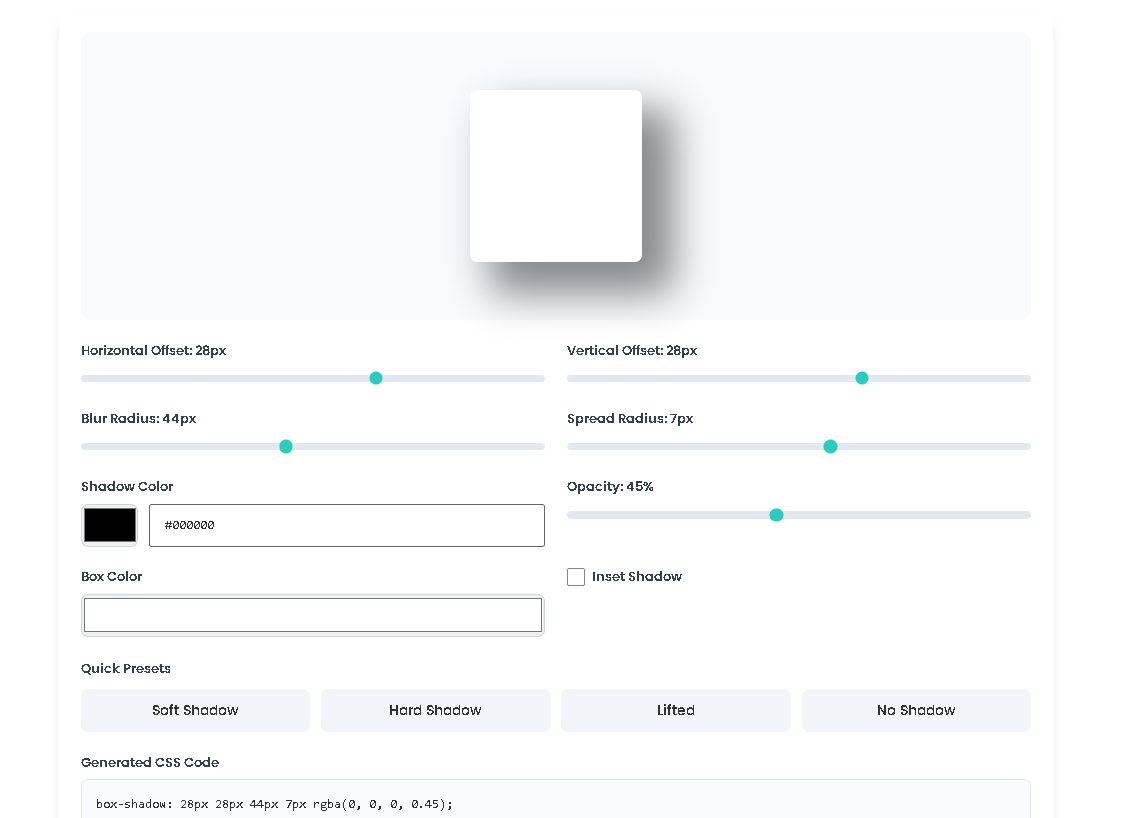
The Preview Box (preview-box) The core of the Box Shadow Generator from Toolota is the preview box. It’s just a div element with a plain white background and rounded edges. JavaScript controls its shadow effect dynamically based on your inputs. Plus, there’s a CSS transition (transition: box-shadow 0.2s ease) that makes all the changes happen smoothly, giving you a nice visual confirmation as you tweak the settings.
The Control Panel: Inputs and Sliders What makes this Box Shadow Generator powerful are its precise controls, arranged neatly in a responsive grid.
Horizontal & Vertical Offset (h-offset, v-offset): These sliders let you adjust where the shadow appears relative to the element. Slide them left or right, up or down to move the shadow around—it’s like positioning a light source. The current values are shown live in the number fields next to them.
Blur Radius (blur): Use this slider to control how soft or sharp the shadow looks. Setting it to 0 gives you a crisp, defined shadow edge, while increasing the value creates a softer, more diffused glow.
Spread Radius (spread): This more advanced control lets you change the size of the shadow compared to the element itself. Positive numbers make the shadow bigger, while negative numbers make it smaller, pulling it inward in this Box Shadow Generator.
Shadow Color (shadow-color, shadow-color-hex): You can pick the shadow color in two ways on Toolota. The color picker lets you choose visually, and the text field lets you enter a precise hex code. They stay in sync—change one, and the other updates automatically, along with the preview.
Opacity (opacity): Instead of dealing with RGBA alpha values, this Toolota tool uses a simple percentage slider for opacity, which is easier for most people. The system converts that percentage into a decimal value for the CSS.
Box Color (box-color): This color picker changes the background color of the preview box. It’s handy for testing how your shadow looks against different background colors in the Box Shadow Generator.
Inset Checkbox (inset): Check this box to switch from an outer shadow to an inner shadow. This adds the inset keyword to the CSS, making the shadow appear inside the element as if it’s sunken into the page.
The Preset System (preset-btn) There are four preset buttons (Soft Shadow, Hard Shadow, Lifted, None) that give you instant starting points. Each button has a data-preset attribute. When you click one, JavaScript reads this attribute and automatically adjusts all the sliders and checkboxes to the pre-set values that match that particular look. It then triggers the updateShadow() function in the Box Shadow Generator.
The Output & Action Area
CSS Output (css-output): This is a read-only text area that always shows the exact box-shadow CSS rule being applied. Think of this as the final CSS code you can use from Toolota.
Copy Button (copy-btn): Just one click on this button uses your browser’s built-in clipboard feature to copy the CSS code from the text area to your clipboard. You’ll see a small notification confirming the copy was successful.
Reset Button (reset-btn): This button reverts all the controls back to their original default settings, giving you a fresh start on Toolota.
The JavaScript Engine The real magic behind it all is the updateShadow() function. This is what ties everything together in the Box Shadow Generator. Here’s what it does:
It reads the current value of every input control.
It converts the hex color to RGB and combines it with the opacity value.
It builds the complete box-shadow string (like inset 10px 10px 20px 5px rgba(0, 0, 0, 0.5)).
It applies this string directly to the preview box’s style.boxShadow property.
It updates the live code shown in the output text area.
It refreshes all the value labels next to the sliders.
Event listeners (addEventListener) are set up on every control. These listeners call the updateShadow() function whenever you interact with any input (like moving a slider or checking a box), which creates the real-time interactivity that makes this Box Shadow Generator from Toolota so useful.
Fast & Efficient: Say goodbye to the frustrating guesswork of manual CSS. Get perfectly crafted shadow code in just seconds using the Box Shadow Generator.
See It Exactly: Our live preview on Toolota lets you see exactly how your shadow will look in your project before you even implement it.
SEO-Friendly Output: The tool creates clean, lean, and neatly formatted CSS, so you won’t end up with bloated style sheets.
Easy for Everyone: Even if you’re new to coding or prefer no-code solutions, our intuitive sliders and visual preview in this Box Shadow Generator make creating advanced CSS shadows straightforward.
Full Design Control: You get access to every box-shadow parameter, like spread and inset, giving you professional-level control over your designs with Toolota.
Seamless Integration: With just one click, you can copy the generated code from the Box Shadow Generator right into your workflow—no hassle, no waiting.
Output Quality: The CSS code it creates follows the standard and works across different browsers. However, how it looks will depend on how well you tweak the settings for your particular design in the Box Shadow Generator.
Tool Limitations: This Box Shadow Generator only makes CSS for one shadow at a time. If you need multiple shadows, you’ll have to manually put the generated codes together yourself.
Appropriate Use: This tool is meant for regular web design and development work. Toolota isn’t responsible for how you use the code it produces or how it turns out in the end.
Best Practices: When working on complex interfaces, it’s wise to use shadows thoughtfully and keep them consistent. This helps maintain a neat and professional visual structure using the tools from Toolota.
Yes, absolutely. Toolota’s Box Shadow Generator is a completely free online tool. There is no sign-up, subscription, or hidden fee. You can use it as often as you like to generate CSS code for personal or commercial projects.
Our Box Shadow Generator emphasizes a complete, professional feature set in a clean interface. It offers dual color input (picker and hex), a spread radius control, box background coloring, smooth animated previews, and useful presets—all in one view without unnecessary clutter.
Yes. The CSS code output by the Box Shadow Generator is standard, vanilla CSS. You can copy and paste it directly into your website’s stylesheet, CSS-in-JS solution, or any framework like React, Vue, or Tailwind CSS (as arbitrary values).
Yes, it does. A dedicated checkbox labeled “Inset Shadow” is included in the controls. When checked, the generated CSS code will include the inset keyword, transforming the shadow from an outer glow to an inner shadow, perfect for pressed or recessed UI effects.
Toolota is your all-in-one online tools platform. Fast, simple, and free utilities designed to make everyday digital tasks easier and smarter.