
Recent Tools
No tools found matching your search.
↑↓ Navigate
←→ Category
↵ Select
esc Close
Check your page title length with character and pixel-width measurements. Preview your title on desktop and mobile, and refine it before publishing.
Title Tag Length Checker gives you pixel-perfect feedback on how your meta title will actually appear in Google search results. Unlike basic character counters, tUnlike basic character counters, this tool measures the pixel width of your title in your browser, so you can see roughly when it may get cut off. Whether you’re fine-tuning an existing page or testing a meta title length checker for a new blog post, Whether you’re fine-tuning an existing page or drafting a title for a new blog post, the live preview shows a close estimate of what users may see. It also measures title width on both desktop and mobile as you type.
Real-time title character counter
Pixel-width measurement for your page title
Desktop and mobile preview modes
Separate character and pixel reference thresholds by device
Visual length meter that updates as you type
Live search-result-style title preview
Site URL preview with automatic URL normalization
Responsive interface for desktop, tablet, and mobile screens
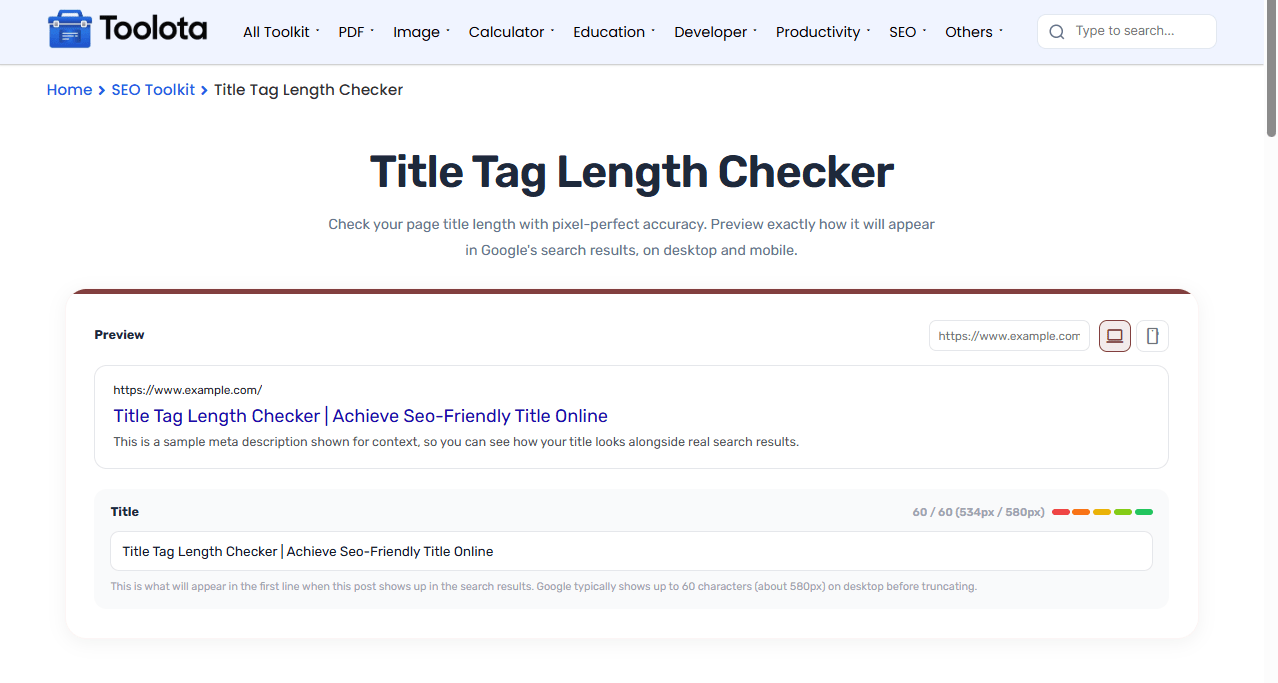

Type or paste your meta title into the main input field.

Enter your website URL to display the domain in the preview.

Switch between Desktop and Mobile to compare the available reference width.

Watch the character count update instantly as you edit your title.

Use the measured pixel width to see how much horizontal space your title occupies.

Use the meter to see whether your title is approaching or exceeding the selected reference threshold.
See both the number of characters and the measured pixel width of your title as you type.
Switch between device views to compare your title against different reference thresholds.
Enter your site URL to see the domain displayed alongside your title preview.
The counter, pixel measurement, visual meter, and preview update instantly without submitting a form.
See your title update immediately in a search-result-style preview.
Use the meter to quickly see how your title compares with the selected pixel threshold.
Once your title fits, check your meta description length too with the Meta Description Length Checker for a complete snippet.
See the title and description together exactly as they’ll appear in results using the SERP Snippet Preview.
When you’re ready to publish, generate the finished HTML tag with the Meta Tag Generator.
Title truncation in Google depends on rendered pixel width rather than a fixed character count, since letters like “i” and “W” take up very different amounts of space.
Character count alone does not show how much horizontal space a title occupies. Characters such as “W” and “i” can use very different amounts of space, which is why this tool measures the title’s width in pixels.
The pixel value helps you compare your title with the tool’s reference threshold. When the title exceeds that threshold, the preview indicates that the available display space has been exceeded.
These metrics are helpful planning estimates, not guaranteed Google Search truncation thresholds. Google may rewrite or display title links differently based on the search query, available space, and device.
A Title Tag Length Checker helps you evaluate the character count and measured pixel width of a page title before publishing it.
The tool uses a 580px reference threshold for desktop and a 480px reference threshold for mobile. These are tool-specific reference values, not guaranteed Google Search limits.
Yes. Use the Mobile button to switch the preview and title measurement to the mobile reference threshold.
No. The preview is an estimate. Google can generate, truncate, or rewrite title links depending on the query, device, and available display space.
Toolota is your all-in-one online tools platform. Fast, simple, and free utilities designed to make everyday digital tasks easier and smarter.
