
Recent Tools
No tools found matching your search.
↑↓ Navigate
←→ Category
↵ Select
esc Close
Build a production-ready .htaccess file — redirects, HTTPS, WWW handling, security headers, GZIP/caching, custom error pages, hotlink protection and more — all through simple toggles, no Apache knowledge needed.
.htaccess Generator builds a complete Apache configuration file without touching a single line of code. Whether you need to force HTTPS, set up redirects, add security headers, or enable browser caching, this tool handles all the syntax for you. Just toggle the options you want, and the .htaccess generator outputs a clean .htaccess file you can upload to your Apache server. It’s a practical Apache config builder for anyone who wants to manage their site’s server behavior without memorizing Apache directives.
Force HTTPS with automatic redirect from HTTP
WWW handling — redirect to or from the www subdomain
Trailing slash management (add or remove automatically)
Custom redirect rules with 301 or 302 status codes
X-Frame-Options to prevent clickjacking
X-Content-Type-Options to stop MIME sniffing
Referrer-Policy control for privacy
Disable directory listing for folder security
Block access to sensitive files like .env and .git
Image hotlink protection for your domain
GZIP compression for faster page loads
Browser caching with adjustable duration
Custom error pages for 404, 403, and 500 errors
Default index file configuration
One-click copy to clipboard
Direct download as a .htaccess file
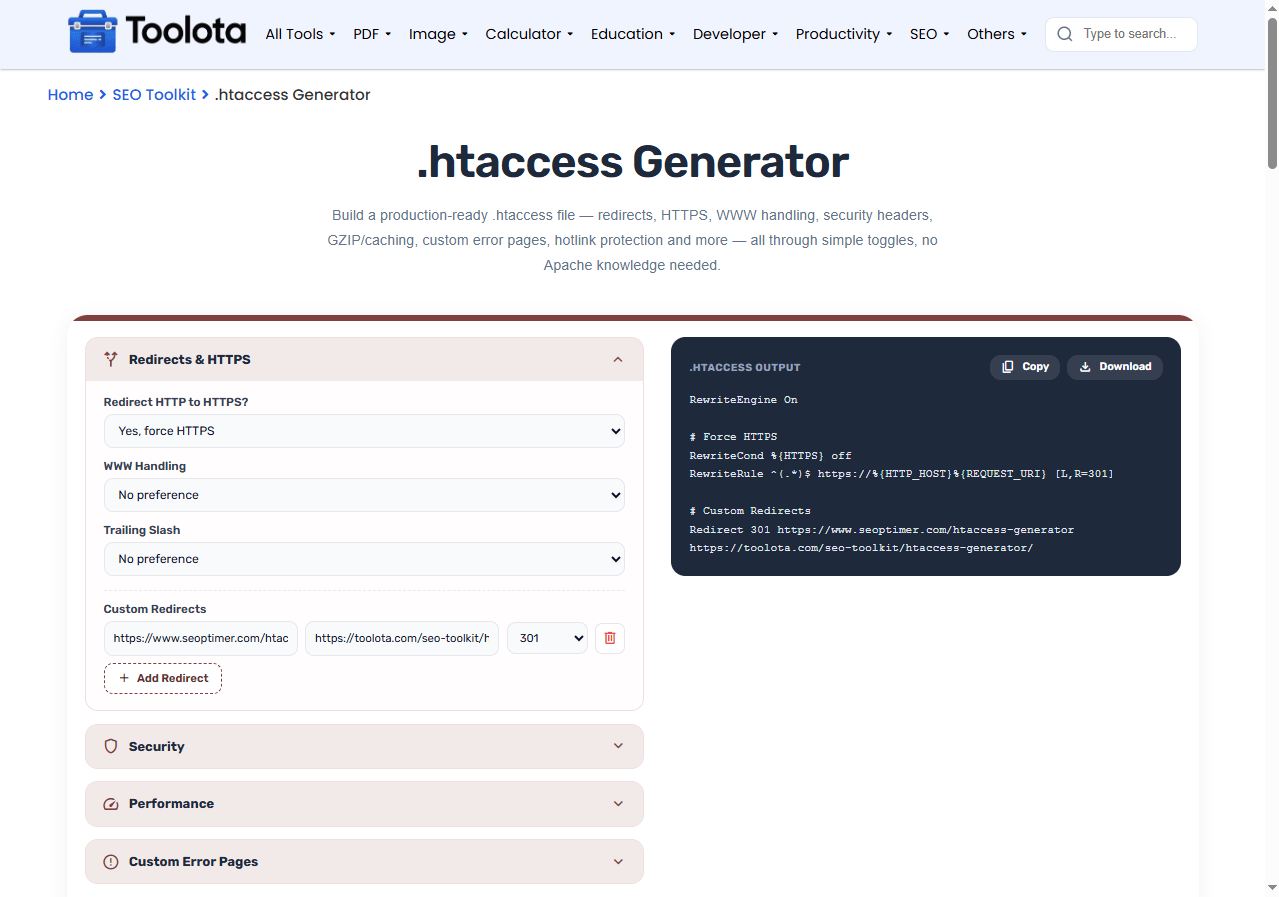

Open each section and toggle the options you need, from HTTPS enforcement to caching rules.

Click "Add Redirect" and enter the old path and new destination for any URL you need to forward.

Fill in the paths to your custom 404, 403, or 500 pages if you have them ready.

Hit the "Generate .htaccess" button and watch your configuration appear in the output panel.

Use the Copy button to grab the code or Download to save the .htaccess file directly.
Just watch the pixel meter: if it turns red, your title is likely to be cut off.
Every option maps directly to the correct Apache syntax. You never have to remember or type a single directive.
Toggle security headers, sensitive file blocking, and hotlink protection without researching the correct Apache syntax.
The output is plain text that you can copy, paste, or download and upload directly to your Apache server.
The generated file groups related rules in a logical order. Back up your current file and test on a staging site first.
From redirects to caching to error pages, every major .htaccess feature is available in one interface.
Add as many redirect rules as you need, each with its own status code, without editing multiple files.
Once your redirects and HTTPS rules are set, make sure crawlers can still reach the right pages by checking your Robots.txt Generator setup.
If you’re adding a WWW or trailing-slash redirect, update your Canonical Tag Generator settings to match, so search engines see one consistent URL.
After deploying security headers, load your key pages once to confirm nothing is blocked, then check them on mobile with the Mobile Viewer Website tool.
Getting redirect rules wrong can create redirect chains that slow down crawling and dilute the SEO value passed between pages.
The .htaccess Generator works by translating your interface selections into Apache directives in real time. Each checkbox, dropdown, and input maps to specific server configuration rules — HTTPS enforcement triggers a RewriteCond and RewriteRule, HSTS adds a header directive, and GZIP compression enables mod_deflate. This tool organizes these rules in the appropriate order, adds Rewrite Engine On when necessary, and categorizes related directives by their function. When you select Generate, the program consolidates all of the components into a single file that Apache may immediately parse.
It’s a configuration file used by Apache web servers that controls directory-level settings like redirects, security, and caching.
Yes, this is a free .htaccess generator with no sign-up or usage limits.
No — the tool writes all the code for you. Just pick your settings and generate the file.
Place it in the root directory of your website (typically the same folder as your index file).
Yes, add unlimited custom redirects with either 301 (permanent) or 302 (temporary) status codes.
Back up your existing file first, then merge the new rules into it instead of replacing it. WordPress sites should keep the existing “# BEGIN WordPress” block.
Yes, as long as your hosting uses Apache, this htaccess generator produces compatible code that works across all major hosting providers.
Toolota is your all-in-one online tools platform. Fast, simple, and free utilities designed to make everyday digital tasks easier and smarter.
