
Recent Tools
No tools found matching your search.
↑↓ Navigate
←→ Category
↵ Select
esc Close
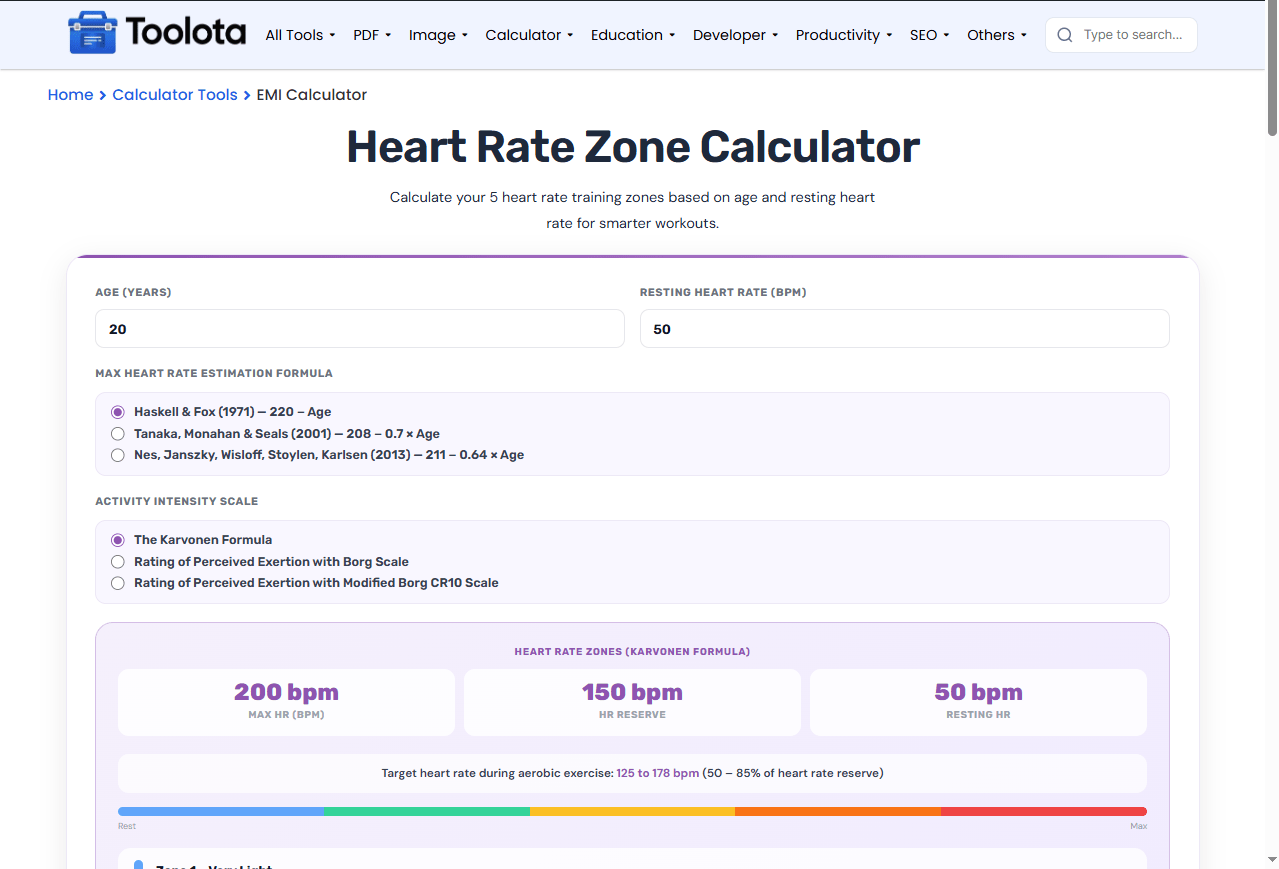
Calculate your 5 heart rate training zones based on age and resting heart rate for smarter workouts.
| Intensity | RPE Scale | Target Heart Rate (bpm) |
|---|
| Intensity | RPE CR10 Scale | Target Heart Rate (bpm) |
|---|
A Heart Rate Zone Calculator helps you train smarter by matching effort to your fitness goals. Simply enter your age and resting heart rate, then choose a methodology, such as the Borg RPE scale or the Karvonen formula, to estimate your five training zones. This tool can help guide your exercise intensity, whether your session focuses on endurance, fat burning, or speed.

Type your age into the "Age (years)" field and your resting heart rate into the "Resting Heart Rate (bpm)" field. Resting HR is optional and defaults to 60 bpm.

Pick one max heart rate formula (Haskell & Fox, Tanaka, or Nes) and one activity intensity scale (Karvonen, Borg RPE, or Modified CR10). Each selection changes how zones are calculated.

Press the purple "Calculate" button. The panel shows your max HR, heart rate reserve, target summary, and all 5 training zones in bpm. Switch scales anytime and press Calculate again for updated numbers.
| Feature | What It Does |
|---|---|
| Age Input | Enter years (10–100) |
| Resting HR Input | Add your RHR (30–100 bpm) |
| 3 Max HR Formulas | Haskell & Fox (220–Age), Tanaka (208–0.7×Age), or Nes (211–0.64×Age) |
| 3 Intensity Scales | Karvonen formula, Borg RPE (6–20), or Modified CR10 (0–10) |
| 5 Color-Coded Zones | Very Light → VO₂ Max with bpm ranges |
| Visual Zone Bar | Shows intensity from Rest to Max |
| Target Summary | Displays 50–85% aerobic target range |
| RPE Tables | Maps perceived exertion to heart rate |
Once you know your target zones, the Calorie Calculator helps you adjust intake to match your training intensity.
Training in the higher zones burns through fluid fast — check your daily needs with the Water Intake Calculator.
If your goal is weight management alongside cardio training, pair this with the BMR Calculator to see your resting energy baseline.
The Karvonen method used here relies on heart rate reserve, the gap between resting and maximum heart rate, to personalize each zone rather than using flat age-based percentages.
Lets you choose between the most cited formulas (Haskell & Fox, Tanaka, Nes) so you’re not stuck with just 220 minus age.
Matches perceived exertion to actual bpm, which is ideal for beginners who don't own a chest strap.
The reset button clears all fields and restores default selections (Haskell & Fox + Karvonen) instantly.
Uses heart rate reserve (max HR minus resting HR) for personalized zones instead of generic percentages.
Each zone (Very Light, Light, Moderate, Hard, VO₂ Max) has a distinct color and training purpose written directly on the card.
The tool calculates heart rate reserve by subtracting resting HR from max HR, then multiplies that by zone percentages (50–60%, 60–70%, etc.) before adding resting HR back. This is why two people of the same age get different zone recommendations. The Borg RPE scale relates a rating of 6 (no effort) to 20 (maximal effort) to a corresponding heart rate percentage. For CR10, it maps 0 (rest) to 10 (greatest effort). The standard aerobic exercise guidelines are met with a heart rate reserve of 50–85% in the goal summary.
It’s a tool that uses your age and resting heart rate to find five training intensity ranges, from very light recovery to maximum VO₂ Max efforts.
You subtract your age from 220 (Haskell & Fox), use 208 minus 0.7 times your age (Tanaka), or 211 minus 0.64 times your age (Nes). This tool includes all three.
The Karvonen formula needs your resting heart rate to calculate heart rate reserve. If you don’t know it, select the Borg RPE or CR10 scale instead — these use perceived exertion rather than resting HR.
Borg uses a 6–20 scale that roughly corresponds to heart rate (multiply by 10), while CR10 uses 0–10 for shorter, simpler ratings like breathlessness.
es. Select ‘Rating of Perceived Exertion with Borg Scale’ from the Activity Intensity Scale dropdown, and the calculator maps RPE levels 6–20 to estimated target heart rates.
Toolota is your all-in-one online tools platform. Fast, simple, and free utilities designed to make everyday digital tasks easier and smarter.
