Prevent duplicate content by generating clean, validated canonical tags. Normalize URLs, strip tracking parameters, catch common mistakes, and process bulk lists with export and duplicate detection.
Canonical Tag Generator helps you create properly formatted canonical tags that prevent duplicate content issues across your website. Simply paste a URL, adjust the normalization settings, and generate a clean HTML link tag or HTTP header in seconds. This tool also catches common mistakes like uppercase URLs, tracking parameters, and missing protocols. It streamlines your SEO workflow and ensures search engines understand which version of a page is the master copy, whether you need a single tag or bulk generation for hundreds of pages.
URL normalization with force HTTPS option
Lowercase URL conversion to prevent case-sensitivity issues
Automatic stripping of tracking parameters (utm_*, fbclid, gclid)
Strip session and sort parameters (sessionid, sid, sort, order)
Remove #fragment from URLs
Force www. or non-www version consistency
Toggle trailing slash removal
Self-reference reminder for canonical best practices
Multiple output formats: HTML <link> tag, HTTP Link header, or both
Bulk URL processing with file upload (.txt, .csv)
Duplicate detection and auto-cleaning statistics
Canonical tag validation tool to catch syntax errors
Copy output to clipboard with one click
Download bulk results as .txt or .csv
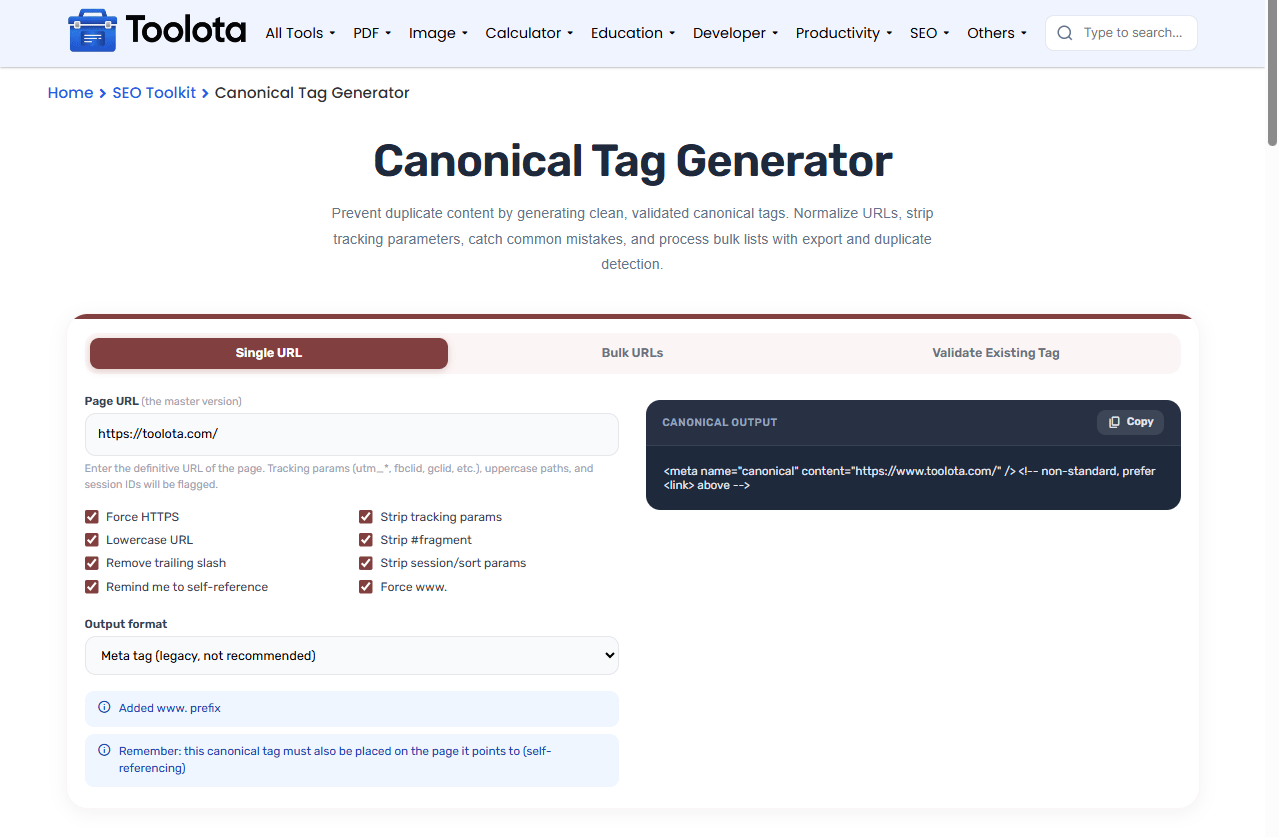

Paste the definitive URL you want to set as canonical

Toggle settings like force HTTPS, lowercase, strip tracking, and remove fragments based on your preferences

Pick HTML link tag, HTTP header, or both

View the clean output instantly in the code display

Click the copy button and paste the tag into your page's section
For bulk tasks: enter up to 500 URLs, click generate, and get the entire list in. txt or. csv format.
“How do I check if my canonical tag is correct?” — Use the Validate Existing Tag tab to test your current tag syntax before publishing.
Automatically clean up messy URLs by stripping tracking parameters, session IDs, and fragments that search engines don't need.
Paste any existing canonical tag to check for syntax errors, missing attributes, or protocol issues without deploying it first.
Includes smart reminders about self-referencing and consistent trailing slash usage so you never miss a critical detail.
Handle up to 500 URLs at once with duplicate detection and auto-cleaning stats, saving hours of manual work.
Copy formatted tags directly with one click — no extra formatting or editing required before implementation.
Always self-reference your canonical tag — the page should point to itself as the canonical version
Use the validation tab to check existing tags before deployment, especially when migrating sites
Download bulk outputs as CSV to import into your CMS or tracking tools
When you use a canonical tag generator, the real value isn’t just the tag itself — it’s the URL normalization process that happens behind the scenes. Search engines treat URLs with uppercase letters, trailing slashes, and tracking parameters as different pages, even when the content is identical. By stripping utm_* parameters, forcing lowercase, and removing fragments, this tool helps you avoid the most common duplicate content traps. The bulk mode also flags duplicate URLs in your list, so you can spot possible issues before they harm your site’s search performance. How your canonical signals are interpreted by search engines is directly affected by each normalization setting.
A canonical tag generator creates HTML link tags or HTTP headers that tell search engines which URL is the master version of a page.
Tracking parameters like utm_source or fbclid create multiple URL versions of the same page, which can dilute your SEO authority.
Yes, paste up to 500 URLs in the bulk tab or upload a .txt or .csv file to generate tags in seconds.
Go to the “Validate Existing Tag” tab, paste your current tag, and the tool checks for syntax errors and common mistakes.
You can generate HTML <link> tags, HTTP Link headers, both formats, or a meta tag (though the meta tag is not recommended for modern SEO).
It validates syntax and catches common issues like missing attributes, relative URLs, and incorrect protocols, but it does not fetch the live page.
Toolota is your all-in-one online tools platform. Fast, simple, and free utilities designed to make everyday digital tasks easier and smarter.
