Add or remove VAT from any amount instantly. Supports custom rates and multiple currencies.
Need a grade calculator online that instantly converts your assignment scores into a final letter grade? This tool calculates weighted averages and tells you exactly what score you need on your final exam. You simply add your assignments with their weights, or switch to “Final Exam Goal” mode to see the required score. This calculator, for example, illustrates the percentage you must get in order to reach your goal if your current grade is 78% and the final counts for 40%.

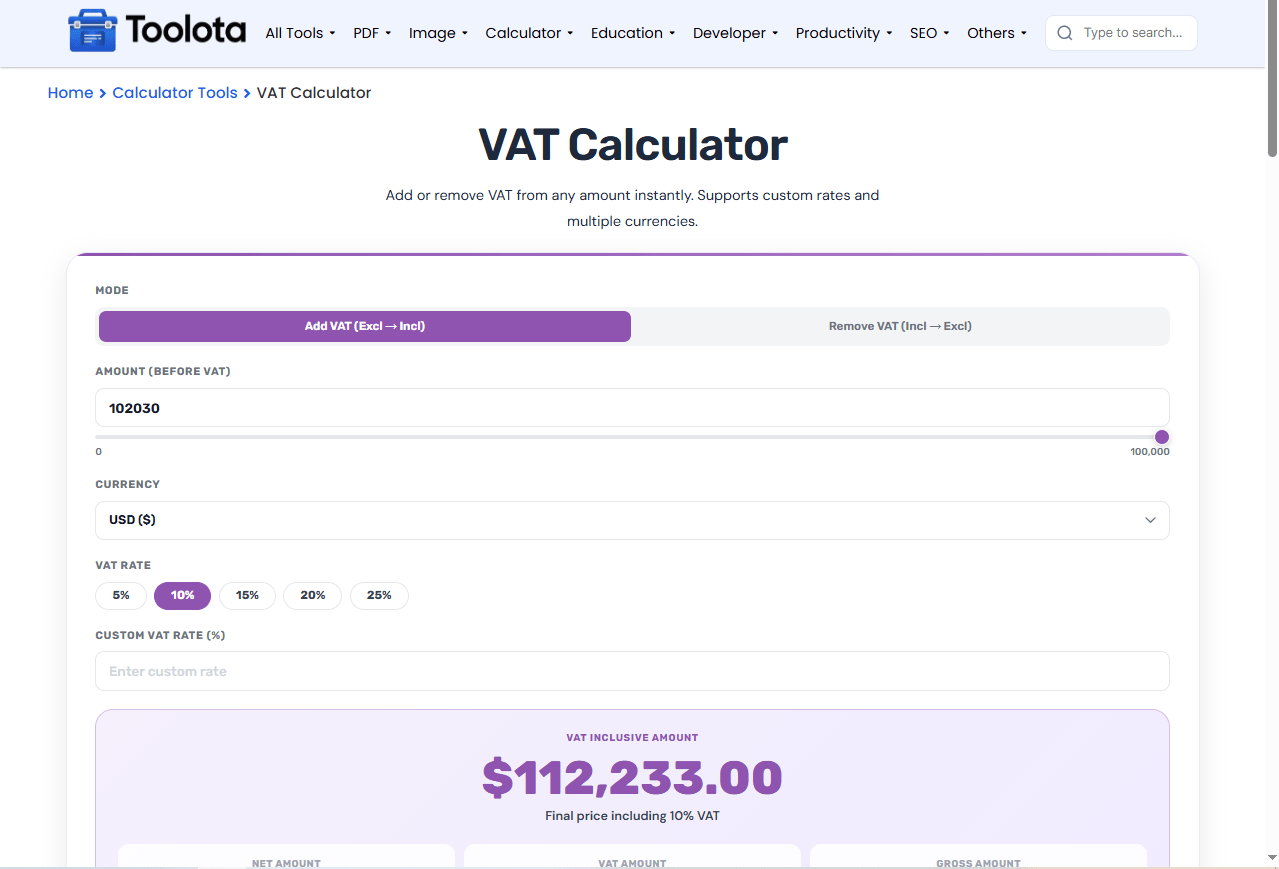
Click either "Add VAT (Excl → Incl)" to calculate the final price including tax, or "Remove VAT (Incl → Excl)" to find the original price before tax.

Type or slide to set your amount. Then click a preset VAT rate chip (like 20%) or enter a custom VAT rate in the field below.

The tool immediately shows the VAT inclusive amount (or exclusive amount), plus a breakdown of net amount, VAT amount, and gross amount in your chosen currency.
Add/Remove Toggle: Switch between “Add VAT (Excl → Incl)” and “Remove VAT (Incl → Excl)” with one click.
Currency Selector: Choose from USD ($), EUR (€), GBP (£), INR (₹), AED, SAR, or BDT (৳).
VAT Rate Chips: Quick-select preset rates: 5%, 10%, 15%, 20%, or 25%.
Custom VAT Rate: Enter any rate from 0 to 100% using the custom input field.
Amount Slider: Drag the slider or type directly into the number input for quick adjustments.
Use the slider first to get close to your number, then type the exact amount for precision.
Clear the custom rate field if you want to switch back to preset chips; the tool prioritizes the custom input when filled.
Check the note below the result — it confirms whether the displayed amount includes or excludes VAT.
Reset anytime with the “↺ Reset” button to clear all fields and start fresh.
Whether you need to add VAT to a net price or remove VAT from a gross price, the math is flawless every time.
Adjust amounts quickly with the slider or type precisely. Both fields stay perfectly synced.
No need for separate converters. This VAT calculator online displays results in 7 major currencies with proper symbols.
The colored result card clearly shows your net amount, VAT amount, and gross amount so you understand exactly where every cent goes.
Unlike basic calculators, this tool automatically changes its logic based on your selection. When you choose “Add VAT” , the label changes to “Amount (Before VAT)” and the result shows the VAT inclusive amount. Change to Remove VAT , and the outcome is the VAT-exclusive amount as the label updates to Amount (Incl. VAT). To confirm if you are viewing the final price or the pre-tax pricing, the vat_note text also changes. You can never get your arithmetic mixed up thanks to this active action.
Select “Add VAT” mode, enter your net amount, choose a VAT rate, and the tool shows the gross amount including tax.
Yes. Click “Remove VAT (Incl → Excl)”, enter the gross amount, and the tool calculates the original net amount before VAT.
The custom rate overrides the preset chips, and the VAT rate note updates instantly to show your entered percentage.
Yes, select from 7 currencies including USD, EUR, GBP, INR, AED, SAR, and BDT. The symbol updates automatically on all results.
Yes. Dragging the slider updates the number field, and typing into the number field syncs the slider position.
Toolota is your all-in-one online tools platform. Fast, simple, and free utilities designed to make everyday digital tasks easier and smarter.
