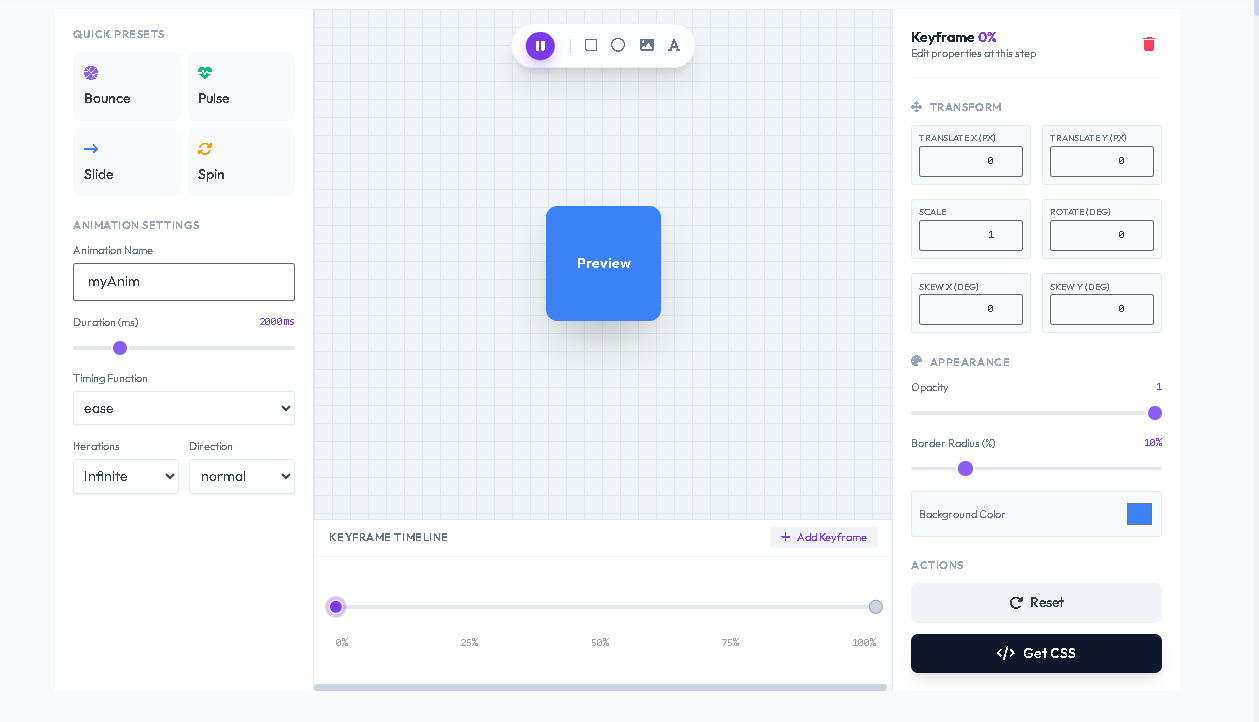
CSS Animation Keyframe Generator is a really handy, web-based visual tool from Toolota. It lets designers and developers create intricate CSS animations without having to write any code at all. This tool tackles the hassle of trial-and-error coding by offering a user-friendly timeline interface.
Set keyframes
Tweak properties like position, scale, rotation, and opacity
Instantly see a live preview
The CSS Animation Keyframe Generator is a really makes a difference when it comes to getting things done. Toolota’s tool, which many call the “CSS Keyframer,” really shines thanks to its deep integration of professional features right into its HTML/JavaScript foundation. The interface is built using a clean, component-based approach with Tailwind CSS, which means it’s responsive and feels intuitive to use. What truly sets it apart is its detailed visual editor; you’re not just choosing from a small selection of pre-made effects.
This tool’s reliability comes from how it works:
Entirely on your computer—your data never leaves your browser
Draggable timeline markers
Special properties panel for each keyframe
Real-time CSS generation
The CSS Animation Keyframe Generator from Toolota boosts productivity by letting you seamlessly switch between coding and seeing the results in your browser, making it easy to quickly try out new ideas that would be much slower to do by hand.
This section provides a detailed breakdown of the tool’s interface and functionality, explaining how user input is transformed into final CSS code.
Left Panel: Setting Up & Quick Options
Quick Presets: The tool comes ready with four easy animation styles (Bounce, Pulse, Slide, Spin) that you can choose with just one click. Picking one fills the timeline with pre-set keyframes, letting you see what the CSS Animation Keyframe Generator can do and giving you a starting point to make your own adjustments.
Overall Settings Area: This is where you manage the big-picture aspects of your animation from Toolota.
Animation Name Field: Use this to give your special @keyframes rule a custom name.
Duration Slider: Slide this to easily change how long the animation lasts, in milliseconds. The time updates right away as you move it.
Timing Function Dropdown: Pick the style of animation flow you want (like starting slow and speeding up, or moving at a steady pace).
Iteration & Direction Dropdowns: Decide here if the animation should play once, loop, or repeat infinitely, and whether it should play forward, backward, or alternate directions.
Getting a Look: The Visual Stage & Timeline
Stage Toolbar: Imagine floating controls right there on your stage. These handy tools let you start, stop, or pause the animation anytime. You can also quickly switch the preview shape between a box, circle, image, or text – perfect for seeing how your animation looks in different scenarios on Toolota.
Visual Stage: This is your main viewing area, with a helpful grid background. It shows exactly what your animated element will look like, updating in real-time based on the timeline and settings you’ve chosen.
Timeline Section: This is the heart and soul of the CSS Animation Keyframe Generator.
Think of the horizontal track as a timeline from start (0%) to finish (100%) of your animation.
You’ll see keyframes represented as little dots you can actually drag along this track.
Click the “Add Keyframe” button to insert a new control point right where it makes sense in the sequence.
When you click any keyframe dot, it gets selected, and all its specific settings pop up in the panel on the right for you to tweak.
Right Panel: Keyframe Properties Editor This panel wakes up and becomes active the moment you select a keyframe. This is where you get into the nitty-gritty and make your animation really come alive.
Transform Group: Here, you’ll find input fields to control movement and shape:
Translate X/Y: Move the element left/right or up/down in pixels.
Scale: Change the element’s size (bigger or smaller).
Rotate: Spin the element around by a certain number of degrees.
Skew X/Y: Tilt or slant the element by degrees.
Appearance Group: This section lets you fine-tune the look:
Opacity Slider: Adjust transparency, going from completely invisible (0) to fully solid (1).
Border Radius Slider: Control how rounded the corners are, from sharp (0%) to very rounded (50%).
Background Color Picker: Pick any color you like for the element’s background.
Every single change you make in these input areas happens instantly – it updates the data for that keyframe, regenerates the CSS code, and refreshes the preview so you can see exactly what you’re doing with the CSS Animation Keyframe Generator from Toolota.
The “Get CSS” button will show you a little pop-up window with the final CSS code that was created on Toolota. You’ll see the complete @keyframes section, including all the percentages and properties you set up, plus a handy .anim-preview class that’s already got all the global settings applied and ready to use.
And if you click the “Copy Code” button, it’ll grab that clean CSS and instantly put it on your clipboard, ready to paste wherever you need it. Behind the scenes, the system also automatically adds this exact CSS to a <style> tag in your webpage’s header, which then makes the animation show up right in the preview element you’re looking at. This smooth journey from seeing and editing the animation visually to getting the production-ready code is exactly what makes a great CSS Animation Keyframe Generator so useful.
Speed: Craft intricate animations in just minutes, bypassing the hours typically spent on manual CSS writing and debugging with the CSS Animation Keyframe Generator.
Accuracy: Set properties visually and witness the precise outcome right away, cutting out all the guesswork and syntax mistakes.
SEO & Performance: This Toolota tool churns out lean, optimized CSS code—no unnecessary extras—ensuring your animations run smoothly, which is crucial for both page speed and SEO rankings.
Learning Aid: Get a hands-on grasp of how keyframes, timing functions, and transforms work together by visually tweaking them.
Easy Editing & Iteration: Change any setting on the fly and watch the results update instantly, keeping your creative juices flowing.
Clean UI/UX: The straightforward three-panel design (configure, preview, edit properties) makes the CSS Animation Keyframe Generator easy to use, no matter your experience level.
Convenience: With direct copy and download features from Toolota, your code is ready to drop into your project in just seconds.
The quality of the output is really up to how creative you are and how well you understand animation basics. Think of the CSS Animation Keyframe Generator as a helpful tool, not a magical AI artist that does everything for you.
Even though the code it gives you is ready to use, it’s always smart to test your animations on various browsers and devices to make sure they work everywhere.
This tool is meant for good, honest web design work. Toolota can’t be held responsible if someone uses it in a way that’s not legal or ethical.
For the best experience, use newer browsers like Chrome, Firefox, or Edge with the CSS Animation Keyframe Generator.
A CSS Animation Keyframe Generator like Toolota’s provides a visual interface to create CSS @keyframes animations. Instead of coding, you use sliders, timelines, and inputs to define an element’s style at various points (keyframes), and the tool writes the corresponding CSS code for you.
It’s perfect for web developers seeking efficiency, UI/UX designers creating interactive prototypes, digital marketers building engaging ads, and students or educators teaching web animation concepts. Anyone who needs to implement CSS animations can benefit from this CSS Animation Keyframe Generator.
Absolutely. The CSS code generated by Toolota’s CSS Animation Keyframe Generator is standard, clean, and yours to use in any personal or commercial web project without any attribution required.
The tool allows you to add an unlimited number of keyframes along the timeline. You can precisely control the element’s transform and appearance properties at each point, enabling the creation of multi-step, complex sequences like a bouncing ball that changes color and rotates mid-air.
Toolota – 350+ Free Online Tools for PDF, AI, Design & More. Use any place, any time with out paying and signup needed.