
CSS Clip-Path Generator
Create complex shapes using CSS clip-path. Choose from preset shapes or customize polygon points for unique designs.
Create complex shapes using CSS clip-path. Choose from preset shapes or customize polygon points for unique designs.
The CSS Clip-Path Generator from Toolota is a handy, free online tool that makes advanced web design more accessible to everyone. Whether you’re just starting out or you’re an experienced developer, this visual tool lets you create fancy shapes for HTML elements without getting bogged down in complex code.
In the vast world of online code generators, Toolota really makes its mark. Our CSS Clip-Path Generator is all about accuracy and making things easy for users. We carefully looked at what developers struggle with most and built a tool that tackles those issues head-on.
User-Focused Design: The design is clean and works like a charm, with Tailwind CSS making sure it looks great on any screen.
Live Preview System: What really sets it apart from just giving you code snippets is our live preview box – it lets you see how shapes change in real time against a nice gradient background, so it’s super clear what you’re doing.
Versatile Shape Options: We’ve packed in eight polygon shapes into the CSS Clip-Path Generator, from basic triangles to fancy stars, so you can cover both everyday tasks and get creative.
Reliable and Accurate Code: The Toolota CSS Clip-Path Generator is reliable too – the code it spits out is spot on, follows the best ways to do things, and you can drop it right into your projects.
Time-Saving Resource: It’s not just a handy tool; it’s a real time-saver that makes advanced CSS easy for everyone, whether you’re just starting to learn it or you’re an expert trying to speed up your work.
Let’s dive into the CSS Clip-Path Generator and see how it all works, shall we? Every part of this HTML tool from Toolota is designed for a specific job, making it easy to turn your ideas into actual code.
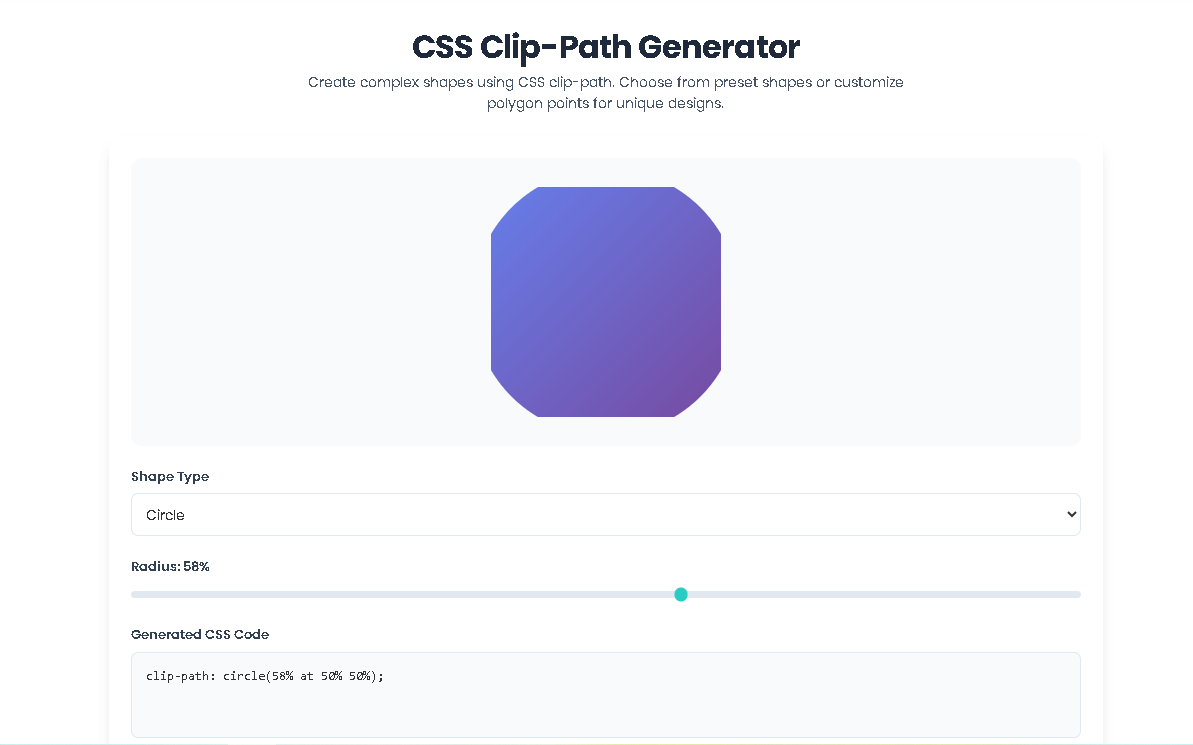
The Live Preview Canvas: Right at the top of the tool, you’ll spot a centered box labeled preview-box. Think of this as your creative space. It’s set to a fixed size (64 units wide and high) and has a lovely gradient background. The magic happens with the clip-path 0.3s ease transition effect applied to it. So, whenever you tweak anything—like moving a slider or typing in new points—the shape smoothly morphs into its new form. This instant visual feedback from the CSS Clip-Path Generator really helps you see exactly how each change affects the shape.
Shape Type Selection: The heart of the Toolota tool is the dropdown menu labeled shape-type. This is where you decide the basic shape you want to create, choosing from circle, ellipse, polygon, or inset. When you pick a different shape, the tool automatically shows the right set of controls for that shape (circle-controls, ellipse-controls, and so on) and hides the others. This smart design keeps things tidy and helps you focus on what you need for the shape you’ve selected in the CSS Clip-Path Generator.
Adjusting Circles and Ellipses: When you choose “Circle,” the CSS Clip-Path Generator shows a single slider to adjust the radius. The slider for the circle’s radius (circle-radius) can be moved from 0 to 100, which stands for percentages. As you move the slider, a live display (circle-radius-val) updates to show the current value, and it also activates the main updateClipPath() function to apply the change. The ellipse section works in much the same way, but it has two separate sliders—one for the horizontal radius (rx) and one for the vertical radius (ry)—giving you the flexibility to create oval shapes using this tool from Toolota.
Polygon Controls and Quick Shapes: The polygon section is where this CSS Clip-Path Generator really shines. It comes with a grid of eight preset buttons to get you started quickly. Each button has a special attribute (data-points) that holds the coordinates for a polygon shape. When you click one of these preset buttons, its coordinate string is automatically added to the polygon-points text box. You can edit this box freely, so you can tweak any preset or even draw your own custom shapes—like a trapezoid, for example, using coordinates like “20% 0%, 80% 0%, 100% 100%, 0% 100%”. Every time you type or change something in this box on Toolota, the preview updates right away to show your changes.
Adjusting the Inset & Border Radius: The “Inset” option in the CSS Clip-Path Generator from Toolota lets you create a rectangle that sits inside the edges of your element. You’ll see five sliders to tweak: one for each side (top, right, bottom, left) and another for the rounded corners (border-radius). This works just like the inset(10% 10% 10% 10% round 5%) code. As you move each slider, you’ll see its value update right away, and the tool automatically builds the complete CSS string for you. It only adds the rounded part if you set a value greater than zero.
Live CSS Preview & Quick Actions: Right below the controls, you’ll find the css-output textarea showing the final CSS rule as you make changes. It’s set to read-only, but you can easily highlight and copy the text. When you click the “Copy CSS Code” button, Toolota uses the modern navigator.clipboard.writeText() method to copy the code to your clipboard, and a little confirmation message pops up briefly to let you know it worked. The “Reset” button (reset-btn) brings everything back to the default settings (a 50% circle), giving you a full experience with the CSS Clip-Path Generator.
Get Results Fast: See your ideas turn into code in just seconds. Playing with sliders and clicking presets on Toolota is way quicker than doing math for percentages or pixel values by hand.
See Exactly What You’re Making: The live preview of our CSS Clip-Path Generator takes the guesswork out of design. You get to see the exact shape forming, making sure it matches your vision before you even touch your main project files.
Good for SEO and Speed: The code it creates is clean and efficient. By using CSS Clip-Path Generator shapes instead of images, it cuts down on HTTP requests and helps keep your website speedy—which is great for search engine rankings.
Learn as You Go: If you’re new to CSS clipping, this tool from Toolota acts like a hands-on lesson. You can play around with the settings, watch the code change, and pick up how the clip-path property works naturally.
No Coding Needed: The CSS Clip-Path Generator makes advanced CSS accessible to everyone. Marketers, writers, and designers can create intricate shapes without needing a developer’s help, making the creative process smoother.
Easy to Use and Integrate: Just one click copies the code from Toolota so you can instantly add it to your styles, code editor, or project tools. The tool has a clean, user-friendly design that makes working with it a breeze.
Your Results Reflect Your Input: How accurate your polygon points are really makes a difference in the final outcome. Just make sure your coordinates in the CSS-Clip-Path-Generator are in a logical order and formatted properly, like “x% y%, x% y%”.
Browser Compatibility: Although clip-path works in most browsers, it’s always smart to double-check caniuse.com for the specific browsers you’re targeting. The Toolota tool gives you standard CSS, but you’ll need to add any vendor prefixes yourself.
Ethical Use: Please don’t use this tool or the code it creates to build UI elements that mimic important system messages, try to trick users, or are used for phishing scams. Toolota encourages ethical web development practices.
Use It as a Helper: Think of this CSS Clip-Path Generator as a helpful tool for your development work. Remember to test the code you generate within your actual project to make sure it plays nicely with your other styles and layout techniques.
The primary purpose of Toolota’s CSS Clip-Path Generator is to provide a visual, no-code interface for creating CSS clip-path shapes. It translates complex geometric coordinates into simple slider adjustments and preset buttons, allowing anyone to generate ready-to-use CSS code for circles, ellipses, polygons, and inset shapes in seconds.
Absolutely. While the CSS Clip-Path Generator offers handy presets, the “Polygon” mode includes an editable text input field. You can type any valid polygon() coordinate string into this field (e.g., "0% 20%, 60% 20%, 75% 0%, 90% 20%, 100% 60%, 80% 100%, 50% 80%, 20% 100%, 0% 60%") to create a completely unique shape, and the live preview will update immediately.
Yes, the code output by Toolota’s CSS Clip-Path Generator is clean, standard CSS. You can copy the clip-path: ...; rule directly into your project’s stylesheet. It is recommended, as with any generated code, to test it in your specific layout environment to ensure it behaves as expected with your content and other styles.
No. Toolota’s CSS Clip-Path Generator, as shown in the HTML, is a client-side tool that runs entirely in your browser. There is no backend server, account system, or login required. You can use all its features for free, without any data being saved or transmitted.
Toolota is your all-in-one online tools platform. Fast, simple, and free utilities designed to make everyday digital tasks easier and smarter.