Design stunning palettes using mathematical color theory. Visualize harmonies on the wheel and verify contrast ratios instantly.
A Color Palette Generator is where technology meets artistry and aids artistic vision. Creating tricky color relationships into easy-to-use, practical tools. Toolota‘s Smart Harmony Generator specifically tackles the challenge of creating not just random color mixes, but smart, context-aware palettes that look great and work well in all sorts of design projects.
Toolota‘s method for creating color schemes goes beyond the basics, weaving smart design thinking into an interface that’s both responsive and easy to use.
Smart Algorithmic Core While simple generators might just cycle through colors, our Smart Harmony Color Palette Generator uses complex, multi-layered algorithms. These account for things like simultaneous contrast, how warm or cool colors relate, and visual balance. This ensures the palettes work beautifully in actual designs, not just as individual color swatches.
Situation-Specific Suggestions The “Smart Harmony” aspect of our Color Palette Generator means it can recommend palettes based on what they’re intended for.
Smooth Integration into Creative Workflows Toolota built this generator to fit naturally into larger creative projects. The palettes you create can be saved directly to your project library, shared with your team using special links, or exported in formats perfect for specific uses (such as CSS for websites, ASE for Adobe apps, or PDF for presentations).
Our tool is designed to be both straightforward and powerful. Beginners can create lovely color palettes right away, while experts can fine-tune every detail.
Let’s take a closer look at the Control Panel and its smart features:
Source Input Module This main section gives you three ways to start:
Color Wheel This visual, interactive tool lets you easily pick your base color.
Image Upload Upload a picture, and our tool will automatically pick out the main, accent, and standout colors to build a palette that tells a story.
Keyword/Mood Input This is special! Type in words like “serene,” “energetic,” or “luxury,” and our system will figure out the perfect colors to match those feelings.
Harmony Preset Engine This menu goes beyond basic color combinations (like Complementary or Triadic). You’ll find more dynamic choices like “Tetradic (Soft Contrast),” “Analogous with Pop,” and “Custom Interval.” Each preset adjusts things like color spacing, how vibrant they are, and their brightness to create a specific look. The “Custom Interval” option lets you type in exact color separations for total control. Using this Color Palette Generator on Toolota ensures a professional result every time.
Advanced Color Controls You’ll find detailed adjustments in a handy, collapsible panel. The “Saturation Variance” slider lets you decide if you want your Color Palette Generator results to have a consistent feel (sticking to a narrow saturation range) or be more vibrant and varied (covering a wide range). Then, the “Brightness Curve” allows you to choose whether your palette should lean towards lighter tones, darker shades, or focus on mid-tones. Lastly, the “Accessibility Threshold” is a really important setting; it can lock the generator on Toolota so it always creates palettes that meet a minimum standard for readability, ensuring there’s enough contrast between text and background colors according to WCAG guidelines.
Project Setting Selector There’s a dropdown menu where you can tell the Toolota tool where the colors will be used: “Web UI,” “Mobile App,” “Print Branding,” or “Data Visualization.” This choice gently guides the algorithm of our Color Palette Generator. For instance, selecting “Web UI” might result in colors that have higher contrast and are generally safe for the web, while choosing “Print Branding” would optimize the colors to look their best when printed, considering CMYK color limitations.
The Output & Interaction Canvas
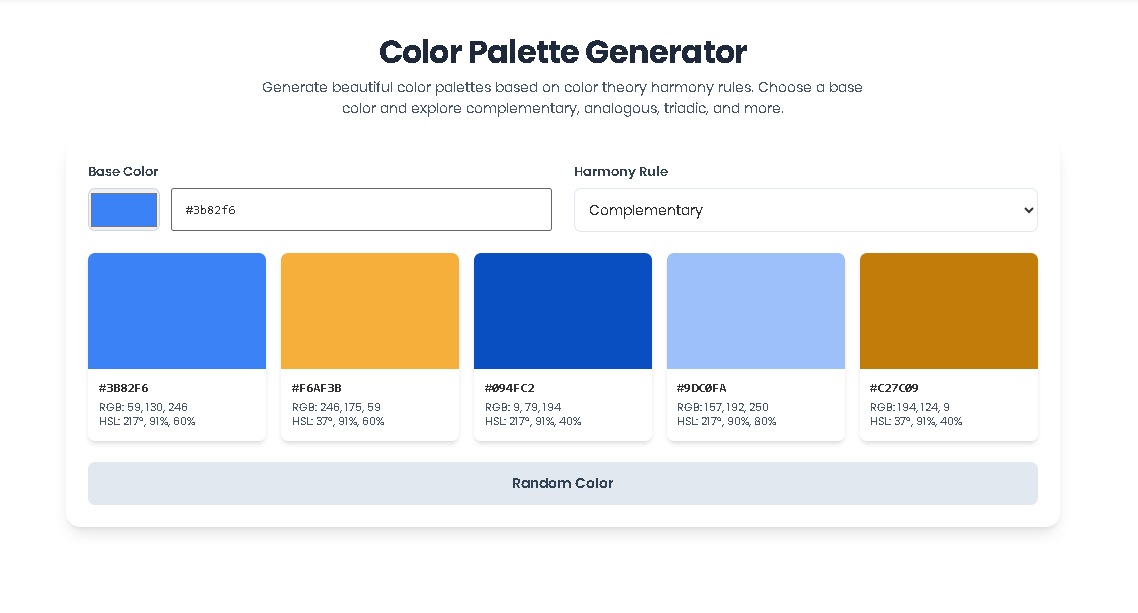
Dynamic Color Display The colors that get generated show up in a flexible grid layout. Each little color square (called a swatch) is interactive. When you hover over one, you’ll see a bigger preview of it. If you click on a swatch, you lock that color in place. This means it won’t change the next time you generate new colors, which is a really effective way to gradually build out your color palette, starting from a color you really like and want to keep in this Color Palette Generator.
Live Application Preview There’s a special preview window built right into Toolota. It uses a hidden frame and some CSS tricks to instantly show you how your current color palette would look on a sample design – maybe a website card, a mobile screen look, or a business card mockup. This is a really important feature because it lets you see how the colors work together in an actual layout, not just as separate blocks. Many simpler color generators miss this crucial step.
Information & Code Panel For each color, you can see all its important details (like HEX, RGB, HSL, CMYK, and even an approximate Pantone code) in easy-to-read fields. There’s also a specific tab called “CSS Code Snippet” that automatically creates code you can copy and paste right into your project, setting up your palette as CSS custom properties (like :root { --primary: #3355ff; }). And if you need to save your work, an “Export” button on Toolota lets you get your palette in several useful formats: as a PNG image (with the color codes included), an SVG file, an ASE file for Adobe programs, or even as a JSON object for your development workflow.
History & Variation Browser The Color Palette Generator tool keeps track of everything you’ve done during your current session. A sidebar lets you scroll back through your previous color ideas and variations, so you can compare them side-by-side. This turns your design exploration into more of a journey you can navigate, ensuring you don’t accidentally lose that one perfect color combination you stumbled upon earlier.
Fast Contextual Results Get sophisticated color palettes that fit the context in just seconds! Skip the tedious hours of manual tweaks and color theory math—our smart algorithms handle all that complex work for you in this Color Palette Generator.
Professional Confidence Feel great about your results. Every palette we create is grounded in the fundamentals of harmony, contrast, and practical use. Plus, the built-in accessibility checker and live preview help you ensure your colors are not only stunning but also work perfectly, saving you time on revisions.
Creative Freedom Unlock more creative possibilities! With mood-based creation, image color extraction, and a complete history log, you can experiment quickly and confidently, exploring color combinations you might never have thought of on your own.
Seamless Handoff Make handoff smooth and easy. Automatically generate CSS variables, JSON, and formats perfect for design systems, directly connecting your design work to the final build and making teamwork much simpler.
Centralized Library Keep all your palettes organized and accessible. Save them to your Toolota account, sort them by project, and pull them up from any device. This turns the Color Palette Generator into a living, evolving library for your brand’s or project’s color identity, not just a one-time tool.
Think of the Color Palette Generator as friendly advice, not a hard-and-fast rule. It offers expert ideas based on what you give it and the rules it follows, but the final choice should always take into account the specific needs of your project, your brand’s identity, and how the colors look and work in the real world across different devices and materials.
Accessibility is a Team Effort Our tool does check for contrast, but making sure your design meets WCAG or other accessibility standards is ultimately down to you, the designer or developer. You’ll need to test the final product in the actual environment it will be used.
Understanding Intellectual Property The color combinations the Toolota tool suggests are like tools – not protected works of art. But if you use those colors in a truly unique logo, interface, or piece of artwork, that specific application might create something that can be protected by design rights. Always make sure your final design is your own original creation.
Good Inputs Make Good Outputs The helpfulness of any Color Palette Generator, even the most advanced ones, really depends on the quality of what you put into it. Think carefully about your starting color, the mood you’re going for, and the context of your project on Toolota – these initial choices directly influence how useful the results will be.
Standard generators often just rotate hues around a color wheel. Our Smart Harmony Color Palette Generator adds intelligence layers: it considers color psychology (via mood keywords), application context (web vs. print), and practical constraints like minimum contrast ratios. It also provides a live layout preview, showing how the palette functions in a real UI, making it a professional-grade decision-support tool rather than just a color picker.
Yes, this is a core strength. Our Color Palette Generator includes an “Accessibility Threshold” slider that ensures any foreground/background color pairs in the palette meet a user-defined WCAG contrast ratio (e.g., 4.5:1 for normal text). The live preview also tests text-on-color combinations, giving you immediate visual and quantitative feedback, which is essential for creating inclusive digital products.
The multi-format export is crucial for professional workflow. You can export as PNG/SVG for presentations, ASE for Adobe Photoshop/Illustrator to use the palette directly in design files, or as CSS/JSON for developers to implement the palette in code immediately. This versatility makes the Color Palette Generator a central hub that feeds directly into all stages of the production pipeline.
When you enter a keyword like “calm” or “energetic,” the tool references an internal model mapping psychological concepts to color attributes. “Calm” might bias the algorithm toward cooler hues (blues, greens), lower saturation variance, and a narrower brightness range. “Energetic” might favor warm, saturated colors with high contrast. It’s not a fixed list, but a dynamic generation parameter, allowing for unique, mood-congruent palettes every time.
Toolota is your all-in-one online tools platform. Fast, simple, and free utilities designed to make everyday digital tasks easier and smarter.
