Calculate your Basal Metabolic Rate — the calories your body burns at complete rest. Supports 3 formulas.
Looking for a reliable BMR calculator online? This tool estimates your basal metabolic rate — the calories your body burns at complete rest. Whether you want to estimate BMR for weight loss, muscle gain, or maintenance, you get instant results using three medical formulas. 60-75% of the calories you burn each day are from your resting metabolism, making it the cornerstone of any dietary strategy.

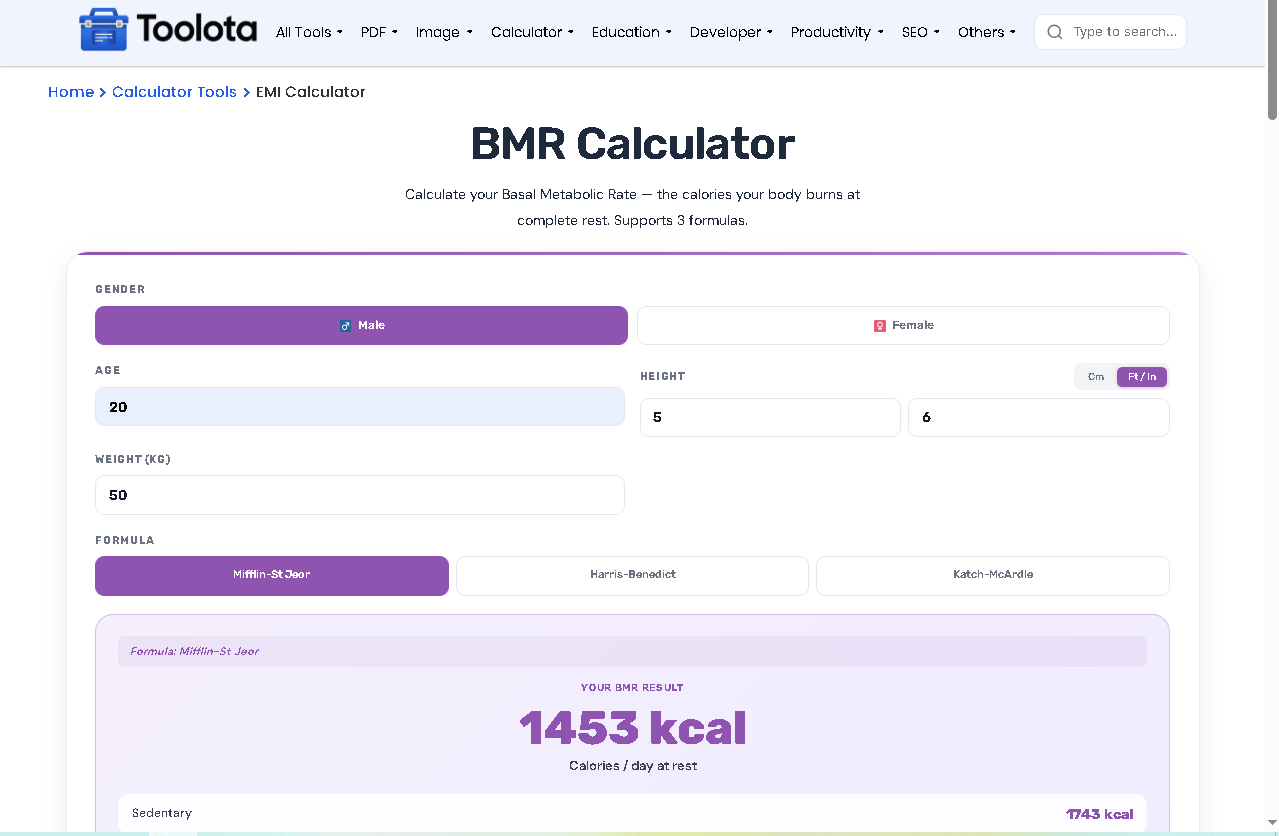
Tap "Male" or "Female" at the top. This changes the formula constants automatically.

Fill age (years), height (cm or ft/in), and weight (kg). Height unit toggle lets you switch between metric and imperial.

Pick a Formula Choose Mifflin-St Jeor (modern standard), Harris-Benedict (original), or Katch-McArdle (requires body fat %).

Press the purple "Calculate" button. Your BMR calculator online shows the number in large text.
Below BMR, see 5 activity levels from Sedentary to Extra Active — each shows total daily calories.
| Feature | What It Does |
|---|---|
| Gender Toggle | Switch between Male / Female for accurate formulas |
| Age Input | Enter years (1-120) for metabolic adjustment |
| Height Input | Choose cm or ft/in — auto-converts |
| Weight Input | Enter kg with decimal support |
| 3 Formula Tabs | Mifflin-St Jeor, Harris-Benedict, Katch-McArdle |
| Body Fat % Field | Required only for Katch-McArdle formula |
| Calculate Button | One-click BMR + TDEE update |
| Reset Button | Clears all fields instantly |
| TDEE Table | Shows calories for 5 activity levels |
| Real-time Calculation | Auto-updates when you type |
Measure weight in the morning after waking for most consistent BMR reading
Use body fat calipers or smart scale for Katch-McArdle — guessing reduces accuracy
Add 200-300 calories to BMR for light activity days, 500+ for heavy training
Every four weeks, recalculate as your weight fluctuates during bulk or diet cycles. Most adults between 19 and 70 should utilize Mifflin-St Jeor.
Your BMR calculator online uses different equations based on what you select:
Mifflin-St Jeor (default): Uses age, gender, height, weight. Most accurate for general population. Formula: for men = 10×weight + 6.25×height – 5×age + 5
Harris-Benedict (revised): Older formula, still widely used. Different constants: men start at 88.362
Katch-McArdle: Requires body fat percentage. Uses lean body mass = weight × (1 – body fat/100). Formula: 370 + 21.6 × lean mass
When you switch tabs, the body fat field appears only for Katch-McArdle. The formula note updates to show which equation is active.
No other BMR calculator online gives you Mifflin, Harris-Benedict, and Katch-McArdle side by side. Switch tabs and compare.
Change any number and the calculation runs instantly. No extra clicking needed after initial setup.
Works inside any page without breaking styles. Clean purple gradient header and responsive layout for mobile.
Height toggles between cm and feet/inches. Type feet and inches — the tool auto-converts to cm behind the scenes.
Once you estimate BMR, the tool automatically multiplies by 5 activity multipliers (1.2 to 1.9) to show maintenance calories.
It estimates calories burned while lying still all day. Use it to start any weight loss, gain, or maintenance meal plan.
Yes. Choose Mifflin-St Jeor or Harris-Benedict — both work without body fat data.
Mifflin-St Jeor is considered best for modern adults. Katch-McArdle is better if you know your exact body fat.
Enter inches into the right box and feet into the left box after pressing the ft/in switch. The utility converts automatically.
Total Daily Energy Expenditure. It’s your BMR multiplied by an activity factor — your real daily calorie need.
Yes. The calculator works entirely in your browser with no data sent to any server.
Toolota is your all-in-one online tools platform. Fast, simple, and free utilities designed to make everyday digital tasks easier and smarter.
