
Merge PDF
Combine multiple PDF files into one seamlessly. Drag to reorder files.
Click to upload or drag and drop
PDF files only (Max 50MB each)
Combine multiple PDF files into one seamlessly. Drag to reorder files.
Click to upload or drag and drop
PDF files only (Max 50MB each)
Merging PDFs...
Merge PDF online in seconds — no account, no server upload, no waiting. Simply drag your files into the tool, organize them in the precise order you need, and combine them all into a single, tidy, cohesive document. Whether you are joining two reports or stacking multiple files together, this pdf merger tool handles it entirely inside your browser. Fast, private, and ready to download the moment processing finishes.
Drag & Drop Upload Zone — A clearly marked dashed upload area sits at the top of the interface. Click the “Choose Files” button or drag your PDFs directly onto the zone to load them instantly.
Multi-File Selection — The file input accepts multiple PDFs at once. Select two, five, or more files in a single pick — all load into the list together.
Sortable File List — Every uploaded file appears as a card showing the file name and size. Grip handles on the left let you drag and drag and drop pdf cards up or down to set the exact merge order before processing.
Individual File Removal — A trash icon on each file card removes that file from the list without clearing the rest. No need to start over.
Progress Bar with Status Text — Once merging starts, a progress bar fills step by step. A status line below it shows which file is currently being processed and when finalizing begins.
Instant Browser-Side Download — The merged file downloads automatically to your device the moment processing completes. No email link, no redirect.
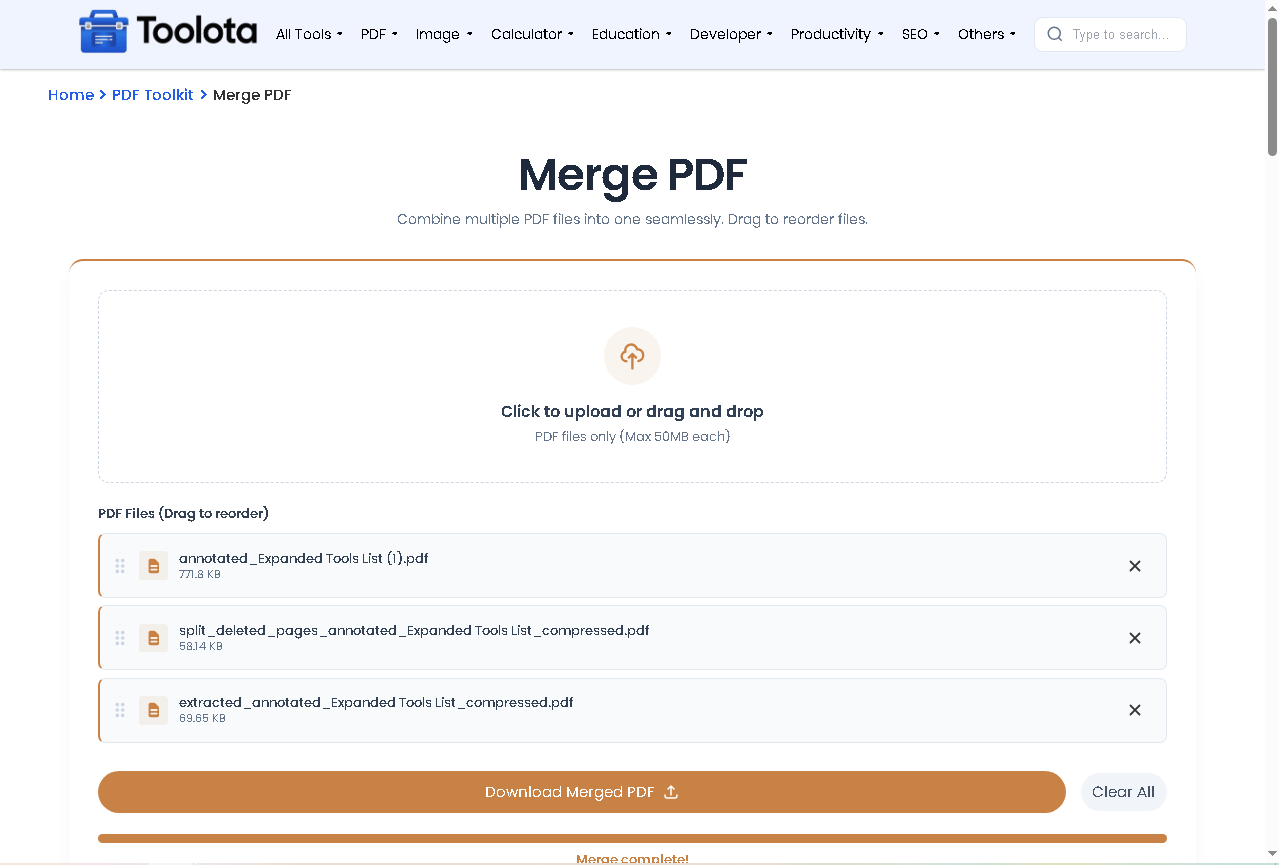

Click the "Choose Files" button inside the upload zone or drag your PDFs directly onto the dashed area. Only PDF files are accepted; non-PDF files are filtered out automatically.

Each file appears as a card in the list below the upload zone. Use the grip handle on the left side of any card to drag it up or down into the correct position. The order shown is the exact order used in the final merged document.

If a file was added by mistake, click the trash icon on its card to remove it. The rest of the list stays unchanged.

The "Merge PDFs" button activates only when two or more files are loaded. Click it to start. The progress bar appears and fills as each file is processed.

Once all files are combined and finalized, the browser automatically downloads the output as merged_document.pdf. No extra step needed.
Reorder before merging — Arrange your file cards in the exact sequence needed before clicking merge. The output page order matches the list order precisely.
Check file count — The counter at the bottom updates live. Confirm it matches how many files you intended to include before starting.
Remove, don’t clear — If one file in a large queue is wrong, use the trash icon on that card only. Clicking “Clear All” removes every file and resets the queue completely.
Large files take longer — The progress bar fills up for each file. It’s normal for larger PDFs to advance more slowly on their step. Before closing the tab, wait for the Done! status.
Same file twice — The tool allows the same PDF to be added more than once. Use this intentionally if you need a document duplicated within the merge output.
The entire process runs inside your browser using pdf-lib. Your files never leave your device, which means complete privacy with zero data risk.
The sortable list lets you join pdf files in any sequence you decide — not just the order they were selected. Drag and rearrange freely before hitting merge.
The progress bar and status text show exactly what the tool is doing at every stage — from loading each file to finalizing — so you are never left guessing.
Open the page and start immediately. There is no sign-up, no login, and no subscription barrier between you and your merged file.
Remove individual files with one click without clearing the entire queue. Add more files at any point before merging begins.
No manual download step. The combine pdf files output saves directly to your device the moment it is ready.
This tool runs entirely client-side using the pdf-lib JavaScript library — meaning no file ever touches a remote server. When you click Merge PDFs, the tool reads each file from your device as a raw ArrayBuffer directly in the browser. It first generates a completely empty PDF file in memory, then iterates through your file list one at a time in the precise sequence displayed on the screen. For each file it loads the full PDF, extracts every page using the file’s page index list, copies those pages into the new merged document, then moves to the next file. The application serializes the last combined document into binary bytes and initiates an automated browser download after all the files have been looped through—all without any network requests after the page loads.
Yes. There are no usage limits, no paid tiers, and no account required. Open the page and merge immediately.
No. All processing happens inside your browser using pdf-lib. Your files are read locally from your device and never sent anywhere.
The tool does not enforce a fixed file limit. You can add as many PDFs as needed. Very large numbers of heavy files may take longer depending on your device memory and browser performance.
Yes. Each file card has a drag handle. Reorder the cards to set the exact sequence. The merged output follows that order from top to bottom.
The tool filters file input to .pdf only. If you drop or select a non-PDF file, it is rejected automatically and an alert notifies you to select PDF files only.
The file downloads automatically to your default browser download location as merged_document.pdf the moment processing is complete.
Yes. Click the trash icon on any individual file card to remove only that file. The rest of the queue stays intact.
Yes. Once the page and its libraries have fully loaded, the merge process itself requires no internet connection since everything runs locally in your browser.
Toolota is your all-in-one online tools platform. Fast, simple, and free utilities designed to make everyday digital tasks easier and smarter.