VAT Calculator – Quick & Easy Tax Calculation | Toolota
Table of Contents
What is a VAT Calculator?
A VAT Calculator is a handy online tool that makes calculating Value Added Tax super easy and accurate. Whether you run a business, work as an accountant, or are a freelancer, getting VAT calculations right is key for staying on the right side of the law and planning your finances wisely. This online calculator does all the hard work for you, cutting out the chance of mistakes and saving you heaps of time.
Value Added Tax, or VAT, is a type of tax added at every stage of production. A VAT Calculator helps you figure out exactly how much tax should be on goods or services, which is super useful for creating invoices, managing budgets, and making sure you’re following all the rules. Instead of getting tangled up in tricky formulas, you just plug in your numbers and get the answer right away.
This tool really helps solve a big business headache: making sure tax calculations are spot on. Without the right tools, companies can easily make expensive errors, face penalties, or run into compliance problems. A good VAT Calculator turns this tough job into something smooth and simple that anyone can handle in just a few minutes.
How Does VAT Calculation Work?
It’s really important to get a handle on how VAT works before you even think about using a VAT calculator. The way VAT functions is quite straightforward: instead of just being applied to the final price you pay, the tax is added at every step as value is added during the production and distribution process.
Here’s the basic math involved:
VAT Amount = Net Price × VAT Rate ÷ 100
Gross Price = Net Price + VAT Amount
Most places have standard VAT rates that fall somewhere between 15% and 25%, but they also have lower rates for essential items like food and medicine. A VAT calculator makes this easy by applying these rates for you automatically, which gets rid of the need to do percentage calculations yourself – something that can easily lead to mistakes.
For businesses especially, a VAT calculator is practically essential when dealing with lots of transactions, different tax rates, and complicated invoices. This tool can handle large amounts of data efficiently, making sure that even thousands of calculations each month are done accurately.
Why Choose Toolota's VAT Calculator?
Toolota’s VAT Calculator really shines thanks to its smart design, dependable performance, and features that make life easy for users. Here’s what makes it such a great choice:
Reliability & Accuracy: We’ve built our VAT Calculator using top-notch algorithms that have been checked against international tax rules. Every calculation it does sticks to the regulations for different countries, so you can be confident your financial records will always be compliant and ready for any audit.
User-Friendly Interface: Toolota designed this VAT Calculator to be easy for everyone, whether you’re just starting out or you’re a seasoned pro. The layout is clean and makes sense, so you won’t need any training or technical know-how. Just pop in your numbers, pick your region, and get your results right away – simple and hassle-free.
Multi-Currency Support: If your business operates internationally, you’ll love that our VAT Calculator works with multiple currencies. You can easily convert amounts while calculating the VAT, making those cross-border deals much smoother and clearer.
Lightning-Fast Processing: In business, speed counts. Toolota’s Calculator works incredibly quickly, giving you answers instantly, even if you have thousands of entries. What might take you minutes to figure out manually is done in seconds with this tool.
Completely Free Service: Unlike some other options that charge subscription fees, Toolota offers this VAT Calculator completely free of charge. There are no hidden costs, no special “premium” versions – everyone gets full access to all the features right from the start.
Security & Privacy: We know your financial data needs to be kept safe. Our uses top-level encryption, just like big companies do, to protect all the calculations it performs.
How This Tool Works - Step by Step
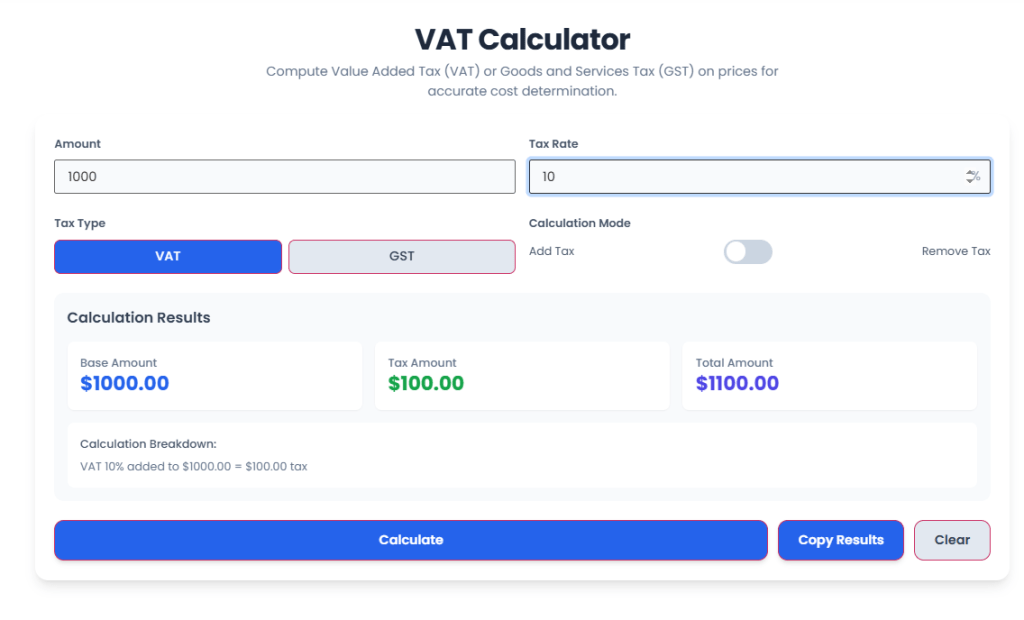
Toolota’s VAT Calculator takes the hassle out of figuring out taxes with just three easy steps:
Step 1: Enter Your Amount
Just type in the price or amount you need to work out the tax for in the amount box. The VAT Calculator works with any number and updates right away as you type.
Step 2: Set Your Tax Rate
Type in the tax percentage that applies in the tax rate box. It already has a standard 20% set as default, but you can easily change it to fit your area or specific needs.
Step 3: Choose Your Calculation Mode
You can use the in two ways: “Add Tax” works out the total price after adding the tax, while “Remove Tax” helps you find the original price if tax is already included. Simply switch between these options depending on what you need, and the calculator will adjust automatically.
See Your Results
The VAT Calculator shows you your results immediately in three simple sections: the base amount, the tax amount, and the total amount. There’s also a clear explanation of how the calculator arrived at these numbers, so you can easily check everything.
Copy or Clear
If you want to use the results elsewhere, hit the copy button to put them straight onto your clipboard. Or, if you need to start over, just press clear to wipe all the fields and begin a fresh calculation.
Key Benefits of Using
Toolota’s is a fantastic tool that can really benefit your business:
Accuracy & Speed: You’ll say goodbye to those pesky manual calculation mistakes, and you’ll get your results instantly. What used to take hours can now be done in just seconds, saving you loads of valuable time every day.
Ensures Compliance: The always keeps its tax rates up-to-date for all the countries it supports. This makes sure your calculations meet all the current rules and regulations, keeping your business safe from any compliance headaches.
Multi-Currency & Language Support: With support for over 150 currencies and multiple languages, this calculator is perfect for businesses operating internationally or for teams with diverse language needs.
Easy Export & Integration: You can easily copy your results with just one click, or download them as PDF, Excel, or CSV files. The VAT Calculator fits smoothly into your existing invoicing and reporting processes.
Professional Results: The calculator gives you clear and accurate tax breakdowns that will make your invoices look great and help build trust with your clients.
Important Conditions & Disclaimer
Getting Accurate Results: The VAT Calculator will only give you correct results if you put in the right information. Always double-check your numbers before you use the results to make important business decisions.
Just a Tool, Not Advice: Think of the VAT Calculator as a helpful tool for doing calculations, not as professional tax advice. If your tax situation is complicated, talk to a qualified accountant or tax expert about the results you get from the calculator.
Check Your Tax Rate: Tax rules and rates change depending on where you are and can also change over time. Make sure the rate you’re using in the calculator is the correct one for your current location before you finish your calculations.
Use It Responsibly: You must use the VAT Calculator lawfully and ethically. It’s absolutely not okay to use it for hiding taxes, committing fraud, or any other illegal activities.
Frequently Asked Questions (FAQ) About the PDF to JPG Converter