
Add events to build your timeline
Create interactive timelines for historical events
Add events to build your timeline
In a world overflowing with information, presenting events, milestones, or project phases in a clear, chronological order is more crucial than ever. Whether you’re a student mapping out historical battles, a project manager outlining a product launch, or a writer plotting a narrative arc, visualizing the sequence of events is key to understanding and communication. This is where a dedicated Timeline Builder becomes an indispensable tool.
A Timeline Builder is a software application or web-based tool designed to transform a simple list of dates and descriptions into a coherent visual story. It automates the tedious task of sorting and arranging events chronologically, allowing you to focus on the content and narrative. The Timeline Builder with Toolota offered on this page exemplifies this perfectly: a streamlined, no-fuss environment where your input becomes a clean, visually distinct timeline instantly.
Forget complex diagramming software or manually drawing lines on a page. This tool provides a focused solution for one job: building a straightforward, elegant timeline directly in your web browser. It’s the digital equivalent of placing index cards on a wall, but with the automatic sorting and neat presentation that only a Timeline Builder in Toolota can provide.
The beauty of a well-designed Timeline Builder lies in its universal utility. Its simplicity makes it accessible to a wide range of users:
Students & Educators: Perfect for history projects, literary analysis (plot timelines), science fair project schedules, or visualizing biographical events. Teachers can use it to create visual aids for lessons.
Researchers & Analysts: Ideal for plotting out historical research, patent timelines, or the sequence of key discoveries in a field.
Writers & Content Creators: Essential for plotting novel chapters, character backstories, blog content calendars, or video production schedules.
Project Managers & Teams: Useful for outlining project phases, marketing campaign milestones, or product development sprints in a simple, shareable format during early planning stages.
Hobbyists & Genealogists: Great for family history timelines, tracking personal goals, or planning event sequences for clubs and organizations.
If you have a list of dates and events that need order and clarity, this Timeline Builder Toolota is designed for you.
The interface is intentionally minimal to get you from idea to visualization in under a minute. Here is the exact process, based on the tool’s actual functionality:
Step 1: Access the Tool
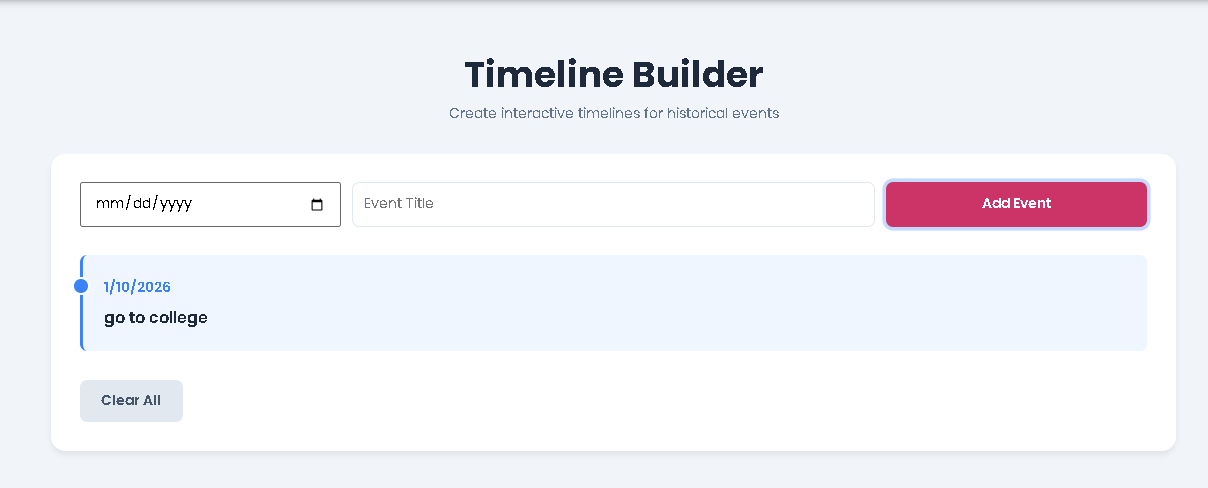
Navigate to the Toolota Timeline Builder page. You are presented with a clean workspace featuring a header, a control panel with input fields, and a main display area.
Step 2: Enter Your First Event
In the control panel, you will see two input fields side-by-side.
Date Field (#event-date): Click on this field and select a date from the pop-up calendar or type it in YYYY-MM-DD format. This is the anchor point for your event.
Title Field (#event-title): In the adjacent text box, type a clear, concise title for your event (e.g., “Declaration of Independence Signed,” “Phase 1 Kick-off,” “Chapter 5 Published”).
Step 3: Add the Event to Your Timeline
Once both fields are filled, click the blue “Add Event” button. The JavaScript behind the tool will:
Validate that both a date and title are present.
Store this event in an array.
Instantly sort all events in the array in chronological order, from earliest to latest.
Clear the input fields, ready for your next entry.
Step 4: Build Out Your Timeline
Repeat Steps 2 and 3 for every event you wish to include. As you add each one, the main display area (initially showing a placeholder message) will update in real-time. You will see your Timeline Builder output taking shape below the input panel.
Step 5: Review and Interpret the Visual Output
Your timeline is rendered as a vertical series of “cards.” Each event card displays:
A colored vertical marker on the left.
The date, formatted in a locale-friendly style (e.g., 7/4/1776).
The event title in bold.
The cards alternate between two light background colors (blue and green tints) for easy visual separation. The timeline flows from top (earliest event) to bottom (latest event).
Step 6: Editing and Management (Important Note)
The current version of this Timeline Builder allows for addition and complete reset. To “edit” an event, you would need to clear the timeline and re-enter your events correctly. To remove all events and start fresh, simply click the “Clear All” button. A confirmation dialog will appear to prevent accidental data loss.
Step 7: Utilizing Your Timeline
Once built, you can:
View & Present: Use the on-screen timeline for personal reference, or share your screen during a presentation or meeting.
Copy Manually: While there is no direct export, you can manually copy the text and dates from the timeline display for use in other documents.
What sets this specific tool apart in the realm of free online utilities? Let’s break down its core advantages:
Speed and Instantaneous Results: The Timeline Builder processes and displays your data the moment you click “Add.” There is no lag, no loading screen—just immediate visual feedback.
Automatic Chronological Sorting: This is the core intelligence of the tool. You can enter events in any order; the Timeline Builder by Toolota will always rearrange them into the correct sequence. This eliminates manual sorting errors.
Clean, distraction-free UI/UX: The interface uses a modern, card-based design with subtle colors (blues and greens) that enhance readability without overwhelming the content. The focus is entirely on your events.
Zero Cost and No Registration Required: Access the full functionality immediately. There are no hidden fees, account sign-ups, or usage limits, making it ideal for quick, one-off tasks or frequent use.
Copy & Visual Clarity Convenience: The output is designed to be clean and legible, making it easy to read from a distance or take information from during a discussion.
Built-in Data Integrity Check: The simple validation (requiring both date and title) ensures every entry on your timeline is complete, maintaining the quality of the final visualization.
While the Timeline Builder is powerful, optimal results depend on user input and understanding its scope.
Output Quality Depends on Input Quality: The tool visualizes the data you provide. Accurate dates and clear titles yield a professional, useful timeline. Vague inputs lead to a vague output.
Browser-Based Session Limit: The timeline exists only in your current browser session. Refreshing or closing the page will erase your work. For long-term saving, take a screenshot or manually transcribe the final output.
Tool for Visualization, Not Collaboration: This is a personal visualization tool. It does not include real-time collaboration, sharing links, or export functions.
Intended for Legitimate Use: As with all tools, it should be used for constructive planning, educational, and organizational purposes.
Yes, absolutely. The Timeline Builder by Toolota is completely free. There is no registration, subscription, or hidden cost. You can build as many timelines as you need without any limitations.
The current version of the Timeline Builder operates within your browser session. The most straightforward way to “save” your work is to take a screenshot (using your computer’s or browser’s screenshot function) of the rendered timeline. You can then save this image to your device for future reference or inclusion in documents.
The tool’s current functionality is centered on quick, linear building. To edit or remove a single event, you would use the “Clear All” button to reset the entire timeline and then re-enter all your events correctly. This approach is most efficient for shorter timelines.
This Timeline Builder distinguishes itself through extreme simplicity and speed. It removes all advanced formatting options, account systems, and complex menus to offer a pure, focused experience: input date and title, get a clean timeline. It’s designed for users who need a visual chronology quickly, without a steep learning curve or feature overload.
Toolota is your all-in-one online tools platform. Fast, simple, and free utilities designed to make everyday digital tasks easier and smarter.