Focus on your work, take breaks, and stay productive.
Sessions
Hours
Streak
This study timer is a digital implementation of the renowned Pomodoro Technique, designed as a fully functional web application that runs directly in your browser. Unlike basic countdown clocks, this tool provides a complete productivity system that helps you structure your work into focused intervals followed by restorative breaks. The study timer from Toolota transforms how you approach tasks by creating a rhythm of concentration and recovery that maximizes mental stamina and minimizes burnout.
The tool operates on a simple yet profoundly effective principle: dedicated, uninterrupted work periods (traditionally 25 minutes) followed by short breaks. Our study timer brings this methodology to life with an intuitive visual interface featuring a circular progress indicator that shows exactly how much time remains in your current session. This real-time visual feedback is crucial for maintaining focus without constantly checking numerical countdowns. The study timer also includes comprehensive statistics tracking, allowing you to monitor your productivity patterns over days and weeks.
Designed for students, remote workers, freelancers, and anyone needing structured focus time, this study timer requires no downloads, installations, or subscriptions. It works instantly in any modern web browser while preserving your data through local storage. Whether you’re preparing for exams, working on a complex project, or trying to establish better work habits, this study timer provides the framework you need to succeed.
Toolotahas developed this study timer with attention to the actual needs of people seeking to improve their concentration and time management. Our tool stands out because it focuses on usability and psychological effectiveness rather than adding unnecessary features. The clean, distraction-free interface ensures that the study timer helps you focus on your work, not on the tool itself.
Reliability is built into every aspect of our study timer. Unlike mobile apps that might interrupt you with notifications or require constant updates, this web-based solution provides consistent performance across all devices. Your session data automatically saves locally, meaning your progress and statistics remain private and secure on your own device. Toolota’s commitment to creating practical, user-centered tools is evident in how this study timer balances simplicity with powerful functionality.
The unique combination of visual progress tracking, customizable intervals, and session analytics makes this study timer particularly effective. The circular progress bar provides satisfying visual feedback that helps maintain motivation, while the statistics panel offers tangible evidence of your improving focus habits. For users of the study timer, this creates a virtuous cycle: using the tool leads to better focus, which leads to more completed sessions, which reinforces the habit of using the tool.
Step 1: Access the Interface
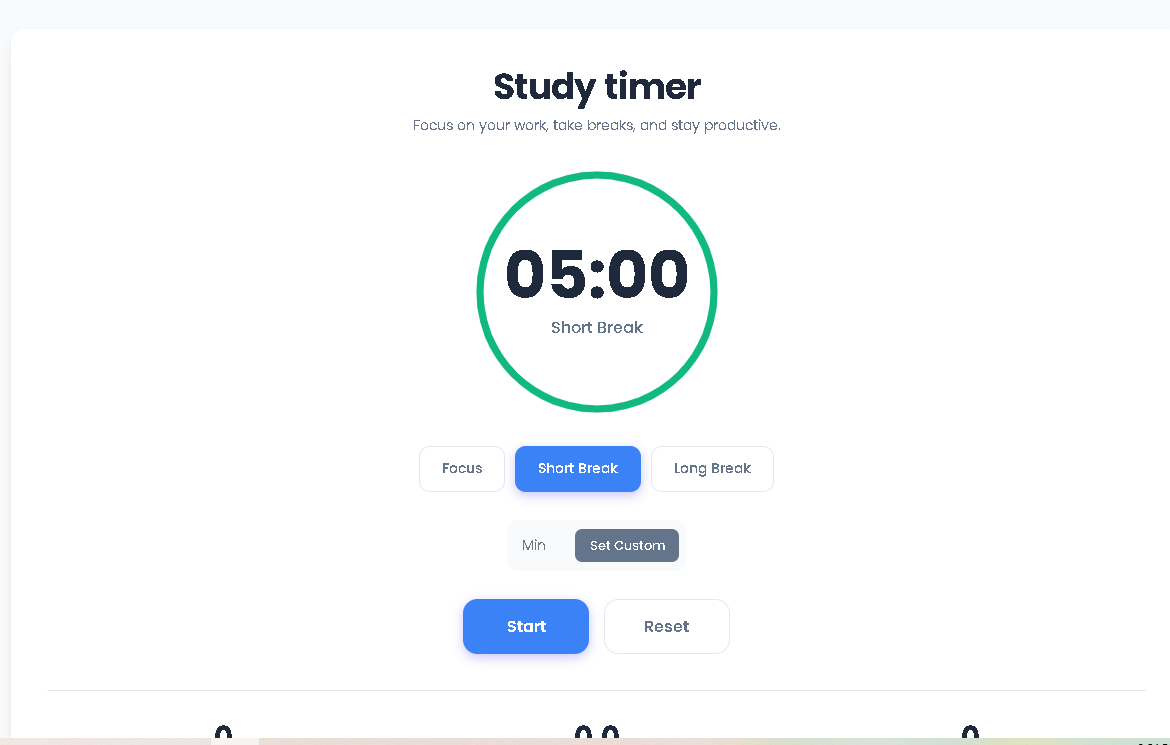
When you open the study timer, you’ll immediately see the central circular timer display showing “25:00” (25 minutes) by default. Above it, you’ll find the title and subtitle, and below it, three mode selection buttons: “Focus,” “Short Break,” and “Long Break.” The “Focus” button will be highlighted in blue, indicating it’s the currently selected mode. This default setting represents the standard Pomodoro work interval that has helped millions improve their productivity.
Step 2: Select Your Timer Mode
Click on any of the three mode buttons to switch between timing presets:
Focus Mode: Sets the timer to 25 minutes for concentrated work sessions
Short Break: Sets the timer to 5 minutes for brief rest periods between focus sessions
Long Break: Sets the timer to 15 minutes for extended recovery after several work cycles
When you click a mode button, several things happen instantly: the timer display updates to show the new duration, the circular progress ring resets completely, and the status text below the timer changes to reflect your selection (e.g., “Focus Time,” “Short Break,” or “Long Break”). The selected mode button becomes visually highlighted with a blue background, while the other two return to their inactive state.
Step 3: Set Custom Intervals (Optional)
If the preset durations don’t match your needs, locate the custom input field below the mode buttons. This white box accepts any number between 1 and 120. Type your desired minutes (for example, “50” for a longer focus session or “10” for a different break length), then either press the “Set Custom” button next to it or hit the Enter key on your keyboard. The study timer will immediately switch to your custom duration, though note that the mode buttons will no longer be highlighted since you’re now in custom mode.
Step 4: Start Your Timer
Click the large blue “Start” button to begin your session. When you do this, the study timer initiates several simultaneous actions: the numerical countdown begins decreasing second by second, the circular progress ring starts shrinking gradually around its circumference, and the status text changes from the mode label to “Running…” The visual progression of the circle provides immediate, at-a-glance feedback about how much time remains without needing to read the numbers.
Step 5: Monitor Progress Visually
As your study timer runs, watch the circular progress indicator. The blue ring gradually shortens around the circle, perfectly synchronized with the numerical countdown. This dual-feedback system serves an important psychological purpose: the shrinking ring creates a sense of urgency and progress, while the precise numbers provide exact timing. You’ll also notice that the “Start” button has been replaced by an orange “Pause” button, giving you control over the running session.
Step 6: Pause or Reset as Needed
If you need to interrupt your session, click the orange “Pause” button. The study timer will freeze exactly where it is—both the numerical display and the progress circle will stop moving. The status text will change to “Paused,” and the “Pause” button will be replaced again by the blue button, now labeled “Resume.” To completely restart your current session, click the “Reset” button on the right. This action immediately returns the study timer to the full duration of your selected mode, with the progress circle restored to complete.
Step 7: Complete Your Session
When your study timer reaches 00:00, several completion events trigger automatically: a gentle notification sound plays, the progress circle disappears completely (showing a full gray circle underneath), and if you’ve granted browser permission, a desktop notification appears announcing “Timer Complete!” The statistics panel at the bottom updates instantly—if you completed a Focus session, the “Sessions” counter increases by one, the “Hours” total adds the session time, and your “Streak” counter increases.
Step 8: Review Your Statistics
After any completed Focus session, check the statistics panel at the bottom of the study timer. The three boxes show:
Sessions: Total number of completed Focus sessions (25-minute intervals)
Hours: Cumulative total of focused hours (calculated from all sessions)
Streak: Consecutive days with at least one completed Focus session
These statistics automatically save to your browser’s local storage every 10 seconds, so you never lose your progress even if you close the tab or browser. This data remains private on your device and helps you track your productivity patterns over time.
Enhanced Focus Through Structured Intervals
The primary benefit of this study timer is its enforcement of the Pomodoro Technique’s proven work-break rhythm. By committing to focused 25-minute intervals followed by guaranteed breaks, you train your brain to concentrate deeply during work periods knowing relief is scheduled. This structure eliminates the guilt often associated with taking breaks while simultaneously preventing marathon sessions that lead to diminishing returns and burnout.
Visual Motivation System
Unlike simple numeric timers, our study timer‘s circular progress visualization provides continuous, at-a-glance feedback that helps maintain motivation. Watching the ring gradually shrink creates a satisfying sense of progression toward your break or completion goal. This visual component taps into psychological principles of gamification, making the act of maintaining focus more engaging and rewarding.
Comprehensive Progress Tracking
The built-in statistics panel transforms your study timer from a simple clock into a personal productivity dashboard. By tracking completed sessions, total focused hours, and current streaks, you gain tangible evidence of your improving work habits. This data helps identify patterns—perhaps you’re more productive in the morning, or you consistently achieve longer streaks when you start before 9 AM—enabling data-informed adjustments to your routine.
Complete Customization Flexibility
While based on proven time intervals, our study timer recognizes that different tasks and individuals require different rhythms. The custom input field allows you to set any duration from 1 to 120 minutes, making the tool adaptable to various scenarios: perhaps 90-minute deep work sessions followed by 15-minute breaks, or 15-minute quick task sprints with 3-minute breaks. This flexibility ensures the study timer serves your specific needs rather than forcing you into a rigid system.
Zero-Friction Accessibility
As a web-based tool, this study timer requires no downloads, installations, updates, or accounts. You can access it instantly from any device with a browser, and your data remains securely stored locally on that device. This eliminates the barriers that often prevent people from adopting new productivity tools—no decision about which app to download, no worry about subscription costs, and no learning curve for installation.
Distraction-Free Interface Design
Every element of our study timer interface serves a clear purpose without unnecessary decoration or features. The clean design minimizes cognitive load, allowing you to focus on your work rather than navigating a complex application. Thoughtful touches like the tabular numerals (which don’t “jump” as digits change) and the consistent color coding (blue for focus, green for short breaks, purple for long breaks) make the tool intuitive to use from your very first session.
Output Quality Depends on Consistent Usage
The effectiveness of any study timer, including ours, depends fundamentally on consistent, proper application. The tool provides the structure and timing, but you must provide the focused attention during work intervals and the genuine disengagement during breaks. Using the study timer while simultaneously checking notifications or multitasking undermines its core purpose. For best results, commit fully to the focused intervals.
Review and Adjust Your Approach Periodically
While the study timer tracks quantitative data (sessions completed, hours focused), you should periodically conduct qualitative reviews of your productivity. Are you accomplishing meaningful work during sessions? Do certain times of day yield better focus? The statistics provide helpful indicators, but you must interpret them in context with your actual output quality and personal energy patterns.
No Generation of Harmful or Unethical Content
This study timer is designed to enhance legitimate productivity for educational, professional, and personal development purposes. It should not be used to facilitate or enhance the creation of unethical, illegal, or harmful content. The tool itself is neutral but becomes valuable or problematic based entirely on how users apply the focused time it helps create.
Basic Technical Requirements
For optimal performance, use the study timer with an updated browser that supports modern web standards. While the tool works across devices, be aware that browser notifications require explicit permission grants. The automatic saving feature uses your browser’s local storage, so clearing browsing data will reset your statistics. For cross-device synchronization, manual tracking outside the tool is recommended.
This study timer implements the complete Pomodoro Technique with visual progress tracking, session statistics, and structured work-break cycles—unlike basic timers that only count down.
Yes, our study timer offers preset modes (25, 5, and 15 minutes) plus a custom input for any duration between 1 and 120 minutes.
Your session statistics automatically save to your browser’s local storage every 10 seconds, so progress remains on the same device and browser.
Absolutely. The study timer is fully responsive and works on all devices—desktops, tablets, and smartphones—with the same features and interface.
Toolota is your all-in-one online tools platform. Fast, simple, and free utilities designed to make everyday digital tasks easier and smarter.
