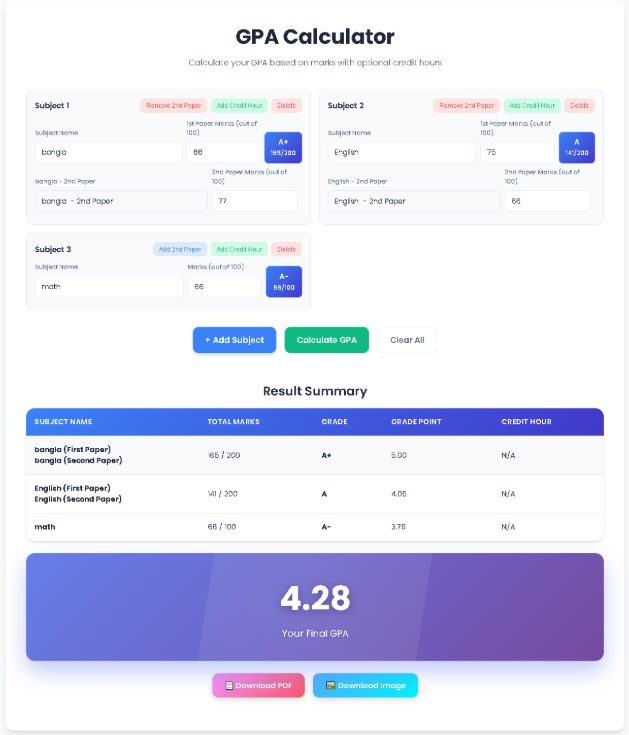
Calculate your GPA based on marks with optional credit hours
| Subject Name | Total Marks | Grade | Grade Point | Credit Hour |
|---|
Calculate precise GPA with Toolota’s advanced GPA Calculator. Handles multiple subjects, credit weighting, and provides downloadable reports for students.
A GPA Calculator is an essential academic tool that transforms raw marks and credit hours into a standardized Grade Point Average. This numerical representation of academic performance helps students, educators, and institutions evaluate achievement consistently across different subjects and grading systems. Unlike manual calculations that are prone to errors, a reliable GPA Calculator automates the complex mathematics behind grade conversions, weighting systems, and final average computations.
The GPA Calculator you’ll find here represents the evolution of academic assessment tools—moving from basic arithmetic to sophisticated digital solutions that handle multiple variables simultaneously. Whether you’re calculating a simple semester average or a complex cumulative GPA with weighted credits, this GPA Calculator provides the accuracy and reliability that modern academic tracking demands.
In a sea of academic tools, Toolota’s GPA Calculator stands out for its precision and user-centric design. Most online calculators offer basic functionality, but our GPA Calculator has been engineered to handle real-world academic complexities. We understand that students face diverse assessment structures—some courses have single papers, others have two; some subjects carry more weight than others through credit hours; and grading scales vary between institutions.
Our GPA Calculator addresses these nuances with features rarely found in free online tools. The dual-paper support accommodates courses divided into multiple assessment components. The credit-hour weighting system recognizes that not all courses contribute equally to your academic load. And the detailed reporting functionality transforms raw calculations into professional documents suitable for academic planning, scholarship applications, or institutional review.
Begin by clicking the “Add Subject” button. Each subject card appears with intuitive input fields. Enter the course name (like “Mathematics” or “Biology”) to keep your calculations organized. The interface supports unlimited subjects, allowing comprehensive semester or cumulative calculations.
For each subject, enter your obtained marks out of 100. The GPA Calculator automatically recognizes whether you’re working with a 100-point or 200-point total system. Need to add a second paper? Simply click “Add 2nd Paper” within any subject card. This flexibility accommodates diverse course structures across educational systems.
For weighted GPA calculations, utilize the credit hour feature. Click “Add Credit Hour” on any subject card to assign weight values. Standard courses typically carry 3.0 credits, but you can customize this to match your institution’s system. The GPA Calculator uses these values to compute credit-weighted averages, providing more accurate academic representations.
As you input data, watch the magic happen. The GPA Calculator instantly converts marks to letter grades and precise grade points using an advanced algorithm. Unlike basic tools that offer only whole number conversions, our calculator provides decimal precision—recognizing that 85% represents different achievement than 89%, even within the same letter grade range.
Once all subjects are entered, click “Calculate GPA.” The tool processes all data through two potential pathways: if credit hours are specified, it computes a weighted average; if not, it calculates a simple mean. The result appears both numerically (like 3.75) and visually through an animated display that celebrates your academic achievement.
Examine the detailed breakdown table showing each subject’s marks, letter grade, grade points, and credit hours. From here, you can download your results as a PDF document or high-quality image—perfect for academic records, advisor meetings, or application materials.
Dual-Paper Support: Accommodates courses divided into multiple assessment components, automatically adjusting total mark calculations and grade conversions for 100-point or 200-point systems.
Credit-Hour Weighting: Goes beyond simple averages by incorporating course weight values, providing GPA calculations that reflect true academic workload distribution.
Precision Grading Algorithm: Converts marks to grade points with decimal-level accuracy, recognizing subtle differences in achievement that basic calculators overlook.
Real-Time Visualization: Displays grade conversions instantly as you input data, with color-coded interfaces and animated feedback that makes the calculation process engaging rather than tedious.
Export Capabilities: Generates professional-quality PDF reports and images directly from your results—no screenshots or manual transcription needed.
Responsive Design: Functions flawlessly across devices, from desktop computers to mobile phones, ensuring access whenever and wherever you need academic calculations.
Data Persistence: Maintains your inputs throughout the session (though does not save between browser sessions for privacy), allowing adjustments and recalculations without starting over.
Input Dependency: The accuracy of any GPA Calculator depends entirely on the correctness of input data. Verify all marks and credit values before calculation to ensure reliable results.
Institutional Variations: While designed for broad compatibility, some institution-specific grading policies (like plus/minus grading with non-standard point values) may require manual adjustment beyond the tool’s default settings.
Browser-Based Functionality: As a web-based tool, this GPA Calculator requires an active internet connection and compatible browser. Calculations are not saved between sessions unless explicitly exported.
Academic Consultation: This tool provides calculations for planning and estimation purposes. For official academic decisions, always consult with institutional advisors and refer to officially calculated GPAs from your school’s registrar.
Privacy Considerations: All calculations occur locally in your browser. No grade or personal data is transmitted to external servers, protecting your academic privacy.
Our GPA Calculator uses a standard 4.0 scale with precise decimal conversions based on exact percentage scores. The algorithm automatically adjusts grade points within letter grade ranges, so 87% converts differently than 82% even though both might be “B+” grades at some institutions. For institutions using different scales, you may need to adjust the output or consult the conversion guidelines provided by your school.
Absolutely. The credit hour feature allows you to assign higher weight values to advanced courses. Many honors and AP courses carry additional weight (often 4.5 or 5.0 instead of 4.0 for an A). Simply adjust the credit values accordingly when setting up your calculation. The GPA Calculator will automatically apply the proper weighting to these courses in your final average.
Beyond significant time savings, our GPA Calculator eliminates common calculation errors like incorrect grade point assignments, arithmetic mistakes, or improper weighting applications. The real-time visualization helps you understand exactly how each mark contributes to your final average, and the export features create professional documentation impossible with manual methods.
While we’ve designed our GPA Calculator to match standard academic calculations, institutional policies can vary. For critical applications like scholarship eligibility or graduation requirements, we recommend using this tool for planning and estimation, then verifying with your institution’s official calculation. The detailed export feature makes comparison easy by providing clear documentation of your inputs and our calculations.
Toolota is your all-in-one online tools platform. Fast, simple, and free utilities designed to make everyday digital tasks easier and smarter.
