Study timer – #1 Focus & 25-Min Study Tool | Toolota
Table of Contents
What This Tool Does
A Flashcard System is more than just a digital stack of question-and-answer cards. It’s a structured methodology for learning and memorization, leveraging proven cognitive techniques like active recall and spaced repetition. The core idea is simple: present a prompt (the question), attempt to recall the answer, and then reveal it to confirm. By systematically reviewing material at optimal, increasing intervals, you move information from short-term to long-term memory far more efficiently than through passive re-reading.
The Flashcard System by Toolota brings this powerful methodology to life in a sleek, self-contained web application. It eliminates the hassle of physical cards, manual scheduling, and complex software. Built directly into your browser with client-side technology, it offers a private, instant, and incredibly effective way to master any subject, from language vocabulary and medical terminology to historical dates and programming concepts.
Why Choose Toolota
In a sea of study apps and tools, our Flashcard System stands out by focusing on simplicity, power, and user sovereignty. You won’t find distracting ads, mandatory logins, or premium paywalls here. This tool is built on the principle that effective learning technology should be accessible, straightforward, and respect your privacy.
Unlike many online tools, this Flashcard System with Toolota stores all your data locally on your device using your browser’s secure IndexedDB database. This means your flashcards are yours alone—never uploaded to a server. It works flawlessly offline after your first visit, giving you the freedom to study anywhere, anytime. The interface is a masterclass in clean design, with just three intuitive tabs that guide you seamlessly from creation to mastery without a learning curve. This is a Flashcard System Toolota designed purely for the learner’s success.
How This Tool Works: The Most Detailed Section
Using this tool is intuitive. Follow this real, step-by-step guide based on the actual interface you see in the HTML.
Step 1: Access the Tool
Simply navigate to the tool’s page. The interface loads immediately—no installation, no account creation.
Step 2: Create Your First Flashcard (The “Create Card” Tab)
Click the “Create Card” tab at the top.
In the “Question/Front” text area, type your prompt (e.g., “What is the capital of France?” or “Define ‘Photosynthesis'”).
In the “Answer/Back” text area, type the correct answer (e.g., “Paris” or “The process by which plants convert light energy into chemical energy.”).
Click the “Add Flashcard” button. Your card is now saved directly to your browser’s local database. Repeat this process to build your deck.
Step 3: Study Your Cards (The “Study” Tab)
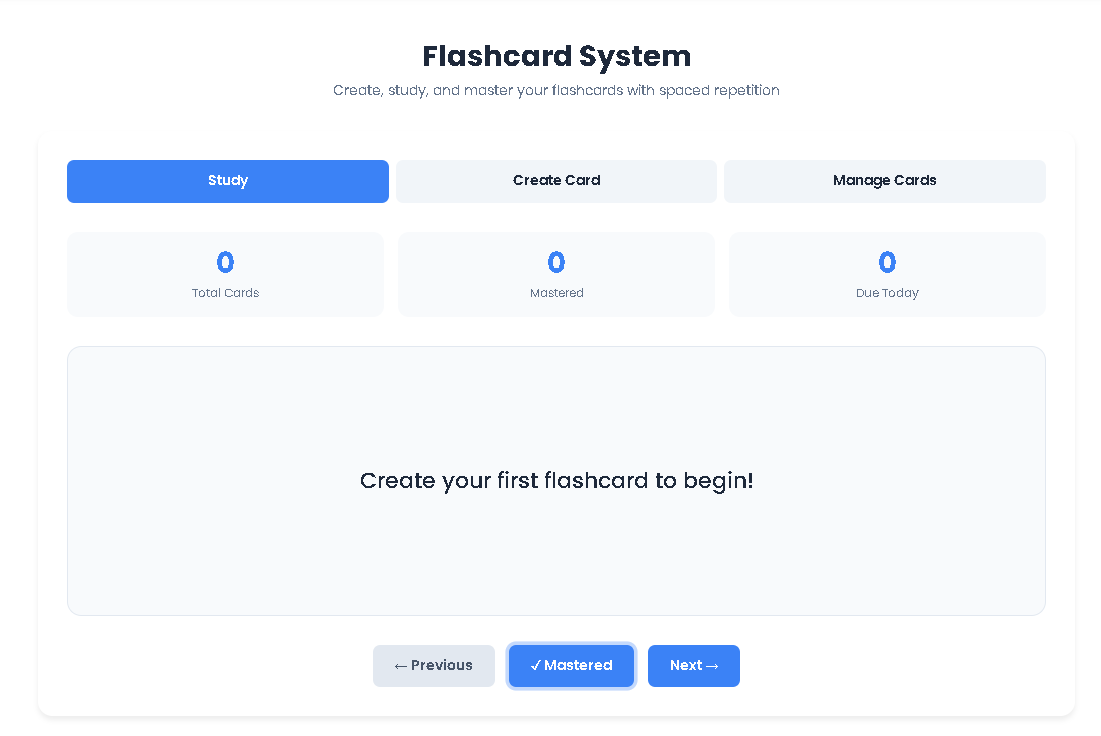
Click the “Study” tab. You’ll see three stat cards: Total Cards, Mastered, and Due Today.
The main screen shows your current flashcard. Click anywhere on the card to flip it and reveal the answer.
After recalling and checking the answer:
Click “✓ Mastered” if you recalled it correctly. The tool uses a smart algorithm to schedule this card for a later review (spaced repetition), increasing the interval each time.
Click “Next →” to see the following card without marking it as mastered, keeping it in the “Due Today” queue.
Use “← Previous” to go back.
Step 4: Manage Your Collection (The “Manage Cards” Tab)
Click the “Manage Cards” tab to see a grid of all your flashcards.
Each card shows its question, answer, and status (Learning/Mastered).
Use the “Delete” button on any card to remove it permanently.
Export Cards (JSON): Click this button to download a complete backup of your flashcard deck as a .json file. This is crucial for safekeeping.
Import Cards: Click this button to select a previously exported .json file and upload it, perfectly restoring your entire collection.
Benefits This Tools
Interactive Flip Card: The central study mechanism provides a tactile, engaging review experience that mimics physical flashcards.
Smart Spaced Repetition Engine: When you mark a card as “Mastered,” the system automatically calculates and schedules the next optimal review time, exponentially increasing intervals to cement long-term memory.
Local-First Data Storage: All data resides securely in your browser. This guarantees privacy, allows offline use, and ensures instant loading with no network dependency.
Comprehensive Deck Management: The full Flashcard System isn’t just about studying. Easily create, browse, and delete individual cards. The import/export functionality via JSON gives you complete ownership and portability of your data.
Progress Dashboard: At-a-glance stats show your total card count, how many you’ve mastered, and—most importantly—how many are “Due Today,” guiding your daily study session.
Responsive, Clean UI: Built with a modern design system, the tool is fully functional and beautiful on desktops, tablets, and mobile phones.
Important Conditions & Guidelines for Use
Output Depends on Input: The quality of your learning is directly tied to the quality of the flashcards you create. Clear, concise cards yield the best results.
Browser Storage Limit: Your cards are stored in your browser’s local database. While limits are high, extremely large decks (10,000+ cards) may require management.
Manual Review is Key: While the system schedules reviews, consistent daily or weekly study sessions are required for the method to work.
No Illegal Use: This tool is intended for personal educational and knowledge-building purposes only.
Clear Browser Data Warning: If you clear your browser’s site data or cache, your local flashcards will be deleted unless you have a recent JSON export.
Frequently Asked Questions (FAQ)