
Random Password Generator
Generate strong, secure passwords with customizable criteria for maximum protection.
Password Strength Not Generated
Password Criteria
4 64
Include Characters:
Additional Options:
0
Generated
0
Length
0
Char Sets
Generate strong, secure passwords with customizable criteria for maximum protection.
0
Generated
0
Length
0
Char Sets
Toolota’s Random Password Generator is a smart security tool that runs on your device to create really strong, unpredictable character strings. Given how common data breaches are these days, using a Random Password Generator is like having a solid first defense. It makes sure your passwords aren’t based on easily guessed patterns or details about you. Unlike passwords we make up ourselves, this tool uses math algorithms to come up with combinations that are extremely difficult, if not impossible, for hackers to crack using usual methods.
This tool works by grabbing specific details you provide—like how long you want the password and what kind of characters it should include—and then feeding that information into a super secure random number generator. The Random Password Generator then picks characters one by one from a huge mix of uppercase letters, lowercase letters, numbers, and symbols. What you get is a completely unique string that doesn’t spell out any words, making this tool super useful for anyone wanting to keep their email, banking, or social media accounts as secure as possible.
Toolota offers a top-notch Random Password Generator experience by focusing on both security and user-friendliness. Our Random Password Generator is crafted with cutting-edge HTML5 and JavaScript, ensuring that password creation takes place right on your device. When you use our tool, your sensitive information never leaves your device—it’s never sent to any server. This makes the Toolota Random Password Generator one of the safest choices you can find online, blending fast processing with complete privacy for users all around the world.
The main issue that a Random Password Generator tackles is the “human factor” in security. People often rely on easily guessable patterns, like birthdays or common words, and a Random Password Generator completely sidesteps this. Plus, it helps protect against “credential stuffing” attacks too. If one site gets compromised, your other accounts stay secure because the generator makes sure each password you use is completely unique and not related to any other.
To get the most out of the Word Scramble Game, please keep these important points in mind.
Spelling Matters: The game checks your answers exactly as you type them. Although it doesn’t care about capital letters (so “cat” is the same as “CAT”), any typos will count as incorrect. Always double-check your spelling before you hit Submit.
Browser Needs: This game runs on JavaScript, which handles everything from shuffling the letters to keeping track of time and scores. Make sure JavaScript is turned on in your browser. For the smoothest experience, use up-to-date browsers like Chrome, Firefox, Safari, or Edge.
Keep Your Progress Safe: If you’re playing in “Lives” mode, remember that refreshing the page will reset your progress and lives. To keep your high score and level, avoid closing or refreshing your browser window while you’re in the middle of a game.
Keep it Clean: We’ve made sure the words in the game are suitable for everyone. Still, please don’t use the answer box to type anything inappropriate—even though the game mainly checks for correct words.
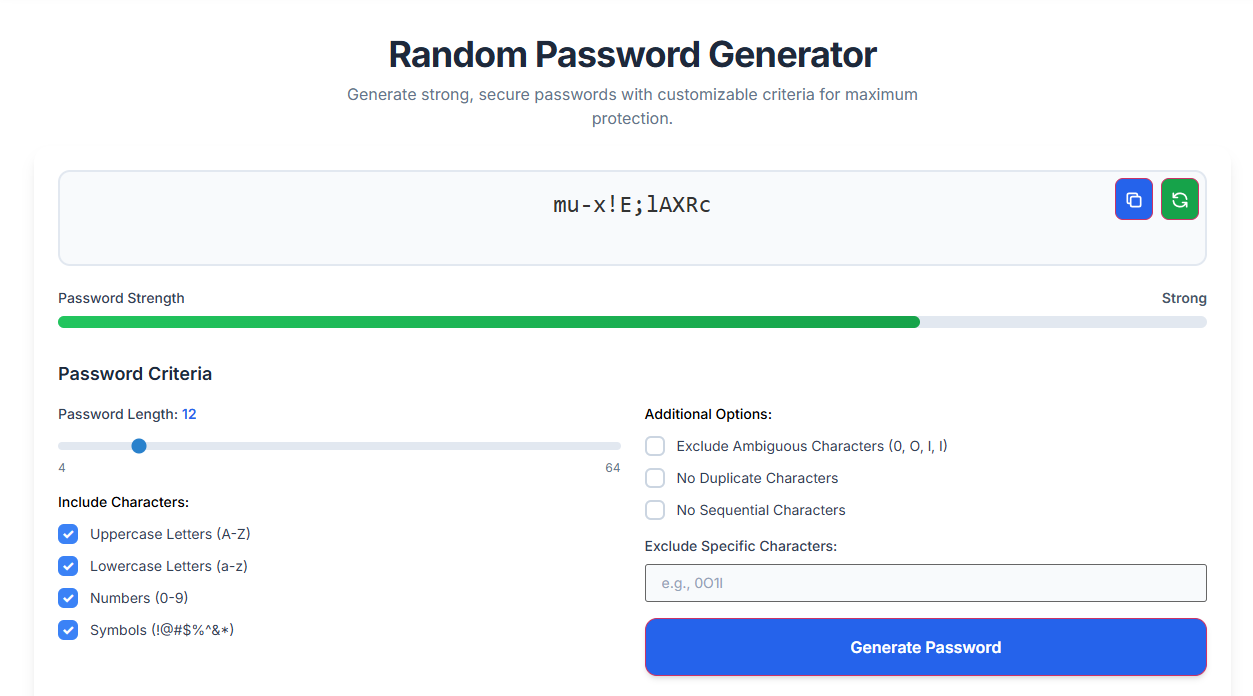
Figuring out how the Toolota Random Password Generator works really helps you see how secure it is. The screen is neatly organized into different sections, giving you complete control over how your password is made.
Input Logic
First up is the Password Length Slider. You can move it to make passwords as short as you like or as long as 50 characters. Below that, you’ll find switches for:
Uppercase letters (A-Z)
Lowercase letters (a-z)
Numbers (0-9)
Symbols (!@#$%^&*)
Advanced Selection Features
One cool thing about this password generator is the Exclude Ambiguous option. This stops it from using characters that look similar, like ‘i’, ‘l’, ‘1’, ‘O’, or ‘0’. Plus, it has “No Duplicate” and “No Sequential” settings. These make sure your password doesn’t contain easy-to-guess patterns like “abc” or “111,” which hackers often look for.
The Conversion Process
When you hit the Generate Button, the generator’s brain kicks into action. It looks at which character types you’ve chosen and creates a special pool of characters to pick from. Then, it randomly grabs characters from this pool one by one until it reaches the length you set. This random picking is what makes the passwords so unpredictable and strong.
Right Panel & Editor Features
The output panel of the Random Password Generator is all about making things efficient and productive for you.
Strength Meter: This feature works in real-time, calculating your password’s strength (its “entropy”) and immediately showing you whether it’s considered “Weak,” “Fair,” or “Strong.”
Copy & Download: Getting your generated password is super easy. Just one click lets you copy it straight to your clipboard or save it as a handy text file.
Regenerate: Didn’t like the first password you got? No problem at all! You can instantly generate a new one with just another click.
One of the biggest advantages of our Random Password Generator is how incredibly fast it works. You can whip up a super-secure, 20-character password in just a blink of an eye—less than a second! Plus, it’s easy for everyone to use, no matter what language they speak or how tech-savvy they are, thanks to its clean and straightforward design. By taking care of creating those tough passwords for you, it not only saves you time but also helps keep your identity safe from the nightmare of theft.
The Random Password Generator is a really useful tool, but how well it works really depends on how you use it.
Character Types: It works best when you make sure to select all the different kinds of characters it offers – like symbols, numbers, and letters.
Compatibility Check: Before you use a password with symbols, it’s a good idea to double-check that the website or service you’re signing up for actually accepts those kinds of characters.
Legitimate Use: Please only use this tool for genuine security reasons, like protecting your personal accounts.
Safe Storage: Once you’ve generated a new password, be sure to store it securely, ideally in a dedicated password manager.
Yes, the Toolota Random Password Generator is extremely safe because it uses client-side JavaScript. This means the Random Password Generator creates the password on your computer, and the data is never uploaded to any external server
For maximum security, we recommend setting the Random Password Generator to at least 16 characters. A 16-character string from a Random Password Generator would take billions of years to crack with current technology.
No, our Random Password Generator does not keep any logs of the passwords you create. Once you refresh the page, the data from the Random Password Generator session is permanently wiped from your browser’s temporary memory.
Absolutely! The Random Password Generator is perfect for creating complex WPA2 or WPA3 keys. Using a Random Password Generator for your home network prevents neighbors or hackers from “guessing” your Wi-Fi password.
Toolota is your all-in-one online tools platform. Fast, simple, and free utilities designed to make everyday digital tasks easier and smarter.