
Unit Converter
Convert between common units of measurement with precision and ease.
Conversion Formula
Select units to see formula
Quick Reference
Recent Conversions
No history yet
0
Total
Length
Mode
6
Decimals
Convert between common units of measurement with precision and ease.
Select units to see formula
No history yet
0
Total
Length
Mode
6
Decimals
Hey there! Looking for a tool to make all your unit conversions between different measurement systems easy? You’ve found it. Whether you’re a student tackling physics homework, a chef working from a recipe with tricky cup and gram conversions, or an engineer jumping between exact numbers and real-world units, this tool’s got your back.
The Measurement Converter is designed to handle those challenging, time-consuming calculations so you can focus on what matters. Forget the confusing, exact figures and manual work – just get the converted number you need.
We’ve designed this converter to be a bright, clear space that works. Forget the clunky, old-school calculators—our Unit Converter gives you support for six essential categories:
Length (meter, foot, inch, etc.)
Weight (kilogram, pound, ounce, etc.)
Temperature (Celsius, Fahrenheit, Kelvin)
Volume (liter, gallon, milliliter, etc.)
Area (square meter, square foot, acre, etc.)
Speed (km/h, mph, m/s, etc.)
You won’t need a bunch of different apps or to worry about mistakes happening while doing the math by hand.
With support for six handy, easy-to-go categories—Length, Weight, Temperature, Volume, Area, and Speed—this Unit Conversion Tool means you won’t need a bunch of different apps. It brings all your measurement tools into one simple place.
Why should you choose this particular Unit Converter when there are so many options out there? Well, it all comes down to the careful way we’ve designed it using advanced HTML and JavaScript to make sure it works reliably. At Toolota, making sure you have the best experience is our top priority.
What makes this tool special is its responsive, real-time conversion engine. The moment you start typing in the “From” field, it’s ready to calculate right away, so there’s no waiting around. Plus, we’ve added a “Unit Converter“ grid—something you won’t find everywhere—that instantly suggests handy values like 1, 5, or 10 units, helping you skip typing them out.
And there’s more: our Unit Conversion Tool has a “Conversion History” sidebar that sticks around. Unlike many basic tools that clear your data when you refresh the page, ours uses local storage to remember your last 50 conversions. This way, you can easily keep track of your work and jump back to previous calculations without having to retype everything.
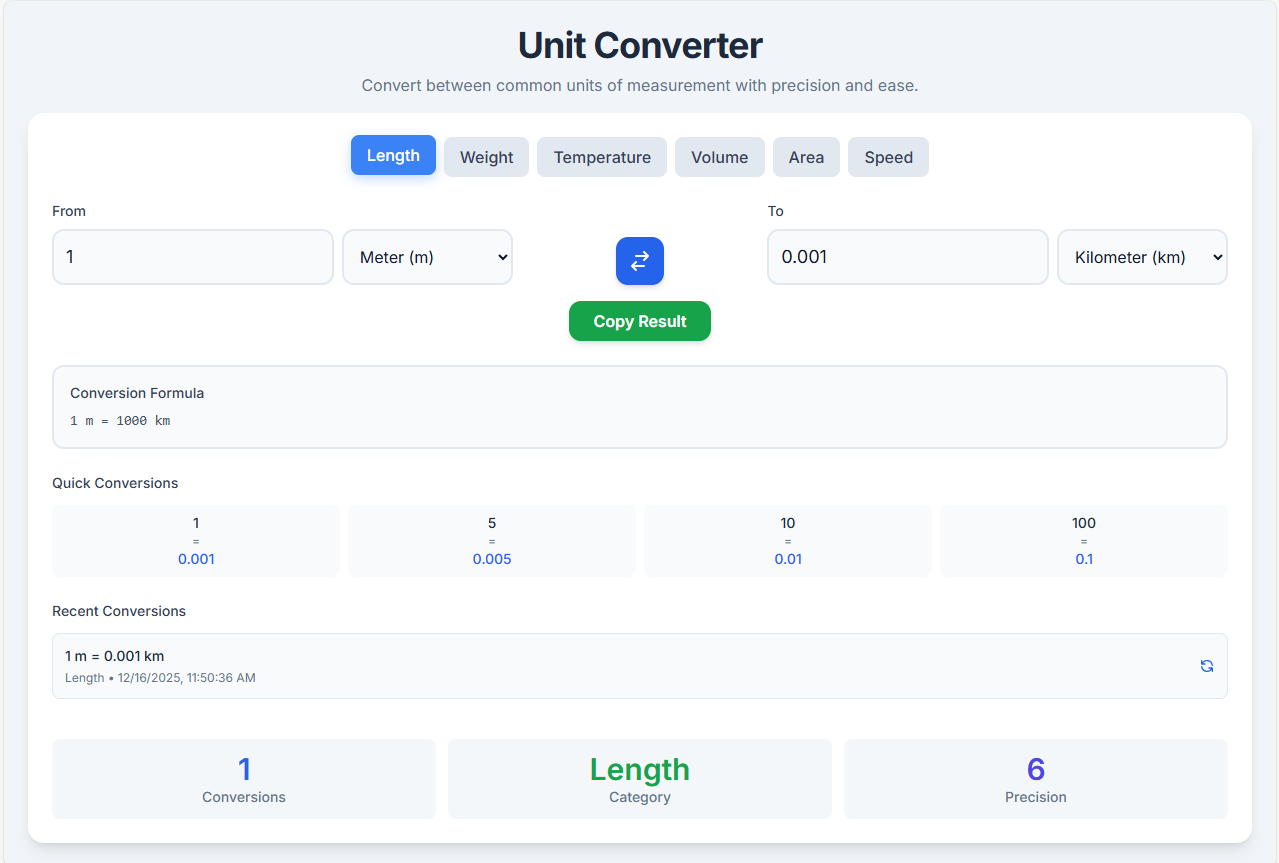
This section takes a closer look at every part of the Unit Converter to help you become really comfortable with its features. We’ve put thought into every element, from the category tabs to the formula display, to make sure it’s as useful as possible for you.
Category Selection Tabs
Right at the top of the screen, you’ll see six buttons for different categories. This converter sorts measurements into these groups:
Just click a tab, and the Online Unit Calculator will instantly switch to show the units that belong to that category.
The Conversion Interface (Input & Output)
The main part of the tool is where you enter your values and see the results. This is the “From” and “To” section.
Swap and Copy Features
There’s a Swap Button (with two arrows) right between the input fields. If you click it, the “From” and “To” units swap instantly, letting you do the opposite conversion without losing your current data. And when you get your result, you can hit the green “Copy Result” button below it to copy the number to your clipboard—just one click, and you’ll even get a little pop-up to confirm it worked!
Dynamic Conversion Formula
Right under the main input fields, you’ll see a gray box that shows you the exact math being used. This is super helpful if you’re using the tool to learn, like in a class. For example, if you’re converting temperature, it’ll show the full formula (such as °F = (°C × 9/5) + 32), while simpler conversions will just show the multiplication factor.
Quick Conversions Grid
To help you work faster, we’ve added a “Quick Conversions” section with four easy-to-click boxes showing common values like 1, 5, 10, and 100. Just tap any of these boxes, and the Unit Converter will fill in that value right away—perfect for quickly checking standard amounts without typing anything.
Conversion History Sidebar
On the right side (or at the bottom on mobile), the tool keeps track of everything you’ve done. Every time you convert something, it adds the details—what you put in, what you got out, the units used, and when you did it—to a list. And if you ever want to reuse a past conversion, just click the “recycle” icon next to it, and those exact values will pop right back into the main inputs.
Stats Bar at the Bottom
The footer stats keep tabs on your usage.
Using this digital tool gives you a clear edge over doing things the old-fashioned way.
Lightning-Fast Performance: Thanks to its powerful JavaScript engine, our Unit Converter does the math in the blink of an eye—literally milliseconds. There’s no need to wait for pages to reload; everything updates instantly right in your browser.
Precision You Can Trust: Say goodbye to human mistakes. This tool relies on exact floating-point calculations to guarantee every conversion is spot-on, accurate to six decimal places. That level of precision is essential for serious scientific or engineering work.
Clear and Easy to See: With its clean design featuring plenty of space, you’ll always know exactly where you are. Important details stand out, making it super easy to use, even for those with visual impairments or anyone who prefers a clean, distraction-free screen.
Works Everywhere You Do: Built with modern technology, the layout adjusts perfectly to any screen size. Whether you’re using it on your phone while out shopping or on your computer while studying, you get the full experience without missing a beat.
Learn While You Convert: This tool actually shows you the formula used for each conversion. It turns a basic Dimensional Converter into a helpful learning tool, letting you understand the math behind the results.
This tool is quite effective, but it works best under specific circumstances. Here’s what to keep in mind:
Browser Compatibility: This Unit Converter depends on JavaScript to do its job. Make sure JavaScript is turned on in your browser so that the calculations and animations can run smoothly.
Input Validity: The results you get will only be as accurate as the information you provide. If you input letters or symbols instead of numbers, the converter won’t be able to give you a result. Stick to clear numeric values for the best outcomes.
Precision Limits: If you’re working with extremely large or tiny numbers, you might run into some standard limitations with how they’re handled. For everyday tasks, this converter is very precise. However, if you’re doing specialized scientific work, you may need to use more advanced software.
Internet Connection: Even though the tool itself works without the internet once it’s loaded, you’ll need an internet connection the first time you access it. After that, you can use it offline until you refresh the page.
Yes, absolutely. This Unit Converter is fully programmed to handle negative values, which is essential for Temperature conversions like Celsius to Fahrenheit. Simply type the negative sign before your number, and the formula will adjust automatically to provide the correct result.
Yes, it does. We utilize your browser’s local storage to save your recent history. When you return to the Unit Converter, your previous 50 calculations will still be listed in the history section, allowing you to resume your work exactly where you left off.
This tool is 100% free for everyone. You can use this Unit Converter for personal, educational, or commercial calculations without any cost. There are no hidden fees, subscriptions, or paywalls blocking access to any of the measurement categories.
The tool is set to display results with high precision, typically rounding to six decimal places. This ensures that your Unit Converter results are accurate enough for detailed construction, cooking, or academic work without cluttering the screen with unnecessary infinite decimals.

Toolota – 350+ Free Online Tools for PDF, AI, Design & More. Use any place, any time with out paying and signup needed.