Word Scramble Game – Fun & Simple Brain Puzzle | Toolota
Table of Contents
Description
Welcome to the ultimate vocabulary showdown! The Word Scramble Game on Toolota is an interactive, browser-based puzzle that puts your spelling speed and mental sharpness to the test. Unlike those old-school puzzles, this digital tool gives you a lively experience where the letters shuffle automatically, and it’s up to you to rearrange them to spell the correct word.
Why Choose Toolota
When you’re on the hunt for an online puzzle, the overall feel really makes a difference. The Word Scramble Game on Toolota really stands out because it has a clean, uncluttered design and comes packed with powerful features that come straight from some top-notch web coding.
Why this tool is handy: Most scramble games are loaded with ads or need you to download something. Our game, though, loads right away in your browser. Plus, it uses a smart randomization algorithm to make sure words are scrambled well, stopping you from just guessing based on how they look.
Reliability and Design: Made with the newest web tech (like Tailwind CSS and JavaScript), the game looks good and works great on any device. Whether you’re on a computer, tablet, or phone, everything stays neat and plays smoothly without any layout mess-ups. The Word Scramble Game makes sure your session runs like clockwork, no lag, and it keeps track of your streaks and scores perfectly.
Unique Features: Toolota gives you options that you won’t find everywhere else. You’re not stuck with just one way to play. You can switch between a laid-back mode or a high-pressure challenge. There’s also a “Streak” counter and “Level” progression built in, which turns the whole thing into a game. It really motivates you to keep going, push yourself, and get better each day.
How This Tool Works: The Most Detailed Section
This section takes a closer look at the Word Scramble Game’s features, breaking down the specific HTML elements and mechanics that bring it all together. We’ve put careful thought into every button and display to make sure it’s as easy and intuitive as possible for you.
1. Game Settings Panel
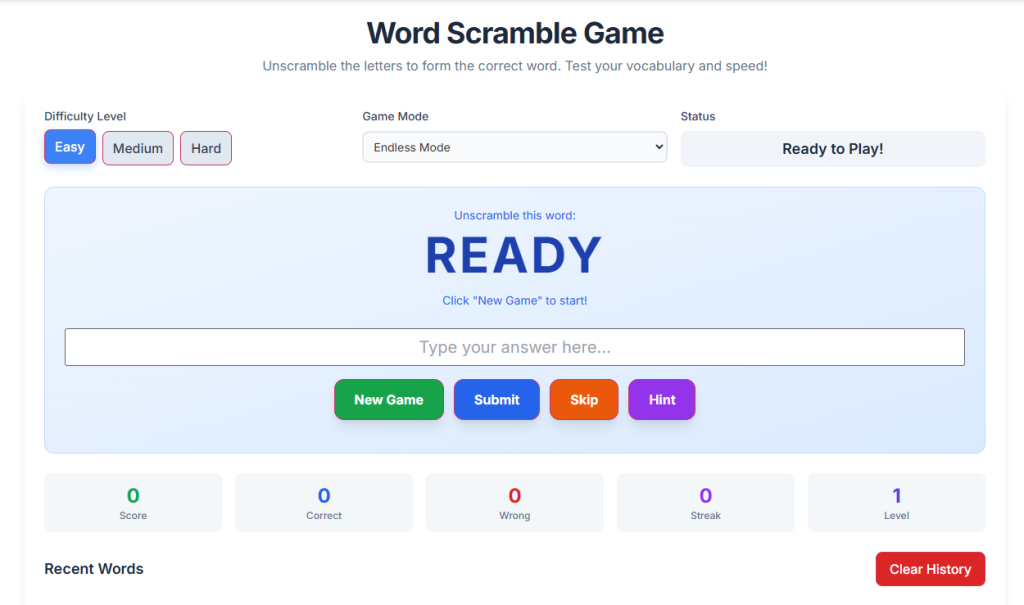
Right at the top of the screen, you’ll spot the control center. This is where you can customize the Word Scramble Game to match your skill level.
Difficulty Level: The game pulls words from three different databases:
Easy: Simple words like “CAT” or “SUN” (think animals or nature). Great for beginners or kids.
Medium: Words like “COMPUTER” or “RAINBOW”. Perfect for casual players.
Hard: Tougher terms like “ENCYCLOPEDIA” or “METAMORPHOSIS”. Reserved for true word pros.
-
Game Mode Selector: Pick how you’d like to play:
Endless Mode: No rush, just relax and solve puzzles at your own pace.
Timed Challenge: A 60-second timer (built with JavaScript) starts counting down, so you’ll need to think fast.
Status Display: This area updates in real-time depending on your chosen mode—showing the remaining time, your lives left (with heart icons), or a “Ready to Play” message when you’re set to start.
Scrambled Word Display: This big text area is your puzzle hub. You’ll see the letters mixed up here, and they’ll magically rearrange themselves using a cool animation effect built into the game.
Category Indicator: Right under the jumbled letters, you’ll find a hint about the puzzle’s theme, like “Nature” or “Technology.” Paying attention to this can really help you crack those tougher words!
Answer Input: There’s a large, central text box provided for you to type your guess. Just remember, you won’t be able to type in it until you hit “New Game.”
Action Buttons: You’ll find a few buttons to control the Word Scramble Game:
New Game: Click this to start fresh – it’ll reset the scrambled word and your score.
Submit: This checks if your guess is right by comparing it to the hidden answer.
Skip: Feeling stuck? This button will show you the answer, but be warned, it will count as a “Wrong” attempt, so it affects your stats.
Hint: Need a little nudge? This reveals a definition or clue (like “A furry pet that meows”). Keep in mind, though, using a hint might lower the points you could have earned for that word.
3. Visual Feedback and Animation
The tool uses visual signals to talk to you as you play.
Right Answer: When you type the correct word, the input box briefly glows green (that’s the “correct answer” animation), and you’ll see a little pop-up message.
Wrong Answer: If you get it wrong, the box will jiggle from side to side (that’s the “wrong answer” animation) to show you made an error, all without needing to refresh the page.
4. Statistics Dashboard
Live stats are displayed right at the bottom of the tool.
Score: Your points add up based on how hard the word was and if you’re on a winning streak.
Correct/Wrong Counts: This keeps tabs on your success rate.
Streak: This counter goes up every time you get one right in a row, giving you a boost.
Level: As you solve more words, your level goes up, giving you a clear sense of how far you’ve come in the Word Scramble Game.
5. Game History Log
Depending on your screen size, you’ll find a scrollable history panel on the side or at the bottom. It records everything from your session, listing each word you tried. You can see the scrambled version, what you answered, and whether it was right or if you skipped it. This makes it easy to look back at your mistakes and learn from them.
Benefits This Tools
Playing the Word Scramble Game is about more than just having fun—it actually helps your brain and learning too!
Sharpening Your Mind: The “Timed Challenge” mode is great for training your brain to quickly understand what you see and recall words, even when you’re under pressure. This really helps improve your thinking speed and how fast you react.
Building Your Vocabulary: Since the game uses words from all sorts of topics—like “Anatomy” and “Geography”—it helps you practice spelling and learn new ideas. Plus, the hint feature acts like a mini-dictionary, giving you definitions that help you remember what each word means.
Relaxing and Focusing: When you concentrate on one thing, like figuring out a scrambled word, you get into a “flow” state. This can lower your stress levels and make it easier to concentrate. Our Word Scramble Game has a clean design so you can stay focused on the puzzle without being interrupted by pop-ups.
Learning Anywhere: Because the game works right in your web browser, anyone with internet access can play. Teachers can even use it on smartboards in class, and students can practice from home.
Important Conditions & Guidelines for Use
To get the most out of the Word Scramble Game, please keep these important points in mind.
Spelling Matters: The game checks your answers exactly as you type them. Although it doesn’t care about capital letters (so “cat” is the same as “CAT”), any typos will count as incorrect. Always double-check your spelling before you hit Submit.
Browser Needs: This game runs on JavaScript, which handles everything from shuffling the letters to keeping track of time and scores. Make sure JavaScript is turned on in your browser. For the smoothest experience, use up-to-date browsers like Chrome, Firefox, Safari, or Edge.
Keep Your Progress Safe: If you’re playing in “Lives” mode, remember that refreshing the page will reset your progress and lives. To keep your high score and level, avoid closing or refreshing your browser window while you’re in the middle of a game.
Keep it Clean: We’ve made sure the words in the game are suitable for everyone. Still, please don’t use the answer box to type anything inappropriate—even though the game mainly checks for correct words.
Frequently Asked Questions (FAQ) About the PDF to JPG Converter