
0
Habits
0
Done Today
0
Avg Streak
Build streaks and transform your daily routine.
The Toolota Habit Tracker is a straightforward, single-page web app created to help you build and stick to good Habits by logging your daily activities and showing off your progress with cool streak visuals. Its clean, full-screen design keeps things simple and lets you concentrate entirely on what matters most—your personal development. This tool tackles the usual challenge of being inconsistent with self-improvement by giving you a clear, visual way to see your daily efforts. It also solves the hassle of juggling multiple apps by providing one easy-to-use place, all stored safely in your browser, so your info stays private and is always ready when you need it. With the Toolota Habit Tracker, managing your routines becomes a breeze—you can easily watch your progress and keep those important streaks going strong, which is really what it takes to succeed in the long run.
Toolota is all about bringing you smart, dependable tools, and our Habit Tracker is a prime example of that. We took a close look at what made other tracking apps so complicated and created something that focuses purely on simplicity and giving you instant feedback. The way it’s put together—using HTML—shows real care in the user experience, making it easy to scan with a clear header, a specific spot for your inputs, a list of habits you can scroll through, and a section for stats, all neatly packaged in a clean card with a subtle shadow.
The Habit Tracker comes to life thanks to JavaScript that works directly with specific parts of the page, making everything feel smooth and responsive for anyone using it.
Adding and Managing Habits
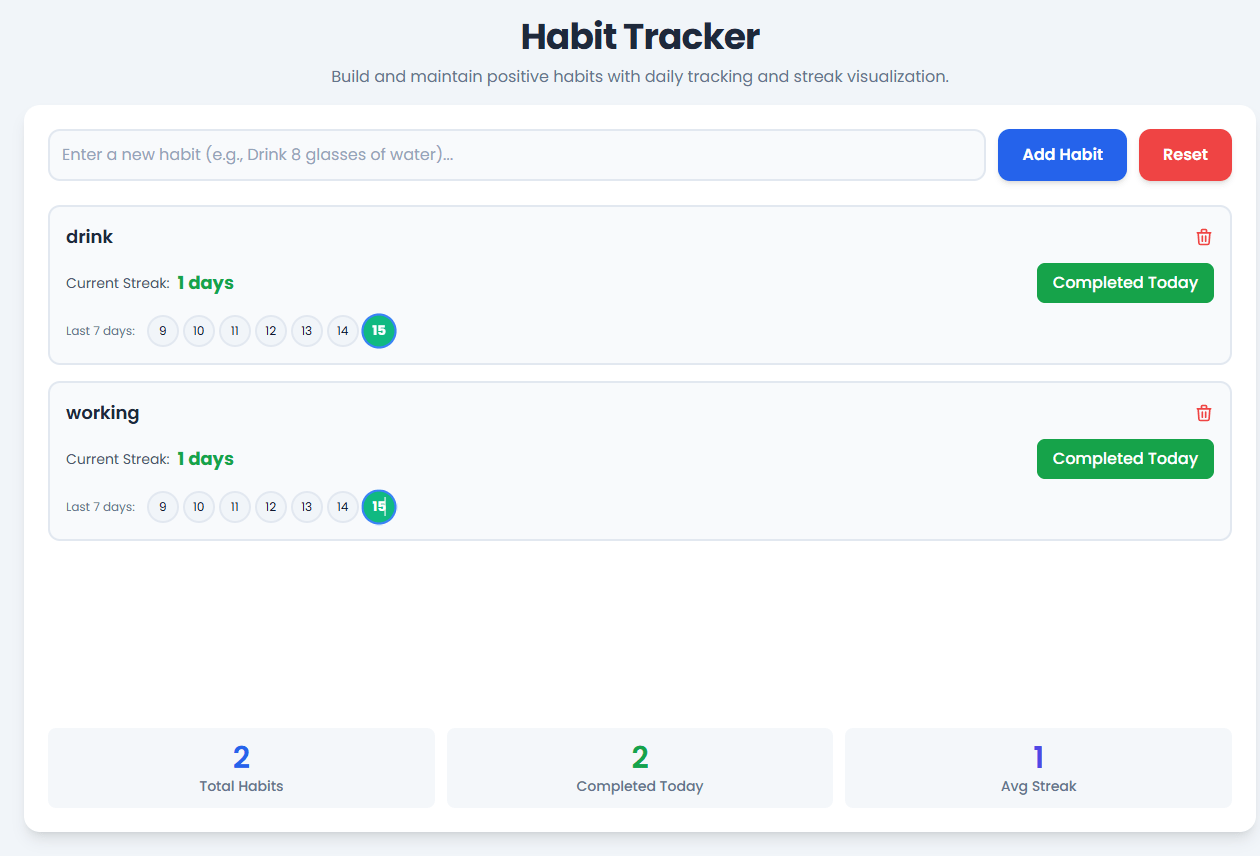
Input Field (habit-input): This is where you’ll type in the details of your new habit (like “Drink 8 glasses of water…”). There’s helpful placeholder text to show you what to enter, and the styling makes it stand out. Plus, you’ll get a subtle highlight when you click on it (that little ring effect).
Add Habit Button (add-habit-btn): When you click this button, it runs the addHabit() function in JavaScript. First, it checks that you’ve actually typed something. The button itself is designed to catch your eye and feel satisfying to press (with that blue color and slight zoom on hover).
Keyboard Support: The app is clever enough to notice when you press ‘Enter’ in the input field, too. This does exactly the same thing as clicking the button, which makes the whole process a bit faster.
Data Structure: Every new habit gets saved as a special object. It includes a unique ID (handled by habitIdCounter), the text you entered, a list of dates you’ve completed it, and the time you created it. This detailed setup makes it easy to keep tabs on your progress and calculate streaks.
Deleting Habits: Next to each habit you add is a delete button (which runs deleteHabit(habit.id)) featuring a trash can icon. Clicking it will remove that habit from your list and update the screen right away. Take charge of your daily routine with Toolota’s Habit Tracker.
Tracking Your Progress and Streaks
Marking Completion: The main way you interact with your habits is by using the “Mark Complete” button. When you click it, it triggers a function called toggleHabitToday(habit.id). This function is quite important because it checks if today’s date (which it gets using getToday()) is already in the habit’s list of completed dates.
If the habit hasn’t been completed today, it adds today’s date to the list, and the button changes its text to “Completed Today” and turns green (using a bg-green-600 style).
If the habit has already been marked as completed today, it removes today’s date from the list, and the button goes back to its original state.
How Streaks Work: The calculateStreak(habit) function figures out how many days in a row you’ve been completing a particular
Habit. It starts with today and then checks each previous day one by one to see if you completed the habit, giving you an up-to-the-minute count of your current streak.
Getting Feedback: When you perform actions like adding a new habit, marking one as complete, or deleting one, a subtle, animated notification (with the class notification-active) will pop up in the bottom right corner. This serves as immediate confirmation and a little positive reinforcement. The app is designed to let you easily see how you’ve been doing over the last 10 days.
Tracking Your Progress: Last 7 Days
The Mini Calendar on each Habit card shows a row that automatically updates to display the past week’s activity (last7Days). This visual snapshot is super helpful for seeing how consistent you’ve been recently.
Design Details:
Days you’ve checked off get a special “completed” style—think a cheerful green background with white text to celebrate your win.
The current day stands out with the “today” look—a noticeable blue border (border: 2px solid #3b82f6) so you always know where you are in the cycle.
When you mark a day complete, you’ll notice a nice little animation: the circle smoothly grows a bit (transform: scale(1.1)) over 0.3 seconds (transition: all 0.3s ease). It’s a small but satisfying visual reward for sticking to your Habit!
Real-Time Statistics
Check out the bottom part of the main card – it shows you three key stats that update automatically. These are super important for keeping an eye on how you’re doing overall. All the math behind these numbers is handled by the updateStats() function:
Total Habits (total-habits): This is just the simple count of how many Habits you currently have set up (it checks the length of your habits list).
Completed Today (completed-today): This figure tells you how many Habits you’ve marked as done today. It counts only the habits where today’s date is listed in their completion dates.
Avg Streak (avg-streak): This one calculates the current streak for each Habit, adds all those streaks together, and then divides by the total number of Habits (if you have any Habits at all). It gives you a rounded number as the average. Keeping track of this average is a great way to stay motivated and keep those streaks going!
Data Persistence and Storage
Toolota Habit Tracker keeps all your data safe and sound using the browser’s built-in localStorage feature. This makes it a fast and secure way to track your personal Habits right in your browser.
Loading: When you first open the tracker, the script automatically looks in localStorage to see if you already have any saved Habit data (habits) or a Habit ID counter (habitIdCounter). If it finds data, it loads it up. If not, it just starts fresh with empty lists and counters.
Saving: The saveHabits() function kicks in after every big action you take – like adding a new Habit, marking one as complete, or deleting one. It immediately saves the latest version of your Habits list and the updated ID counter back to localStorage. This means whenever you come back to Toolota’s Habit Tracker, all your progress will be right where you left it, instantly restored.
Get Instant Feedback: See your progress with a 7-day visual chart and a real-time streak counter. It’s a great feeling to see your hard work, and it turns tracking into a positive Habit. This helps you stay on top of your routine.
Simple and Clean Design: Built with Tailwind CSS, the interface is modern, clean, and very easy to use. The design is simple, so you don’t have to think too hard. Logging your Habits is quick and easy thanks to a dedicated input field and a clear list view.
Your Data Stays Private: All your progress is saved on your computer using localStorage. There’s no server involved and no external tracking. Your personal growth data is completely private.
All About Streaks: The main focus is on building streaks, which is the best motivator for forming Habits. By showing you your consecutive days of completion, the tool encourages you to keep the chain going – this is key for long-term consistency.
Track Your Progress in Real-Time: Get updated stats instantly for Total Habits, Today’s Completed, and your Average Streak. These numbers give you a clear picture of how you’re doing, and you can check your performance for the last 10 days and more. This is what makes it a smart Habit Tracker.
Fast and Accessible: As a single, lightweight HTML file, the app loads right away and runs smoothly. You won’t experience the delays you might with apps that rely on servers.
To really make the most of the Toolota Habit Tracker, here are some tips and important things to keep in mind:
Be Specific with Your Habits: The success you see (like keeping a streak going) really comes down to how well you define your Habits. Try to be clear, detailed, and make them something you can measure. For example, instead of just saying “Read more,” try setting a goal like “Read 20 pages.”
Watch Out for Local Storage: The tracker saves your data right in your web browser. If you ever clear your browser’s data—specifically things labeled “Site Data” or “Local Storage”—you’ll lose all your Habit tracking history. So, if you want to keep everything, just be careful not to clear that browser data.
Daily Habits Only: This tool works best for tracking Habits you do every day. It checks off your completions based on the calendar day. To keep your streak alive, make sure you mark your Habit as done before midnight each night. It’s perfect for focusing on one clear, daily goal.
Use It for Good: Please remember, this tool is all about helping you grow in positive ways. It should only be used for personal improvement and self-betterment. Don’t use it to track or support anything illegal, harmful, or unethical.
The Habit Tracker calculates your current streak by starting with the current day and checking the previous day’s completion, and the day before that, and so on. It continues counting backwards as long as each consecutive date is found in the habit’s completed dates list. The moment it encounters a day that was not marked complete, the streak stops. This smart calculation helps you easily monitor your progress and keep your streaks alive.
Your data for the Habit Tracker is stored entirely within your web browser’s localStorage. This means the data never leaves your device and is not transmitted to any external server. This approach ensures complete privacy and security for your personal habit tracking information, making it a reliable and private way to manage your routine.
Yes, you can track multiple goals simultaneously. Simply type a new habit into the input field and click “Add Habit.” The application will generate a separate card for each habit, allowing you to track and manage each one’s current streak and 7-day history independently. The overall statistics at the bottom will automatically update to reflect your total number of active Habit Tracker goals and the average streak across all of them.
The Habit Tracker focuses on the last 7 days for a quick, impactful visualization that fits cleanly within the minimalist UI. This short-term view is designed to give you instant feedback on your immediate consistency, making it easier to maintain your current momentum and quickly notice any potential break in your chain. While the internal data tracks all completed dates, the Habit Tracker displays the most actionable data to keep your streaks alive.
Toolota is your all-in-one online tools platform. Fast, simple, and free utilities designed to make everyday digital tasks easier and smarter.