Beautify and indent HTML, with a live preview of the rendered result.
An Html Formatter Online tool takes your raw, messy markup and turns it into properly indented, readable code in seconds. If you’ve ever opened an HTML file with no line breaks or inconsistent spacing, you know how frustrating it can be. This tool fixes that. You can paste your code, upload a file, or fetch it from a URL, and the formatter handles the rest. It also lets you beautify html code with your preferred indentation style, and includes a live preview so you can see the rendered result side-by-side. Whether you wish to rapidly format html online or pretty print html for a clean export, this program simplifies the process.
The interface gives you everything you need to clean up your markup without any extra clutter:
File upload – Load .html or .htm files directly from your device with a single click.
URL fetch – Enter any public URL to pull HTML content into the editor.
Sample button – Instantly load demo markup to test the formatter without pasting anything.
Paste from clipboard – Read HTML directly from your system clipboard (requires HTTPS).
Clear editor – Wipe the input area in one click to start fresh.
Indentation control – Choose between 2 spaces, 4 spaces, or tab characters for your output.
Beautify button – Run the formatter to clean up the current HTML content.
Live preview tab – See how your formatted HTML actually renders in a browser iframe.
Code view tab – Switch to see the beautified source code with proper indentation.
Word wrap toggle – Enable or disable text wrapping for easier reading inside the editor.
Font size controls – Increase or decrease the editor font size to match your preference.
Line numbers – Automatically generated line numbers that respect wrapped lines.
Download output – Save the formatted HTML as a .html file to your computer.
Copy to clipboard – Copy the beautified code with one button.
Open in new tab – Preview the rendered HTML in a separate browser tab.
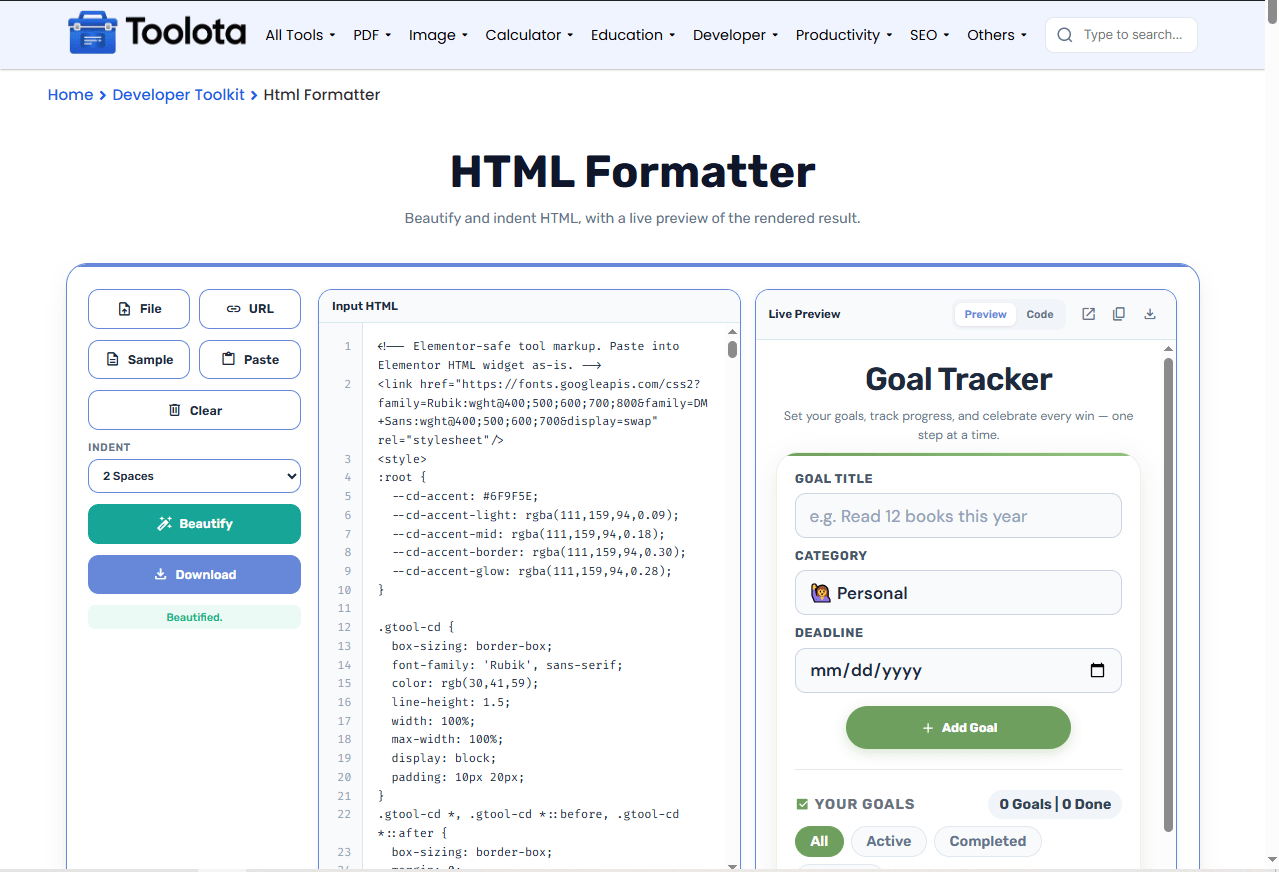

Paste your code into the editor, upload a file, fetch from a URL, or click Sample to get started.

Use the dropdown to select 2 spaces, 4 spaces, or tabs for the output.

Click the teal button to clean up your markup and see the formatted result.

Use the tabs to view the rendered page or the beautified source.

Download the file, copy the code, or open the preview in a new tab.
Here’s a quick voice-search style tip: “How do I format messy HTML online? Just paste it into this tool, pick your indent size, then hit Beautify to get readable, clear code in a flash.
The beautify process runs in milliseconds, so you never wait around for your formatted output.
Choose between 2 spaces, 4 spaces, or tabs so the output matches your personal or team coding style.
Download the formatted file or copy the code directly, making it easy to move your cleaned-up markup anywhere.
Upload files, fetch from URLs, paste from clipboard, or use the sample – you're never stuck hunting for a way to get your code in.
See exactly how your HTML renders without leaving the tool, saving you from switching between apps.
The tool runs entirely client-side, so your HTML stays on your machine – no server uploads, no privacy worries.
Use the Word Wrap toggle when working with long lines – it keeps everything visible without horizontal scrolling.
Try the Sample button first to see how the tool handles different tags before pasting your own code.
When you’re debugging, keep the Preview tab open – any rendering issues in the iframe will show you problems with your HTML structure right away.
Most people think formatting is just about making code look pretty, but it actually affects how you work. When you run an Html Formatter Online, you’re not just adding spaces – you’re creating a structure that’s easier to debug, modify, and share. The tool respects self-closing tags, void elements, and preserves content inside <pre>, <script>, and <style> blocks, so your formatting never breaks functionality. The live preview lets you catch visual errors instantly, while the code view shows you exactly how the structure is organized. These capabilities collaborate to transform a disorganized document into a usable one, sparing you from physically tallying tags or looking for missing ending brackets.
It takes unindented or poorly formatted HTML and adds consistent line breaks and spacing, making the code readable and easy to edit.
Yes, click the File button and select any .html or .htm file from your computer to load it into the editor.
Yes, the Indent dropdown lets you choose tab characters, 2 spaces, or 4 spaces for the output.
No, everything runs locally in your browser. Your code never leaves your device.
Click the Preview tab – the tool renders your HTML inside an iframe so you can see the visual result immediately.
Yes, click the Copy icon in the output panel to copy the formatted HTML with one click.
Toolota is your all-in-one online tools platform. Fast, simple, and free utilities designed to make everyday digital tasks easier and smarter.
