





No tools found matching your search.

Watermark Adder

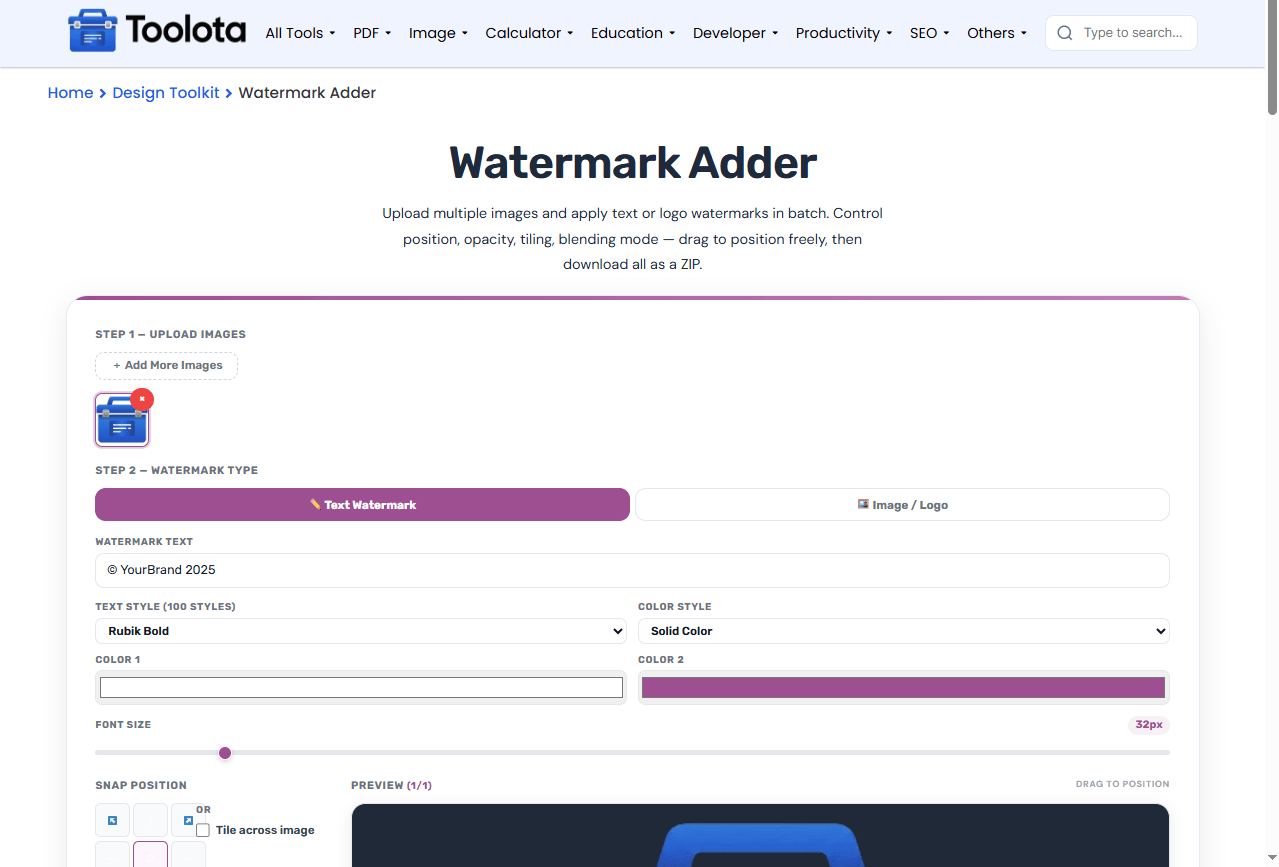
Upload multiple images and apply text or logo watermarks in batch. Control position, opacity, tiling, blending mode — drag to position freely, then download all as a ZIP.

Step 1 — Upload Images
🖼️
Drop images here or click to browse
PNG, JPG, WEBP · Multiple files supported
No images uploaded yet
Step 2 — Watermark Type
Font Size 32px
📁
Upload Logo / PNG
Transparent PNG works best
Logo Size 25%
Snap Position
Fine Position (X / Y)
X50%
Y50%
Or
X Position
Y Position
💡 Tip: Drag watermark on preview
Opacity 30%
Rotation
Scale 100%
Preview Drag to position
Processing...

Other Tools

Online Watermark Adder Free | Protect Your Images Instantly

watermark adder free tools let you protect your photos with text or logo watermarks in seconds. A free watermark adder makes batch processing simple — upload multiple images, choose your watermark style, adjust position and opacity, then download all watermarked images as a single ZIP file. Whether you need to add a copyright notice to product photos or brand your social media graphics, this watermark adder free tool handles batch processing with full control over placement, tiling, and blending.

Features of This Free Watermark Adder

  • Upload multiple PNG, JPG, or WEBP images at once via drag-and-drop or file browse

  • Add more images anytime using the “Add more images” button without losing settings

  • Text watermark with 100+ font styles including Rubik, Montserrat, Playfair Display, Lobster, and Bebas Neue

  • 10 text color styles: Solid, Gradient, Radial, Rainbow, Outline, Glow, Shadow, 3D, Neon, and Emboss

  • Two color pickers for custom gradient and effect colors

  • Image/logo watermark support for transparent PNGs and other image files

  • Font size slider from 10px to 200px for text watermarks

  • Logo size slider from 5% to 80% of image dimensions

  • Uniform scale slider from 20% to 300% for additional resizing

  • 9-position snap grid for instant watermark placement

  • Drag-to-position on the preview canvas for precise control

  • X and Y position sliders with real-time percentage readouts

  • Tile watermark across images with spacing control from 0 to 200px

  • Opacity slider from 5% to 100% for subtle or bold watermarks

  • Rotation slider from -180° to +180° for angled watermarks

  • 12 blend modes: Normal, Multiply, Screen, Overlay, Darken, Lighten, Color Dodge, Color Burn, Hard Light, Soft Light, Difference, and Exclusion

  • Live preview canvas showing real-time watermark updates

  • Previous/Next navigation to preview all uploaded images

  • Download current image as a single watermarked file

  • Batch download all watermarked images as a ZIP file with progress tracking

  • Reset button to clear all images, logo, and settings with one click

Watermark Adder Free Toolota

How to Use This Watermark Adder Free Tool

1

Upload Your Images

Click or drag images into the upload zone. The tool accepts PNG, JPG, and WEBP formats. Multiple files can be uploaded at once.

2

Choose Text or Logo Watermark

Select "Text Watermark" to type custom text with font and color styling. Select "Image / Logo" to upload a PNG or image file as your watermark.

3

Position and Style Your Watermark

Adjust opacity, rotation, and scale. Use the snap grid or drag the watermark directly on the preview. Enable tiling if you want the watermark to repeat.

4

Preview All Images

Use the Previous/Next buttons to see how your watermark looks on every uploaded image. Make adjustments as needed.

5

Download Your Watermarked Images

Click "Download All as ZIP" for batch export, or "Download Current" for a single file. The tool processes each image and saves them with your watermark applied.

“How can I place my watermark in the exact location I desire?” Simply move it by clicking and dragging it on the preview canvas, or utilize the X/Y sliders for accurate percentage-based positioning.

Why Choose This Watermark Adder Free Tool

🔄 Batch Processing Saves Time

Upload multiple images and apply the same watermark settings to all of them. Download everything as a ZIP file instead of processing images one by one.

📍 Drag-to-Position Precision

Unlike tools that only offer preset positions, this watermark adder free tool lets you click and drag watermarks anywhere on the canvas. The X/Y sliders update automatically for fine control.

🎨 100+ Font Styles Included

No need to install fonts. Every text style from Rubik to Lobster is built in, giving you professional typography options without any setup.

📦 No Signup Required

Everything runs in your browser. Upload, watermark, and download without creating an account or providing personal information.

What Your Watermarked Images Look Like

The preview canvas shows exactly what you’ll get. The image maintains its original aspect ratio inside the preview area, and your watermark appears with all applied settings — opacity, rotation, blend mode, position, and scaling.

When you enable tiling, the watermark repeats in a grid pattern across the entire image. The tile spacing slider lets you control how close or far apart each watermark appears.

For text watermarks, the color style you choose determines the visual effect. Gradient styles use both color pickers, while effects like Neon and Glow create glowing text ideal for dark images. Outline and Emboss work great for watermarks that need to remain visible on any background.

Logo watermarks will retain their initial proportions when resized. Transparent PNG files are most suitable for smooth blending with your pictures.

Pro Tips for Better Watermarking

  1. Keep opacity between 20-40% for watermarks that protect images without distracting from the content. Lower opacity works best for text watermarks on busy backgrounds.

  2. Use the Tile feature for pattern watermarks when you want full-image coverage. This makes removing the watermark nearly impossible for unauthorized users.

  3. Save your preferred settings by taking a screenshot of your slider positions. The Reset button clears everything, but there’s no preset save feature, so note your favorite combinations.

Frequently Asked Questions

What image formats does this free watermark adder support?

This watermark adder free tool supports PNG, JPG, and WEBP files for upload. Exported images save as high-quality JPEG files.

Yes. Upload several images, configure your watermark once, and download all watermarked images as a single ZIP file.

Use the 9-position snap grid for quick placement, or drag the watermark directly on the preview canvas. The X/Y sliders give you percentage-based control.

Text watermarks let you type custom text with 100+ font styles and 10 color effects. Logo watermarks use an uploaded image file like a company logo or signature.

No. Everything runs in your browser. Your images never leave your device, making this a secure watermarking solution.