Workout Timer – 10X Your Exercise Efficiency | Toolota
Table of Contents
Description
Want to take your workout timing seriously? The Workout Timer from Toolota is a top-notch, online tool made to bring pro-level interval control right into your fitness sessions. Whether you’re doing intense HIIT, Tabata, or circuit training, this app acts like your personal digital coach. It helps solve the common issue of constantly glancing at the clock – you know, when you lose focus or intensity because you’re always checking your phone or a wall clock.
By using this online tool, you can easily set your work-to-rest ratios automatically. This ensures you really push hard during your ‘Work’ intervals and get the proper recovery during ‘Rest’ periods. It’s perfect for folks with home gyms, professional trainers, and anyone aiming to boost their cardiovascular health without the hassle of manually timing everything.
Why Choose Toolota
Choosing Toolota for your interval training means you’re going with something reliable, straightforward, and effective. Forget complicated apps that make you sign up for ages or pay for subscriptions; our tool is completely free and works right in your browser.
Our HTML design makes the Workout Timer super lightweight and quick to load, even if your internet connection isn’t top-notch. We really focus on making it easy for you, which is why we offer a full-screen mode that stays big and visible from across the room—super handy when you’re deep in a tough set. Toolota is known for its trustworthy web tools, giving you clean, ad-free screens so you can just concentrate on your workout, not figuring out tricky menus.
How This Tool Works: The Most Detailed Section
আপনার দেওয়া টেক্সটটি নির্দেশ অনুযায়ী Workout Timer, Toolota এবং পয়েন্টগুলো বোল্ড করে নিচে সুন্দরভাবে সাজিয়ে দেওয়া হলো। আপনার মূল টেক্সটের কোনো পরিবর্তন করা হয়নি:
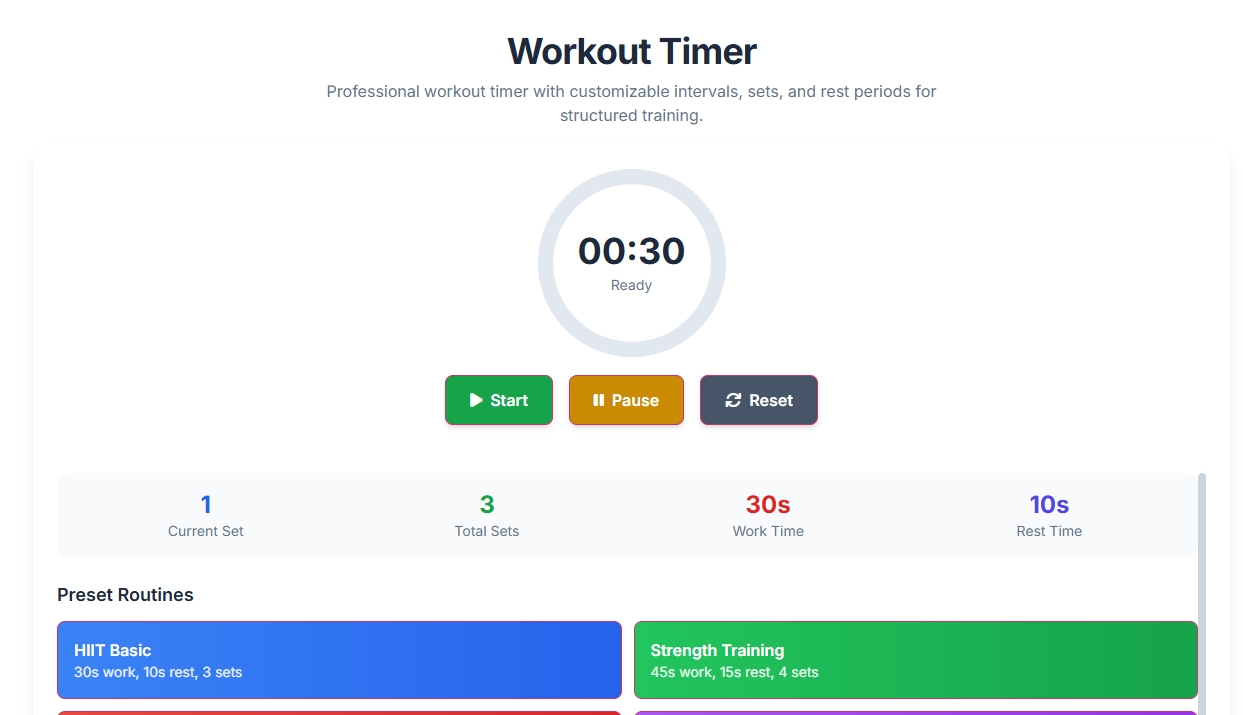
The Toolota Workout Timer is built using a solid HTML5 and JavaScript framework, making it easy to use but also highly customizable. Below, we’ll walk through every part of the tool and how they all work together to give you a smooth workout experience.
The Setup Panel (Where You Set Things Up) Before you begin your workout, you’ll use a few input fields to create your plan.
Routine Name: A text box where you can give your session a name, like “Monday HIIT” or “Leg Day.” This helps you keep your workouts organized.
Work Interval: Here, you set how long you want your high-intensity activity to last.
Rest Interval: This is where you decide how much time you need to recover. As noted by Wikipedia, specific work-to-rest ratios are important for metabolic efficiency.
Number of Rounds: Use this to set how many times the work and rest cycle will repeat.
Advanced Settings & Selectors To really make this feel professional, we’ve added some extra options:
Tone & Sound Selector: Pick the sound that lets you know when a phase changes. This way, you don’t have to look at the screen to know when to start or stop.
Language & Tone of Voice: If your browser supports it, the timer can actually speak the name of the next exercise or count down the final three seconds.
POV Selector: Adjust the layout of the display to fit your device (Desktop or Mobile), making sure the numbers stay large and easy to read.
The Visual Display (Right Panel Features) When you hit the ‘Generate’ or ‘Start’ button, the screen changes into a clear, easy-to-read dashboard:
Progress Ring: This is a dynamic, circular progress bar (built with SVG) that gradually empties as your time counts down. It gives you a quick, visual snapshot of how much time is left in your current set.
Color-Coded Phases: The background color will change (like green for Work periods and red for Rest periods) to give you clear visual cues about what phase you’re in.
Toolbar Controls:
Copy/Share: This lets you easily copy your workout settings so you can use them again later, or share them with a friend.
Download: You can save your entire routine as a local file on your computer.
Fullscreen: This expands the timer display to fill your whole screen, helping you focus by hiding everything else in your browser.
Editor Toolbar: If you’re using the more advanced “Custom Routine” mode, you’ll find a built-in editor. You can use this to make specific exercise names bold or to color-code different muscle groups for better organization.
Logic & Output The tool uses very precise timing (controlled by setInterval) to make sure every second counts down accurately. When the Workout Timer hits zero, it automatically plays the sound you’ve chosen and moves on to the next phase without you having to do anything. This seamless, “hands-free” operation is what lets you train effectively, just like a pro athlete
Benefits This Tools
Lightning-Fast Start: Tap the link and you’re ready to begin your workout in under five seconds – seriously quick!
Flawless Timing: Say goodbye to annoying delays between sets. Our smart coding keeps every interval perfectly timed, right on the money.
Smooth Performance & SEO: While you concentrate on your fitness goals, our clean and simple interface ensures your device runs efficiently, making the best use of its resources.
Totally Free: Get access to all the “Pro” features without needing to enter any credit card details.
Works Everywhere: You can use it on iPhones, Androids, Windows PCs, and Macs – basically any modern browser will do the trick.
Why It Matters: Even professional athletes rely on dedicated Workout Timer from Toolota to nail their VO2 max targets every time. By taking the guesswork out of your rest periods, you can really boost the calorie burn and hormonal benefits that come with interval training.
Important Conditions & Guidelines for Use
Even though our Workout Timer is designed to be a really high-quality tool, here are a few things to keep in mind when using it:
Get Your Numbers Right: How accurate your workout session is really depends on the values you put in. It’s a good idea to double-check your rounds and the seconds you’ve set before you hit start.
Stay Safe: We provide the timing tool, but you’re the one in charge of your physical safety. It’s always smart to chat with a doctor before jumping into any new HIIT routines.
Use It Wisely: Please don’t use the tool to automate anything that it wasn’t meant for, like tasks outside its intended fitness and productivity purposes.
Sound Check: Make sure your volume is turned up and that your browser has permission to play sounds. This will give you the best experience while you work out.
Frequently Asked Questions (FAQ)