
Tip Calculator
Easily determine the appropriate tip amount and split bills among friends.
Tip Amount
/ person
0.00
Total
/ person
0.00
Total Tip
0.00
Grand Total
0.00
Easily determine the appropriate tip amount and split bills among friends.
Tip Amount
/ person
0.00
Total
/ person
0.00
Total Tip
0.00
Grand Total
0.00
A Tip Calculator is an easy and fast digital tool made to help you quickly figure out how much to give as a tip, or how much to leave over as a service charge. This smart calculation tool takes the guesswork out of using services. Instead of calculating tips by instinct, always working out the right amount in your head by the percentage you are aiming at, this tool is based on your bill and the percentage you want to make sure to tip.
The Tip Calculator is fairly straightforward, which is great for anyone’s dining and makes it useful for splitting the bill with friends. With this tool you’re commanding a whole new split of figuring the bill out with the right tip. It solves the usual problem of trying to pay the right share of the tip and makes splitting bills with everyone a joyous pay.
Whether you’re sharing dining, you’re a devotee, the getting of a food delivery, or using a service where a tip is the norm, things can get complicated calculation wise, or using a survey can be helpful. Instead of expecting, with this tool it makes it in your pay. Instead of basic calculating, this specialized Tip Calculator from Toolota basically calculates everything, this specialized Tip Calculator does all the work for you, including standard tip percentages, and even splitting the bill automatically.
Toolota offers a trustworthy and easy-to-use Tip Calculator that’s really appreciated for how simple and accurate it is. We’ve designed it with an interface that’s a breeze to navigate, offering handy preset tip percentages like 5%, 10%, 15%, 25%, and 50%, plus you can always type in a custom amount for ultimate flexibility when figuring out your tip.
You get your results right away, instantly seeing both what each person owes and the total bill amount at the same time. This handy dual display helps everyone in a group see their own share while keeping track of the overall cost. We’ve kept the look clean, using color-coding (blue for the tip amount, green for the total) to make it super easy to understand everything in a single glance.
Using Toolota’s Tip Calculator is super convenient – there’s no need to download or install anything. It just works instantly right in your web browser, whether you’re on a desktop, tablet, or mobile phone. The design is responsive, so it adjusts perfectly to any screen size while still working perfectly.
We’ve built it with your privacy in mind, so all the calculations happen right on your device, and none of your financial info is sent anywhere else. Built using modern web tech, it processes everything super fast without any lag. Plus, there’s a handy reset button that clears everything with just one click, making it easy to start over for different bills or if you’re splitting costs during a group outing.
simple and accurate it is. We’ve designed it with an interface that’s a breeze to navigate, offering handy preset tip percentages like 5%, 10%, 15%, 25%, and 50%, plus you can always type in a custom amount for ultimate flexibility when figuring out your tip.
You get your results right away, instantly seeing both what each person owes and the total bill amount at the same time. This handy dual display helps everyone in a group see their own share while keeping track of the overall cost. We’ve kept the look clean, using color-coding (blue for the tip amount, green for the total) to make it super easy to understand everything in a single glance.
Using Toolota’s Tip Calculator is super convenient – there’s no need to download or install anything. It just works instantly right in your web browser, whether you’re on a desktop, tablet, or mobile phone. The design is responsive, so it adjusts perfectly to any screen size while still working perfectly.
We’ve built it with your privacy in mind, so all the calculations happen right on your device, and none of your financial info is sent anywhere else. Built using modern web tech, it processes everything super fast without any lag. Plus, there’s a handy reset button that clears everything with just one click, making it easy to start over for different bills or if you’re splitting costs during a group outing.
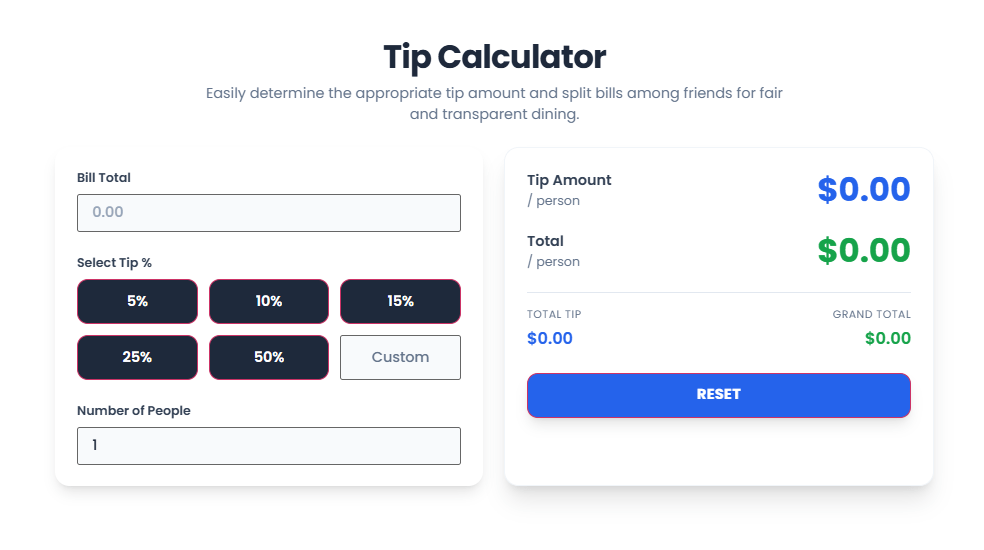
Getting familiar with how the Tip Calculator works helps you make the most of it for all sorts of dining and service situations. The tool’s layout is straightforward, with two main parts: the section on the left where you put in your details, and the area on the right that shows your results.
Bill Total Input Field
The main spot to enter your information is where you put the total amount of your bill, including a dollar sign right at the beginning. You just need to type in the total cost of your bill before adding the tip, using the usual way we write money with a decimal point (like this: 85.50). This box has a nice slate-gray background, and it gets a blue outline when you click on it, so you know exactly where you’re typing.
This spot for numbers can handle amounts that go down to the nearest cent, which means you can be really precise. You’ll see “0.00” inside the box to help you remember how to format it. You can type the number yourself or use the number pad that comes up on your device. The Tip Calculator can handle any amount, starting from zero and going all the way up, so it works whether you’re paying for a simple coffee or a big dinner for a group.
The Tip Calculator gives you six different ways to choose your tip percentage. You’ll see five handy preset buttons for common tip amounts: 5%, 10%, 15%, 25%, and 50%. These buttons have a dark slate-gray look, but they turn a bright blue when you pick one, so you know exactly which option you’ve selected.
When you click any of these preset buttons, it automatically calculates the tip based on that percentage and clears the box where you might have entered a custom tip. They also have a cool little hover effect with a subtle scaling animation to make using them feel smoother.
Just so there’s no confusion, only one preset button can be active at a time. This prevents any mix-ups if you accidentally click more than one.
The sixth option is a special field for custom tip percentages. If you want to use a percentage that’s not one of the presets, like 18.5%, you can just type it in here. As soon as you enter your custom tip, all the preset buttons will turn off automatically, making sure your specific percentage is the one used in the calculation. This handy feature from Toolota lets you adapt to different tipping customs, show extra appreciation for great service, or stick exactly to your budget.
The “people counter” field is what determines how the bill gets split. You’ll notice a little user icon right before it, which makes it clear what this field is for at a glance. By default, it starts at one person, but you can easily change it to any positive number if you’re splitting the bill among a group.
If you increase this number, the Tip Calculator will automatically divide both the total bill and the tip equally among everyone. As you change the number of people, the Tip Calculator instantly updates the amount each person owes, taking the guesswork out of manual division that often leads to mistakes when groups try to split checks on their own.
The system won’t let you put in fewer than one person, so you don’t have to worry about illogical results. When dealing with larger groups (10 people or more), the calculator keeps things precise by showing what each person owes, down to the cent, helping everyone pay the exact amount and avoiding arguments over rounding.
Real-Time Results Display Panel
Over on the right side, you’ll see the results of your calculations displayed in a clear panel. This panel has four different sections, arranged in a way that guides your eye from top to bottom. Each section updates instantly whenever you change any of the numbers you’ve entered, so you get immediate feedback without needing to press any buttons to see the new totals.
The top section, in large blue text, shows the “Tip Amount Per Person.” This tells you exactly how much gratuity each individual should contribute. Just below that heading, you’ll see a small note stating “per person,” which is there to confirm that this amount is what each person in the group owes.
The “Total Per Person” is clearly shown below in bold green numbers. This figure represents the full amount each person owes, which includes both their share of the bill and their portion of the tip. Having this total makes it easy for groups to collect the exact right amount from everyone.
Further down, you’ll find the “Total Tip” and “Grand Total” displayed in a slightly smaller but still clear font, separated by a horizontal line. These numbers represent the entire tip amount for the bill and the final overall total (bill plus tip). This section serves as a helpful summary to double-check your math and see the complete financial picture.
All money amounts are automatically formatted with dollar signs and two decimal places, following standard currency conventions. The Tip Calculator from Toolota is also designed to handle decimal calculations precisely, preventing common errors that can sometimes occur in JavaScript.
Interactive Features and Animations
When you hover over the tip buttons, they will subtly enlarge to let you know they’re ready to be clicked. The results section also has a nice touch: when you move your cursor over any monetary value, the text will slightly enlarge, adding a polished feel to the experience.
Input fields feature a blue ring that appears when they’re selected or in focus. This visual cue makes it obvious which field you’re currently working on and is especially helpful for users who navigate using a keyboard, enhancing usability across all devices.
The biggest benefit is how fast it works—the Tip Calculator gives you the answer right away as you type, so there’s no waiting around for the math to be done. This is super helpful for groups sharing a meal, as it saves a lot of time when it’s time to pay. You won’t have to deal with those uncomfortable moments where everyone’s trying to do the math in their heads or fiddling with their phone calculators.
It also ensures fairness for everyone involved. The precise calculations help make sure you’re not tipping too little (which isn’t fair to the service workers) or too much (which can put a strain on your budget). When you need to split the bill, it gives you exact amounts for each person, so everyone pays exactly what they owe. This way, you don’t run into issues where someone ends up paying a bit more just because of rounding.
The way it’s designed is really easy to understand, so you don’t need any instructions. New users can jump right in and figure out how to enter the numbers and read the results thanks to clear labels, a logical setup, and familiar design elements. The important information is highlighted, and all the extra details are still easy to find.
Plus, this calculator is great for any situation. Whether you’re eating alone, with a partner, in a small group, or with a big party, it handles everything smoothly. There are preset options for typical tipping situations, but you can also customize it for special cases, different regional customs, or your own preferences.
Tip Calculator interface showing bill input, percentage selection, and automatic calculation results”What makes the Toolota Bulk Price Calculator so powerful is its straightforward, easy-to-use one-step process, all backed by solid code. By taking a closer look at the HTML file’s structure, we can really understand how this efficient tool handles your data and gives you results right away.
Step 1: The Three Key Things You Need to Enter
To get the calculator working its magic, you just need to provide three essential pieces of information. These are clearly marked, and they’re the only things you need to tap into all the Bulk Price Calculator’s features.
Product Name: This text field (with the ID `product-name`) lets you type in the name of the item. While the actual calculation doesn’t use this name, it’s really handy for labeling your results. This makes it simple to keep track of prices for different products and easy to copy them later.
Unit Price: This is where you enter the standard cost for just one item (field ID: `unit-price`). It’s important that you enter a number here; otherwise, the calculation won’t work.
Quantity: This is the crucial field (ID: `quantity`) where you input the total number of units you want to buy. The number you put here determines which discount level will be applied to your purchase.
Step 2: Meet the Automated 5-Tier Discount Engine
What really powers the Bulk Price Calculator is its 5-tier discount setup. It’s built-in, super clear, and always gives you reliable, consistent pricing based on how much you buy. The JavaScript code behind it all simply checks which is the best discount tier your order quantity fits into.
Here’s how those set discount tiers break down:
Getting accurate results from this calculator all comes down to the numbers you plug in. Make sure you enter the exact total from your bill and pick a tip percentage that makes sense to you. That way, you’ll get results that are actually useful.
It’s worth noting that the calculator does the math based on what you give it, but it doesn’t check if the numbers seem reasonable. If you put in something extreme—say, a 500% tip or a bill for a million dollars—it will technically give you the right calculation, but the result probably won’t make much real-world sense.
Even though the calculator is good at doing precise math, you should still take a quick look at the results to make sure they sound right for your specific situation. Tipping customs vary a lot from place to place—what’s normal in one area or culture might be very different elsewhere. This tool from Toolota can crunch the numbers, but it can’t tell you what the social norms or appropriate tip amounts are where you are.
When it comes to splitting the bill, the Tip Calculator assumes everyone owes the same amount. If your group ordered very differently—like some people got expensive main courses while others just had appetizers—then the amount each person ends up paying might not really reflect what they actually owe individually. The calculator divides the total mathematically, but it doesn’t keep track of who ordered what.
Remember, this tool is designed just for helping with tips and splitting bills. You’re responsible for making sure you use it in a way that follows the laws and social customs where you live.
The Tip Calculator features a dedicated custom input field where you can enter any percentage value including decimals. When you type a custom percentage (like 18.5% or 22%), the calculator automatically deselects preset buttons and applies your custom rate to the bill total. This flexibility allows precise gratuity control beyond standard preset options, accommodating regional tipping norms or personal preferences.
Yes, the Tip Calculator divides bills equally among the specified number of people. Enter the total number of diners in the people field, and the tool calculates per-person tip and total amounts automatically. However, this assumes equal bill splitting—if your group has uneven orders, you’ll need to manually adjust for individual consumption differences after using the calculator’s base division.
The Tip Calculator functions completely offline after your browser loads the page initially. All calculations occur locally in your browser using JavaScript without requiring internet connectivity or server communication. This design ensures fast performance, privacy protection, and continued functionality even when network connections drop during use.
Unlike basic calculators requiring manual percentage and division calculations, the Tip Calculator automates the entire process. It instantly shows per-person amounts, total tips, and grand totals simultaneously while you adjust inputs. Preset percentage buttons eliminate typing errors, and the split-bill feature handles group dining scenarios that basic calculators can’t process automatically, saving time and preventing calculation mistakes.
Toolota is your all-in-one online tools platform. Fast, simple, and free utilities designed to make everyday digital tasks easier and smarter.