Sleep Tracker – Improve Your 7-Day Sleep Cycle | Toolota
Table of Contents
What This Tool Does
Sleep Tracker is a handy digital tool that helps you keep tabs on, record, and make sense of your sleep habits over time. Unlike simple sleep journals, Toolota’s professional version lets you jot down when you go to bed, when you wake up, how well you slept, and any personal thoughts—all of which are safely saved right in your browser. It does the math for you, automatically figuring out how long you slept, your average sleep times, and any patterns that emerge, then shows this info in simple charts and stats.
Why Choose Toolota
Our free Sleep Tracker tool is special because it’s both easy to use and packed with useful details. Made with a clean, responsive design using Tailwind CSS and Chart.js, it’s all about giving you a great experience without losing any of its power. Unlike other apps that ask for subscriptions or share your information, this one works right in your browser—your data stays on your device and never leaves. Toolota is known for making dependable, high-quality web tools that help you be more productivity and feel better every day. This complete sleep analysis platform has cool features like a sleep score, interactive sliders, and tips for better sleep habits—all meant to give you practical advice. By showing you how you sleep, Toolota’s tool helps you make smart choices to get more consistent and better sleep, which can really boost your health and how well you do each day.
How This Tool Works: The Most Detailed Section
Toolota’s sleep analysis platform is built using easy-to-use HTML5, CSS3, and JavaScript components that work together to give users a complete Sleep Tracker experience. Let’s break down each part:
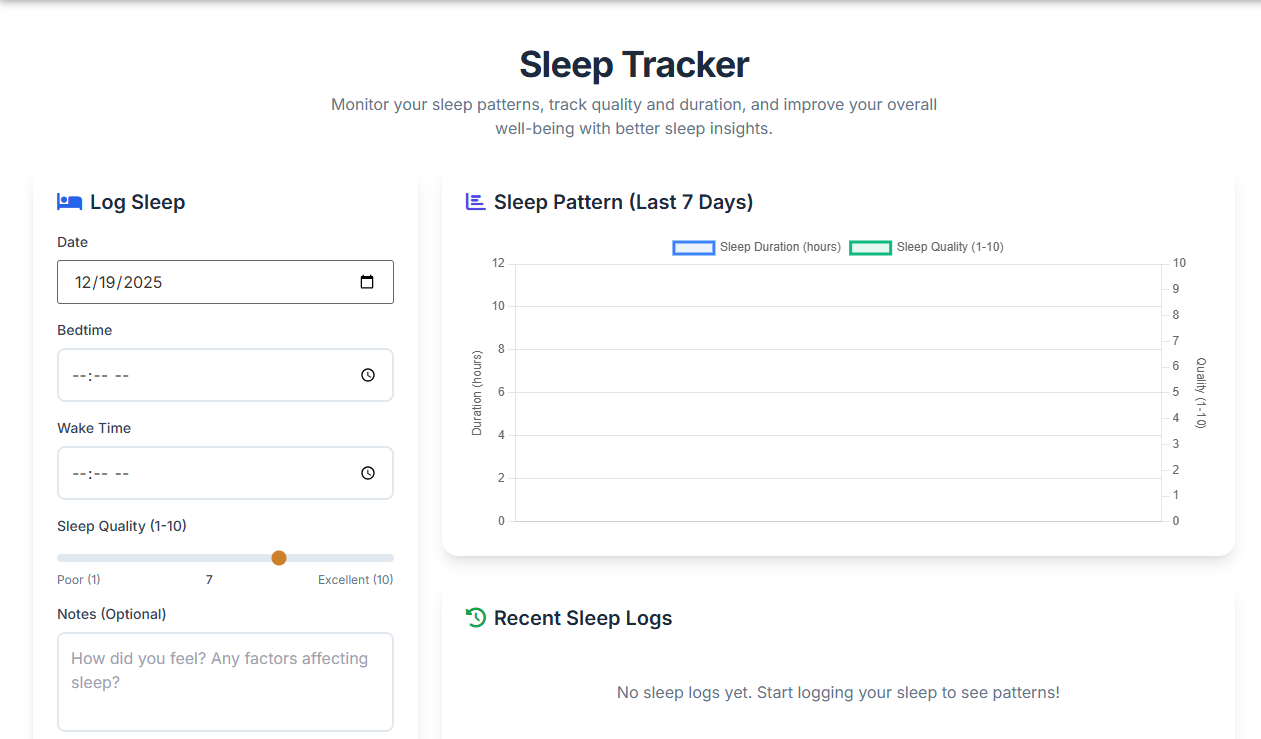
A. Sleep Entry Form
Date Input: Uses <input type="date"> to let users pick the sleep date, defaulting to today.
Bedtime & Wake Time Inputs: <input type="time"> fields capture exact sleep and wake times, supporting 24-hour format.
Sleep Quality Slider: An <input type="range"> lets users rate their sleep from 1 to 10, with the value updating in real time.
Notes Textarea: An optional <textarea> for jotting down factors like stress, caffeine intake, or sleep environment.
Submit Button: A styled <button> with hover effects that triggers data processing.
B. Data Storage & Calculation
All entries are saved to localStorage as a JSON array, so the data stays even after closing the browser.
The calculateDuration() function computes sleep duration, including overnight cases (like falling asleep at 10 PM and waking up at 6 AM).
Entries are sorted by date (newest first), and if there’s a duplicate entry for the same day, it automatically updates the existing one.
C. Sleep Stats
Average Duration: How long you slept on average, based on all your logged nights.
Average Quality: The typical quality rating you gave your sleep.
Total Logs: The total number of sleep entries you’ve saved.
Sleep Score: A single score (0–100) that balances your sleep duration and quality.
-
D. Sleep Trends Chart
This chart uses Chart.js to show your sleep duration (in hours) and quality (on a 1–10 scale) for the past week. It updates automatically when you add new data and comes with a custom look, helpful tooltips, and clear labels for your Sleep Tracker.
E. Latest Sleep Entries
Here you’ll see your five most recent sleep logs, complete with formatted dates, times, how long you slept, and a quality rating (with color coding and emojis for a quick glance). There’s also a “Clear All Data” button if you want to start fresh on Toolota, but you’ll get a confirmation first.
F. Sleep Improvement Tips
This section has four cards with useful sleep hygiene advice, each with its own theme, color, and icon. These tips are backed by science to help you sleep better using this Sleep Tracker.
Benefits This Tools
Speed & Simplicity: Log your sleep in under 30 seconds—no login needed on this Sleep Tracker!
Accuracy: Get precise duration calculations and track your sleep quality.
SEO-Optimized Design: Enjoy a clean HTML5 structure with semantic tags and mobile-friendly design on Toolota.
Privacy-First: All your data stays right on your device; no cloud storage or tracking involved.
Visual Insights: Interactive charts make it easy to spot sleep patterns instantly.
Actionable Feedback: Use your sleep score and averages to set goals for improvement.
Multi-Device Support: Works smoothly on any modern browser, whether you’re on a desktop, tablet, or phone.
Easy Editing & Export: No problem if you need to edit past entries—plus, you can manually copy or clear your data from Toolota.
User-Friendly UI: We’ve made it easy on the eyes with thoughtful spacing, scrollable sections, and clear typography for a smoother Sleep Tracker experience.
Important Conditions & Guidelines for Use
The quality of the results you get really relies on you providing consistent and accurate information for this Sleep Tracker.
Think of this sleep analysis tool as a source of helpful information—it’s not a medical device.
Please don’t use it to diagnose or treat any sleep problems. If you have concerns, it’s best to talk to a healthcare professional.
This tool is completely free, but it comes with no promises or guarantees, and Toolota won’t be responsible if any data is lost.
Please don’t use it for anything illegal, harmful, or for automatically gathering data.
We suggest using it for personal reasons to become more aware of your sleep and develop better habits through Toolota.
Frequently Asked Questions (FAQ)