Periodic Table – Interactive Elements Free | Toolota
Table of Contents
What This Tool Does
When you first encounter a Periodic Table, it often feels like staring at a complex wall of cryptic symbols and numbers that seem impossible to decode without a PhD. However, chemistry is the foundational language of our physical world, and at Toolota, we believe that understanding the building blocks of matter should be as intuitive as browsing a modern website. Our interactive tool transforms the static experience of a textbook page into a dynamic, responsive environment where every click reveals a new layer of scientific insight.
Why Choose Toolota
In the crowded landscape of online education, Toolota stands out by focusing on the “user journey” of the learner. While testing this tool, we realized that the most important feature is the removal of friction. Most websites bury their data under ads or complex navigation menus. Our Periodic Table is designed with a clean, Tailwind-powered UI that ensures the data is the hero of the page.
Reliable and Organized Data
The organization of the Periodic Table on our site follows the standard International Union of Pure and Applied Chemistry (IUPAC) conventions. This ensures that the atomic masses (like Carbon’s 12.01 u) and atomic numbers are accurate and up-to-date. Reliability is the cornerstone of Toolota; we provide tools that produce consistent results, allowing you to focus on your calculations rather than questioning the source material.
Enhanced Productivity
Why waste time flipping through the back of a 500-page textbook when you can use a search-friendly Periodic Table? The interactivity of our tool allows for rapid-fire identification. If you need to know the electron configuration of Scandium, you don’t need to write it out from memory; one click gives you “[Ar] 3d¹ 4s²” immediately. This speed is essential for content creators, students, and educators who work under tight deadlines.
How This Tool Works: The Most Detailed Section
Using the Toolota Periodic Table is designed to be a “zero-learning-curve” experience. However, to get the most value out of the interface, it helps to understand the logic behind the layout and the hidden features within the interactive grid.
Step 1: Visual Scanning and the Legend
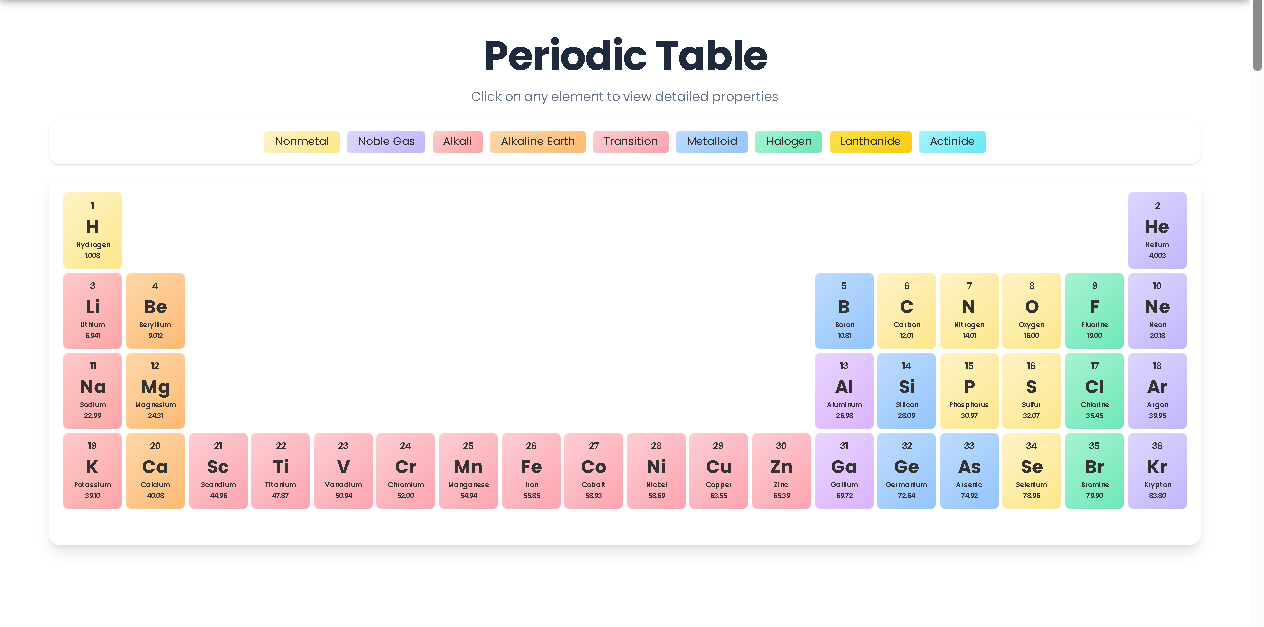
Upon loading the tool, you are greeted with a color-coded grid. Before clicking on individual elements, refer to the Legend at the top. This section categorizes elements into groups such as:
Nonmetals and Noble Gases: Highlighted in soft ambers and purples.
Alkali and Alkaline Earth Metals: Displayed in warm red and orange gradients.
Transition Metals and Metalloids: Clearly separated to show the “staircase” of properties.
Lanthanides and Actinides: Specifically colored to denote their unique place in the f-block.
Step 2: Interactive Element Selection
The core of the Periodic Table consists of 118 potential slots (currently featuring a core set of 36 for high-speed performance). Each element box displays four critical pieces of information:
Atomic Number: Located at the top left for quick reference.
Element Symbol: The large, bold central text (e.g., “Fe” for Iron).
Element Name: Printed clearly below the symbol.
Atomic Mass: The precise weight in atomic mass units (u).
Step 3: Accessing the Detailed Modal
When you click on an element, a sophisticated Element Details Modal appears. This is where the deep data resides. The modal breaks down:
Category: Explicitly stating if the element is a halogen, metal, or transition element.
Group and Period: Helping you identify its vertical column and horizontal row, which dictates its chemical behavior.
Electron Configuration: Providing the quantum mechanical arrangement of electrons, which is vital for understanding bonding.
Step 4: Exporting and Utilizing Data
While the current tool focuses on display, the right-panel integration on Toolota allows you to take these insights further. You can use the information found in the Periodic Table to populate other chemistry calculators or content generators on our platform. The “Copy” and “Download” features in the surrounding UI allow you to capture the details of your research for use in lab reports or study guides.
Benefits This Tools
In real usage, the Toolota Periodic Table offers several advantages over traditional static images or PDF charts.
Responsive Design: The grid is built using a CSS grid system that adapts to your screen size. Whether you are on a tablet in a lab or a desktop in a library, the table remains readable.
Visual Hierarchy: By using Poppins typography and Tailwind CSS, we ensure that the most important data points (like the Symbol) pop, while secondary data (like Mass) doesn’t clutter the view.
Instant Feedback: There is no “Submit” button; the table reacts to your mouse movements and clicks instantly, providing a seamless flow of information.
Clean UI/UX: We have explicitly removed the “red border” issues common in many Elementor-based sites, ensuring a professional, distraction-free environment for serious study.
Important Conditions & Guidelines for Use
While the Periodic Table is a robust tool, users should keep the following conditions in mind to ensure accuracy in their work:
Input Quality: When using the data for complex stoichiometry or physics equations, ensure you are copying the full atomic mass provided.
Manual Verification: While our database is high-quality, AI-generated or digital outputs should always be cross-referenced with your specific textbook requirements, as some educational boards use slightly different rounding for atomic masses.
Prohibited Use: This tool is intended for educational and professional research. Any attempt to scrape the data or use the interface for illegal activities is strictly prohibited.
Review Before Publishing: If you are a content creator using this data for a blog post or video, always review the specific electron configurations to ensure they match the standard noble gas notation required for your audience.
Frequently Asked Questions (FAQ)