Heart Rate Zone Calculator – Smart & Efficient Fitness Tool
Table of Contents
What This Tool Does
Toolota‘s Heart Rate Zone Calculator is a handy online fitness tool that takes the guesswork out of your workouts. Just plug in some basic info, and it’ll quickly figure out your maximum heart rate and break it down into five different intensity levels. This turns any ordinary workout into a customized session aimed at your specific goals.
The calculator gives you clear, numbered targets for each zone, whether you’re doing a light recovery jog or pushing yourself to the limit. Whether you’re a casual stroller or a serious competitor, you can use this tool to match your cardio efforts to what you’re trying to achieve—whether that’s shedding fat, building endurance, or hitting peak performance. It solves the common issue of training too hard or too easy, making sure every minute you spend exercising counts toward your fitness success.
Why Choose Toolota
Our Heart Rate Zone Calculator really shines because it’s the perfect mix of scientific accuracy, sleek design, and easy-to-use features. Built with clean, responsive HTML5 and Tailwind CSS, it works smoothly on any device you use. Toolota is all about giving you trustworthy, free tools that make tricky calculations simple.
Unlike those old-fashioned charts, our dynamic calculator gives you instant results and visual feedback right away. You’ll love the cool features like animated progress bars for each zone, practical training tips, and a smooth notification system. This tool helps you get more out of your workouts by giving you instant, useful info, so you don’t waste time doing math by hand—you can just focus on your exercise. With its user-friendly design, our Heart Rate Zone Calculator makes even complex training ideas easy for anyone to understand.
How This Tool Works: The Most Detailed Section
This part gives you a close-up look at how the tool’s interface works and what makes it tick, showing you how your information turns into a training plan tailored just for you.
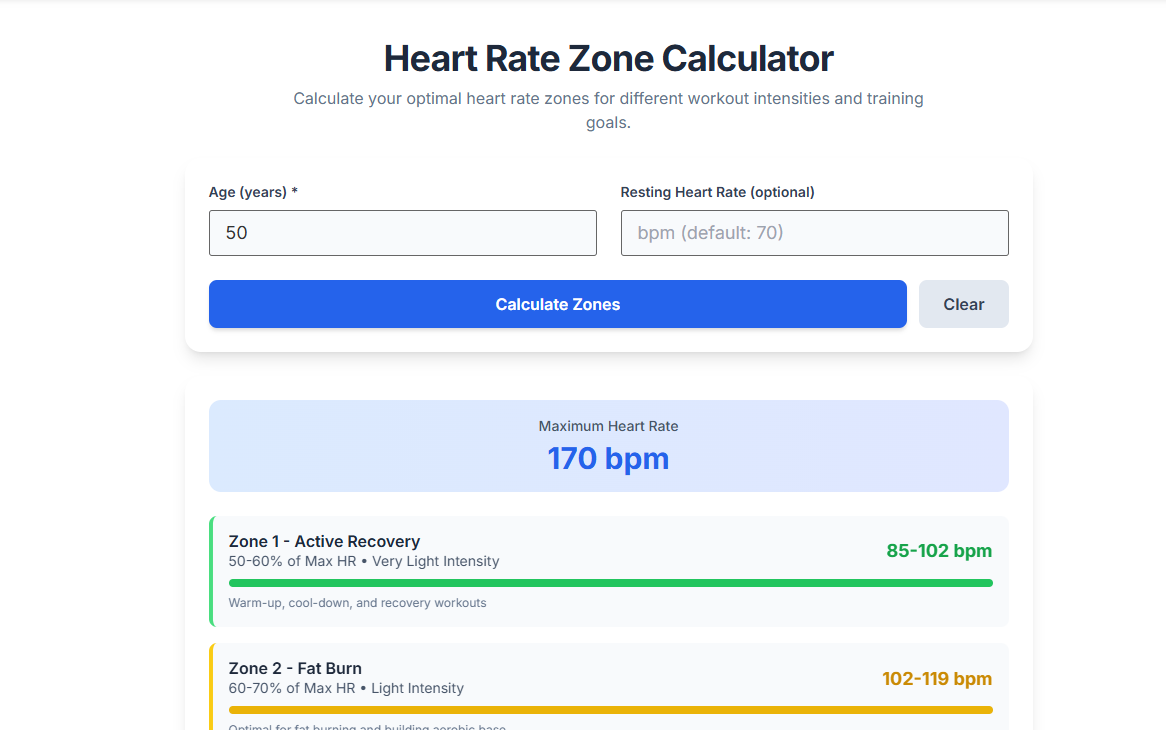
The Input Section: Where You Enter Your Info The tool has two main places for you to input details, neatly arranged in a simple card-like box. You’ll need to enter your “Age” – this is a required field where you can select a number between 10 and 100. The tool checks to make sure the age you enter makes sense. There’s also an optional “Resting Heart Rate” field, which is there for potential future updates to make the calculations even more personal. Both fields have subtle visual cues and smooth animations when you focus on them, making everything feel polished. This basic information kicks off the Heart Rate Zone Calculator‘s process.
The Control Buttons: Getting Things Done and Starting Over There are two buttons to manage how you interact with the tool. The main one is “Calculate Zones,” which really catches the eye with a blue gradient and a little animation when you hover over it. Clicking this does the heavy lifting by running the main JavaScript function. The other button, “Clear,” simply wipes the slate clean – it empties all the fields and results, so you can easily start fresh or adjust your inputs. This straightforward setup makes the Heart Rate Zone Calculator super easy to use on Toolota.
The Calculation Engine: The JavaScript Core The heart of the system is a clear, well-commented script that drives the logic. When activated, it first checks the age input to make sure it’s valid. Then, it uses the standard “220 minus age” formula to figure out the Maximum Heart Rate (MHR). With that MHR, it calculates the minimum and maximum beats per minute (BPM) for five different zones—50-60%, 60-70%, 70-80%, 80-90%, and 90-100% of the MHR. Each value is rounded to the nearest whole number for accuracy. This precise calculation is what makes our Heart Rate Zone Calculator work so well on Toolota.
The Results Display: Visualizing Your Zones The results section appears smoothly, showing all the data in an easy-to-read format. The MHR is shown right at the top. Below that, each of the five zones is displayed in its own card, with a colored left border (green, yellow, blue, orange, and red) to help you spot them quickly. Each card lists the zone name, the percentage range, the calculated BPM range, and a short description. Inside each card, a horizontal bar animates to fill up, giving you a quick visual idea of how intense each zone is compared to your maximum heart rate. The way the results are presented makes it simple to understand at a glance.
Interactive and Responsive Feedback The tool gives you instant feedback as you use it. Just entering a valid age can trigger the calculation right away. The “Calculate” button also works when you press the Enter key. Once the calculation is done, a temporary notification pops up to let you know it was successful, and the results section smoothly scrolls into view. This interactive design is a key feature of the Heart Rate Zone Calculator.
Benefits This Tools
Speed & Simplicity: Get your five personalized heart rate zones in just three seconds with a single click—it’s that easy!
Accuracy: We use the well-known and science-backed 220-minus-age formula to estimate your maximum heart rate (MHR) for reliable results.
Clear Visualization: Our color-coded zones and animated fill bars turn numbers into a simple, visual plan that’s easy to follow.
Actionable Guidance: Whether you’re new to training or an experienced athlete, our integrated recommendations help you make the most of your heart rate zones.
Universal Accessibility: The Heart Rate Zone Calculator on Toolota is fully responsive, so it works smoothly on your desktop, tablet, or smartphone—no matter where you are.
Completely Free: No sign-ups, no subscriptions, no hidden costs—just instant access to a powerful training tool, completely free of charge.
Important Conditions & Guidelines for Use
This Heart Rate Zone Calculator is meant to give you information, help you learn, and assist with planning—nothing more. The zones it calculates are just rough estimates based on what’s typical for most people. Keep in mind that your personal situation might be different because of your genes, any medications you’re taking, or how fit you already are.
Remember, this tool isn’t a replacement for advice from a doctor or a qualified fitness expert. It’s really important to talk to a physician or a certified fitness pro before you start any new exercise plan. Also, the results you get depend heavily on the information you put in, so make sure it’s accurate. Please don’t use this tool for medical decisions or diagnoses. By using the Heart Rate Zone Calculator on Toolota, you’re agreeing to use it wisely as a general guide for your fitness planning.
Frequently Asked Questions (FAQ)