
Graphing Calculator
Advanced mathematical visualization. Enter functions to see them come to life.
Advanced mathematical visualization. Enter functions to see them come to life.
Imagine being able to see the shape of an idea. That’s the fundamental power a Graphing Calculator provides. It’s not just a tool for computation; it’s a visual interpreter for the language of mathematics, translating abstract equations like y = sin(x) * x or y = x^2 into clear, actionable graphs on a coordinate plane. The Graphing Calculator from Toolota brings this capability directly to your web browser, eliminating the need for expensive hardware or complex software installations.
This tool works by taking a user-inputted mathematical function, processing it across a defined range of X and Y values, and plotting each calculated point onto a dynamic canvas.
In a digital landscape filled with options, why dedicate your time to this particular tool? The answer lies in a blend of reliability, thoughtful design, and user-centric functionality. Toolota has built this Graphing Calculator not as a mere tech demo, but as a practical solution focused on real user experience.
From practical testing, the tool’s reliability shines through its robust expression parser. It correctly interprets various mathematical notations (like ^ for exponentiation or sin for sine), which is a common stumbling block in free online tools. Toolota’s commitment is evident in the clean, distraction-free interface that puts the graph front and center,
Let’s walk through exactly how to harness this tool, as if you’re sitting down with it for the first time. The goal is not just to use it, but to understand how to use it effectively for your specific needs.
Step 1: Define Your Viewport (The “Window” Into Your Graph)
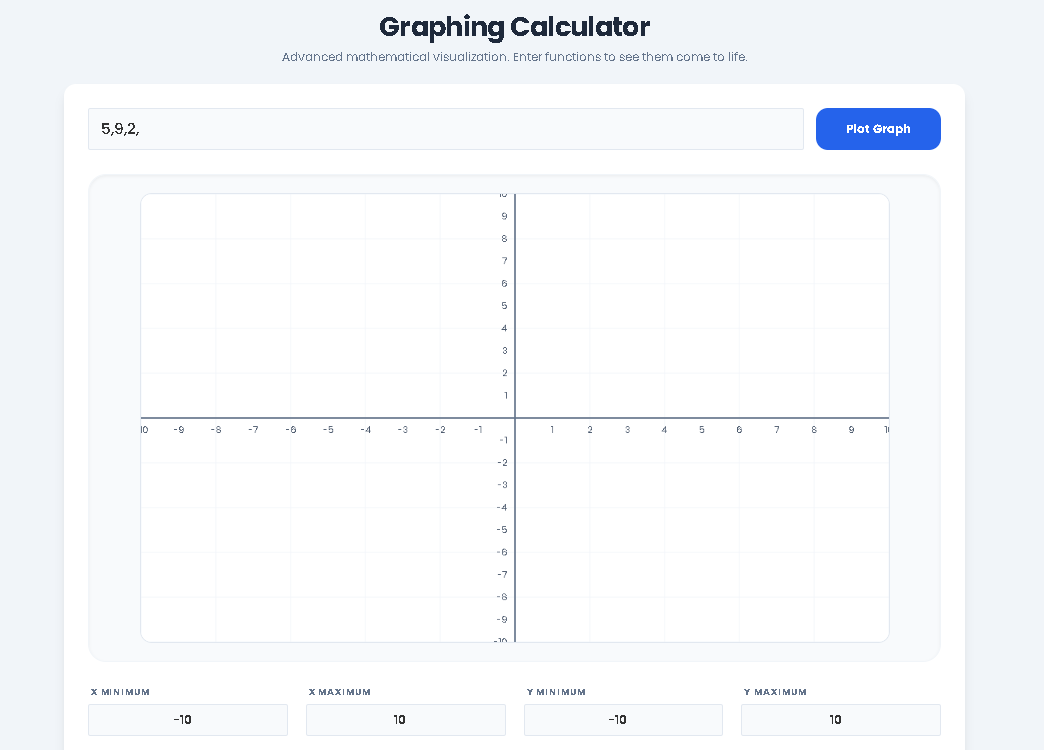
Before plotting, set the stage. The four configuration boxes—X Min, X Max, Y Min, Y Max—define the viewing window. Think of this as choosing the area of a map you want to see. The default is -10 to 10 on both axes, a good starting point for many functions. If you’re plotting a sine wave, you might want a narrower X-range (like 0 to 6.28, which is 2π) to see a couple of cycles. For a function like y = sqrt(x), set X Min to 0 since square roots of negative numbers are undefined in real numbers. Adjusting the viewport is the first step to getting a meaningful, well-framed graph.
Step 2: Input Your Mathematical Function
In the large input field labeled “Mathematical Function (y = …)”, type your expression. Use x as your variable. The syntax is forgiving and designed to be natural:
Use ^ for exponents (e.g., x^2).
Use sin(x), cos(x), tan(x) for trigonometry.
Use sqrt(x) for square root and log(x) for natural logarithm.
For multiplication, use * (e.g., 2*x).
If you’re unsure, click any of the “Function Example” buttons (Linear, Quadratic, Sine Wave, etc.). This will auto-populate the field with a classic example—click “Plot Graph” to see it instantly. This is an excellent way to learn the syntax by example.
Step 3: Generate and Analyze the Plot
Click the prominent blue “Plot Graph” button. Within a moment, the tool will draw the coordinate axes based on your viewport and plot your function as a smooth, blue curve. Observe the shape. Does it behave as expected? Is the curve continuous, or are there gaps (like in y = 1/x where it jumps at x=0)? Use the grid lines to estimate key points: where does the graph cross the X-axis (roots)? Where does it cross the Y-axis (y-intercept)? What are its maximum or minimum values within your view?
Step 4: Iterate and Explore
The real power comes from iteration. Now, change the function slightly. Add a coefficient: turn sin(x) into 2*sin(x) and replot to see the amplitude double. Change the viewport: zoom in on a specific region where a function has interesting behavior by adjusting the Min/Max values to a smaller range. You can also click “Reset Viewport” to return to the default -10 to 10 window, or “Clear Data” to start fresh with a blank input field. This exploratory process is how you build deep, intuitive understanding.
Moving beyond a simple how-to, let’s examine the concrete advantages this digital approach offers over manual sketching or static textbook images.
Speed and Instant Feedback: The most immediate benefit is speed. What would take minutes to plot by hand appears in milliseconds. This allows for rapid hypothesis testing. You can ask “What if?” and see the answer immediately, fostering a more experimental and engaged learning or problem-solving process.
Unmatched Accuracy: Human-drawn graphs are prone to estimation errors, especially with complex curves. This Graphing Calculator computes and plots each pixel with mathematical precision, ensuring the graph’s shape, intercepts, and asymptotes are represented accurately. This reliability is crucial when the graph is the basis for further calculation or decision-making.
Enhanced Conceptual Understanding: Visualization bridges the gap between symbolic manipulation and geometric meaning. Seeing how changing an equation’s parameter shifts a graph horizontally or stretches it vertically builds a deeper, more durable understanding than memorizing rules alone. It turns abstract algebra into tangible geometry.
Accessibility and Cost-Effectiveness: High-quality handheld Graphing Calculator units can be costly. This web-based tool delivers core functionality for free, making advanced math visualization accessible to anyone with an internet connection. It removes a significant financial barrier to education.
Clean, Focused User Experience: The interface is intentionally minimal. There are no distracting ads, overwhelming menus, or unnecessary features. The design philosophy prioritizes the graph itself, reducing cognitive load and allowing users to focus entirely on the mathematics.
To ensure you get the best results and use the tool responsibly, please keep these conditions in mind:
Output Quality is Input-Dependent: The accuracy and usefulness of the graph are directly tied to the correctness of the function you input and the appropriateness of your chosen viewport. A syntax error will result in no plot, and an overly wide viewport might make important details invisible.
Review and Interpretation are Essential: While the tool plots with computational accuracy, interpreting the graph’s meaning, context, and implications is a human task. The Graphing Calculator is an aid to understanding, not a replacement for it. Always apply your own knowledge to analyze the result.
Intended for Legal and Educational Purposes: This tool is provided to assist with learning, teaching, and professional analysis. It must not be used for any illegal, unethical, or malicious purposes.
Basic Understanding Enhances Utility: The tool is designed to be intuitive, but a fundamental grasp of mathematical function notation (like y = f(x)) will dramatically improve your ability to use it effectively. The example library is there to help bridge any initial knowledge gaps.
You can plot a wide variety, including polynomial (e.g., x^2 - 4), trigonometric (sin(x), cos(2x)), exponential (exp(x)), logarithmic (log(x)), and rational functions (1/(x-1)). The tool supports standard operators (+, -, *, /, ^) and common mathematical constants.
Yes, absolutely. The Graphing Calculator is a free, web-based tool with no hidden fees, subscriptions, or required downloads. You can access and use all its core plotting and visualization features without any cost.
Yes. The tool is built with a responsive design, meaning it will adapt its layout to function properly on desktops, laptops, tablets, and smartphones. The touch-friendly buttons and inputs make it quite usable on mobile devices.
This online tool replicates the core graphing functionality of physical calculators but with the advantages of a larger, clearer display, easier data entry via a keyboard, and no cost. For advanced standardized tests that require a specific approved model, a physical unit may still be necessary. However, for learning, homework, and general visualization, this online Graphing Calculator is an excellent and often superior alternative.
Toolota is your all-in-one online tools platform. Fast, simple, and free utilities designed to make everyday digital tasks easier and smarter.